前言 写这篇文章的起因是由于之前的一篇关于Kafka异常消费 ,当时为了解决问题不得不使用临时的方案。
总结起来归根结底还是对Kafka不熟悉导致的,加上平时工作的需要,之后就花些时间看了Kafka相关的资料。
何时使用MQ 谈到Kafka就不得不提到MQ,是属于消息队列的一种。作为一种基础中间件在互联网项目中有着大量的使用。
一种技术的产生自然是为了解决某种需求,通常来说是以下场景:
需要跨进程通信:B系统需要A系统的输出作为输入参数。
当A系统的输出能力远远大于B系统的处理能力。
针对于第一种情况有两种方案:
使用RPC远程调用,A直接调用B。
使用MQ,A发布消息到MQ,B订阅该消息。
当我们的需求是:A调用B实时响应,并且实时关心响应结果则使用RPC,这种情况就得使用同步调用。
反之当我们并不关心调用之后的执行结果,并且有可能被调用方的执行非常耗时,这种情况就非常适合用MQ来达到异步调用目的。
比如常见的登录场景就只能用同步调用的方式,因为这个过程需要实时的响应结果,总不能在用户点了登录之后排除网络原因之外再额外的等几秒吧。
但类似于用户登录需要奖励积分的情况则使用MQ会更好,因为登录并不关系积分的情况,只需要发个消息到MQ,处理积分的服务订阅处理即可,这样还可以解决积分系统故障带来的雪崩效应。
MQ还有一个基础功能则是限流削峰 ,这对于大流量的场景如果将请求直接调用到B系统则非常有可能使B系统出现不可用的情况。这种场景就非常适合将请求放入MQ,不但可以利用MQ削峰还尽可能的保证系统的高可用。
Kafka简介 本次重点讨论下Kafka。Kafka是一个支持水平扩展,高吞吐率的分布式消息系统。
Kafka的常用知识:
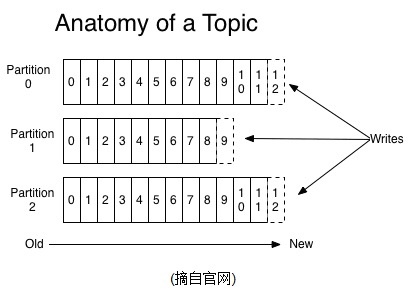
结构图如下:
创建Topic Kafka的安装官网有非常详细的讲解。这里谈一下在日常开发中常见的一些操作,比如创建Topic:
1 sh bin/kafka-topics.sh --create --zookeeper localhost:2181 --replication-factor 1 --partitions 3 --topic `test`
创建了三个分区的test主题。
使用
1 sh bin/kafka-topics.sh --list --zookeeper localhost:2181
可以列出所有的Topic。
Kafka生产者 使用kafka官方所提供的Java API来进行消息生产,实际使用中编码实现更为常用:
1 2 3 4 5 6 7 8 9 10 11 12 13 14 15 16 17 18 19 20 21 22 23 24 25 26 27 28 29 30 31 32 33 34 35 36 37 38 39 40 public class Producer {private static final Logger LOGGER = LoggerFactory.getLogger(Producer.class);private static String consumerProPath;public static void main (String[] args) throws IOException {"product_path" );KafkaProducer <String, String> producer = null ;try {FileInputStream inputStream = new FileInputStream (new File (consumerProPath));Properties properties = new Properties ();new KafkaProducer <String, String>(properties);catch (IOException e) {"load config error" , e);try {for (int i = 0 ;i<100 ; i++){new ProducerRecord <String, String>("topic_optimization" , i+"" , i+"" ));catch (Throwable throwable) {"%s" , throwable.getStackTrace());finally {
再配合以下启动参数即可发送消息:
1 -Dproduct_path = /xxx/producer.properties
以及生产者的配置文件:
1 2 3 4 5 6 7 8 9 10 bootstrap.servers =10.19.13.51:9094 acks =all retries =0 batch.size =16384 auto.commit.interval.ms =1000 linger.ms =0 key.serializer =org.apache.kafka.common.serialization.StringSerializer value.serializer =org.apache.kafka.common.serialization.StringSerializer block.on.buffer.full =true
具体的配置说明详见此处:https://kafka.apache.org/0100/documentation.html#theproducer
流程非常简单,其实就是一些API的调用。
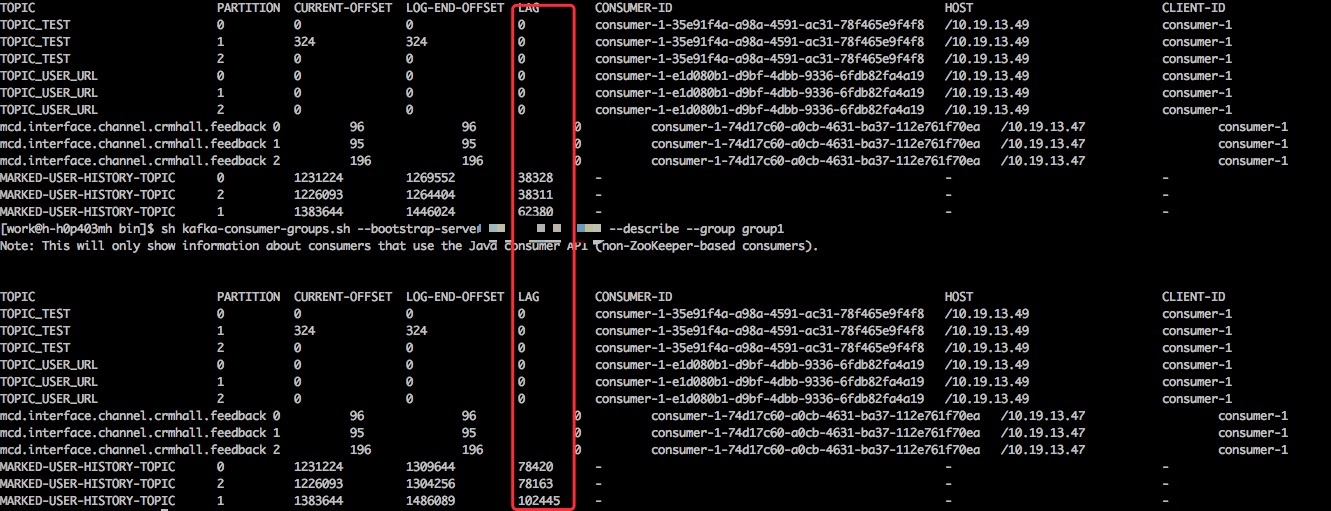
消息发完之后可以通过以下命令查看队列内的情况:
1 sh kafka-consumer-groups.sh --bootstrap-server localhost:9094 --describe --group group1
lag便是队列里的消息数量。
Kafka消费者 有了生产者自然也少不了消费者,这里首先针对单线程消费:
1 2 3 4 5 6 7 8 9 10 11 12 13 14 15 16 17 18 19 20 21 22 23 24 25 26 27 28 29 30 31 32 33 34 35 36 37 38 39 40 41 42 43 44 45 46 47 48 49 50 51 52 53 54 55 56 57 58 59 60 61 62 63 64 65 66 67 68 69 70 71 72 73 74 75 76 77 78 79 80 81 82 83 84 85 86 87 88 89 90 91 92 93 94 95 96 97 98 99 100 101 102 103 104 105 106 public class KafkaOfficialConsumer {private static final Logger LOGGER = LoggerFactory.getLogger(KafkaOfficialConsumer.class);private static String logPath;private static String topic;private static String consumerProPath ;private static boolean initCheck () {"topic" ) ;"log_path" ) ;"consumer_pro_path" ) ;if (StringUtil.isEmpty(topic) || logPath.isEmpty()) {"system property topic ,consumer_pro_path, log_path is required !" );return true ;return false ;private static KafkaConsumer <String, String> initKafkaConsumer () {KafkaConsumer <String, String> consumer = null ;try {FileInputStream inputStream = new FileInputStream (new File (consumerProPath)) ;Properties properties = new Properties ();new KafkaConsumer <String, String>(properties);catch (IOException e) {"加载consumer.props文件出错" , e);return consumer;public static void main (String[] args) {if (initCheck()){return ;int totalCount = 0 ;long totalMin = 0L ;int count = 0 ;KafkaConsumer <String, String> consumer = initKafkaConsumer();long startTime = System.currentTimeMillis() ;while (true ) {ConsumerRecords <String, String> records = consumer.poll(200 );if (records.count() <= 0 ){continue ;"本次获取:" +records.count());long endTime = System.currentTimeMillis() ;"count=" +count) ;if (count >= 10000 ){"this consumer {} record,use {} milliseconds" ,count,endTime-startTime);0 ;"end totalCount={},min={}" ,totalCount,totalMin);
配合以下启动参数:
1 -Dlog_path =/log/consumer.log -Dtopic =test -Dconsumer_pro_path =consumer.properties
其中采用了轮询的方式获取消息,并且记录了消费过程中的数据。
消费者采用的配置:
1
2
3
4
5
6
7
8
9
10
11
12
13
14
15
16
17
bootstrap.servers =192.168 .1.2 :9094 group.id =group1enable.auto.commit =true key.deserializer =org.apache.kafka.common.serialization.StringDeserializervalue.deserializer =org.apache.kafka.common.serialization.StringDeserializersession.timeout.ms =10000 fetch.min.bytes =50000 receive.buffer.bytes =262144 max.partition.fetch.bytes =2097152
为了简便我采用的是自动提交offset。
消息存放机制 谈到offset就必须得谈谈Kafka的消息存放机制.
Kafka的消息不会因为消费了就会立即删除,所有的消息都会持久化到日志文件,并配置有过期时间,到了时间会自动删除过期数据,并且不会管其中的数据是否被消费过。
由于这样的机制就必须的有一个标志来表明哪些数据已经被消费过了,offset(偏移量)就是这样的作用,它类似于指针指向某个数据,当消费之后offset就会线性的向前移动,这样一来的话消息是可以被任意消费的,只要我们修改offset的值即可。
消费过程中还有一个值得注意的是:
同一个consumer group(group.id相等)下只能有一个消费者可以消费,这个刚开始确实会让很多人踩坑。
多线程消费 针对于单线程消费实现起来自然是比较简单,但是效率也是要大打折扣的。
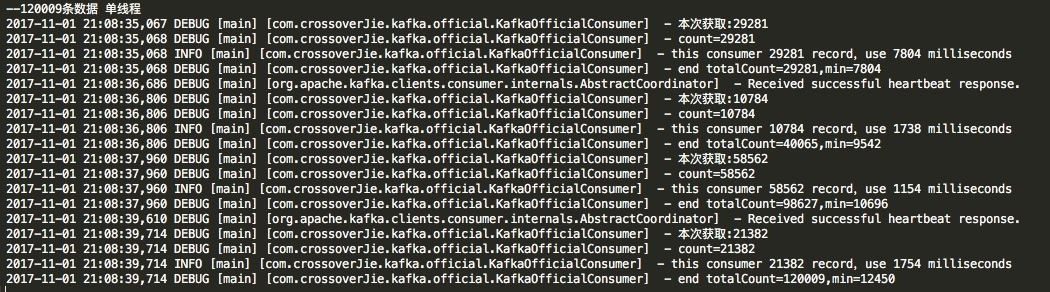
为此我做了一个测试,使用之前的单线程消费120009条数据的结果如下:
那么换成多线程消费怎么实现呢?
我们可以利用partition的分区特性来提高消费能力,单线程的时候等于是一个线程要把所有分区里的数据都消费一遍,如果换成多线程就可以让一个线程只消费一个分区,这样效率自然就提高了,所以线程数coreSize<=partition。
首先来看下入口:
1
2
3
4
5
6
7
8
9
10
11
12
13
14
15
16
17
public class ConsumerThreadMain {private static String brokerList = "localhost:9094" ;private static String groupId = "group1" ;private static String topic = "test" ;private static int threadNum = 3 ;public static void main (String [] args) new ConsumerGroup (threadNum, groupId, topic, brokerList);execute ();
其中的ConsumerGroup类:
1
2
3
4
5
6
7
8
9
10
11
12
13
14
15
16
17
18
19
20
21
22
23
24
25
26
27
28
29
30
31
32
33
34
35
36
37
38
39
40
public class ConsumerGroup static Logger LOGGER = LoggerFactory .getLogger (ConsumerGroup .class );ExecutorService threadPool;List <ConsumerCallable > consumers ;ConsumerGroup (int threadNum, String groupId, String topic, String brokerList) {ThreadFactory namedThreadFactory = new ThreadFactoryBuilder ()setNameFormat ("consumer-pool-%d" ).build ();new ThreadPoolExecutor (threadNum, threadNum,TimeUnit .MILLISECONDS,new LinkedBlockingQueue <Runnable >(1024 ), namedThreadFactory, new ThreadPoolExecutor .AbortPolicy ());new ArrayList <ConsumerCallable >(threadNum);for (int i = 0 ; i < threadNum; i++) {ConsumerCallable consumerThread = new ConsumerCallable (brokerList, groupId, topic);add (consumerThread);void execute () {System .currentTimeMillis () ;for (ConsumerCallable runnable : consumers) {Future <ConsumerFuture > future = threadPool.submit (runnable) ;if (threadPool.isShutdown ()){System .currentTimeMillis () ;info ("main thread use {} Millis" ,endTime -startTime) ;shutdown ();
最后真正的执行逻辑ConsumerCallable:
1
2
3
4
5
6
7
8
9
10
11
12
13
14
15
16
17
18
19
20
21
22
23
24
25
26
27
28
29
30
31
32
33
34
35
36
37
38
39
40
41
42
43
44
45
46
47
48
49
50
51
52
53
54
55
56
57
58
59
60
61
62
63
64
65
66
67
68
69
70
71
72
73
74
75
76
77
78
79
80
81
public class ConsumerCallable implements Callable<ConsumerFuture> {( ConsumerCallable.class) ( ) ( ) ( ) ( String brokerList, String groupId, String topic) {( ) ( "bootstrap.servers" , brokerList) ( "group.id" , groupId) ( "enable.auto.commit" , "true" ) ( "auto.commit.interval.ms" , "1000" ) ( "session.timeout.ms" , "30000" ) ( "key.deserializer" , "org.apache.kafka.common.serialization.StringDeserializer" ) ( "value.deserializer" , "org.apache.kafka.common.serialization.StringDeserializer" ) ( props) ( Arrays.asList( topic) ) a result, or throws an exception if unable to do so.a result( ) throws Exception {0 ( ) ( flag) {200m s作为获取超时时间( 200 ) ( records.count( ) <= 0 ) {( failPollTimes >= 20 ) {( "达到{}次数,退出 " ,failPollTimes) 0 ( "本次获取:" +records.count( ) ) ( records.count( ) ) ( count.get( ) ) ( ) ( count.get( ) >= 10000 ) {( "this consumer {} record,use {} milliseconds" ,count,endTime-startTime) ( endTime-startTime) ( ) ( ) ( "end totalCount={},min={}" ,totalCount,totalTime) ( ConsumerRecord<String, String> record : records) {( record.value( ) + " consumed " + record.partition( ) +" message with offset: " + record.offset( ) ) ( totalCount.get( ) ,totalTime.get( ) )
理一下逻辑:
其实就是初始化出三个消费者实例,用于三个线程消费。其中加入了一些统计,最后也是消费120009条数据结果如下。
由于是并行运行,可见消费120009条数据可以提高2秒左右,当数据以更高的数量级提升后效果会更加明显。
但这也有一些弊端:
灵活度不高,当分区数量变更之后不能自适应调整。
消费逻辑和处理逻辑在同一个线程,如果处理逻辑较为复杂会影响效率,耦合也较高。当然这个处理逻辑可以再通过一个内部队列发出去由另外的程序来处理也是可以的。
总结 Kafka的知识点还是较多,Kafka的使用也远不这些。之后会继续分享一些关于Kafka监控等相关内容。
项目地址:https://github.com/crossoverJie/SSM.git
个人博客:http://crossoverjie.top 。