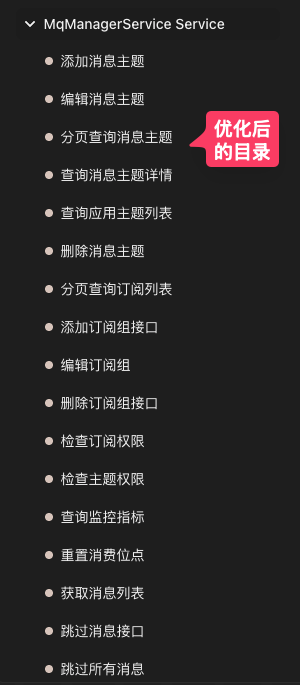
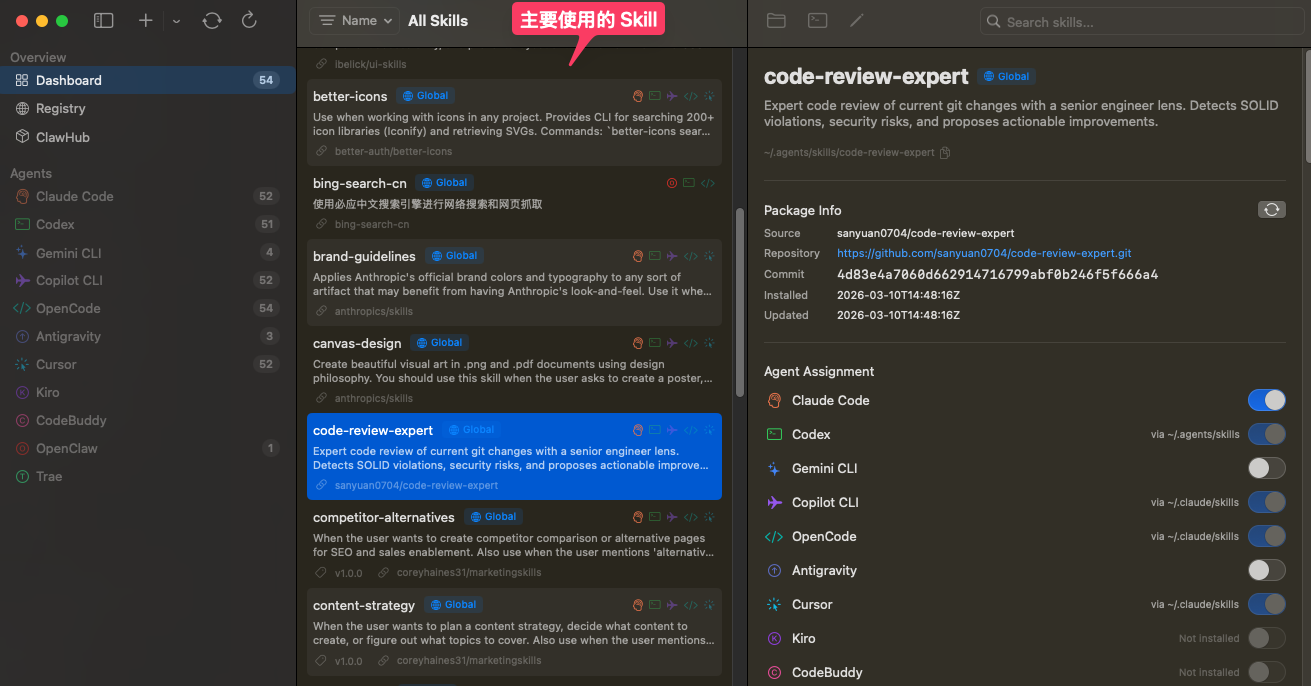
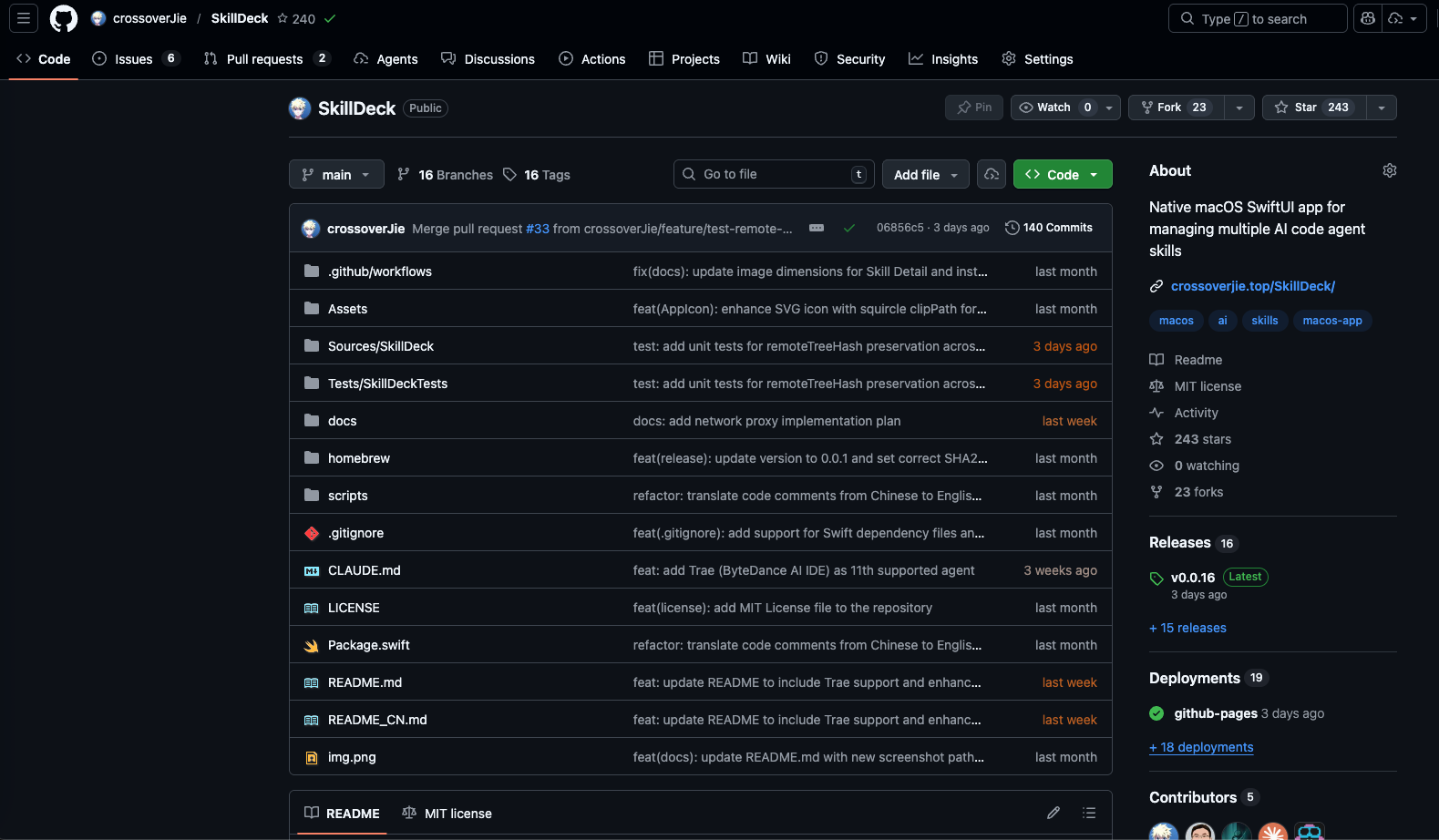
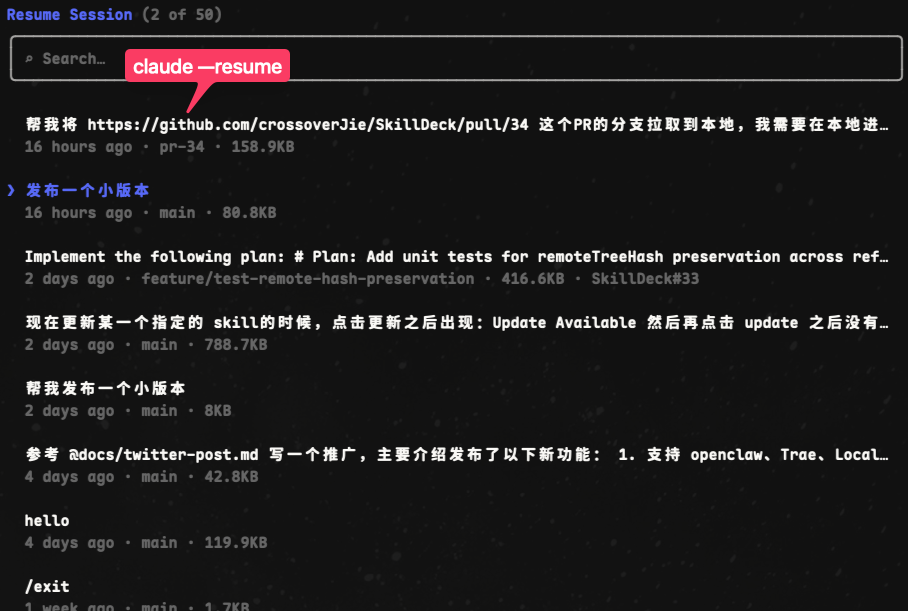
<?xml version="1.0" encoding="utf-8"?>
<feed xmlns="http://www.w3.org/2005/Atom">
  <title>crossoverJie&#39;s Blog</title>
  
  <subtitle>baller</subtitle>
  <link href="http://crossoverjie.top/atom.xml" rel="self"/>
  
  <link href="http://crossoverjie.top/"/>
  <updated>2026-03-24T10:51:28.441Z</updated>
  <id>http://crossoverjie.top/</id>
  
  <author>
    <name>crossoverJie</name>
    
  </author>
  
  <generator uri="https://hexo.io/">Hexo</generator>
  
  <entry>
    <title>企业大模型应用与 Vibe Coding 实战</title>
    <link href="http://crossoverjie.top/2026/03/24/AI/%E4%BC%81%E4%B8%9A%E5%A4%A7%E6%A8%A1%E5%9E%8B%E5%BA%94%E7%94%A8%E4%B8%8E-Vibe-Coding-%E5%AE%9E%E6%88%98/"/>
    <id>http://crossoverjie.top/2026/03/24/AI/%E4%BC%81%E4%B8%9A%E5%A4%A7%E6%A8%A1%E5%9E%8B%E5%BA%94%E7%94%A8%E4%B8%8E-Vibe-Coding-%E5%AE%9E%E6%88%98/</id>
    <published>2026-03-24T00:00:00.000Z</published>
    <updated>2026-03-24T10:51:28.441Z</updated>
    
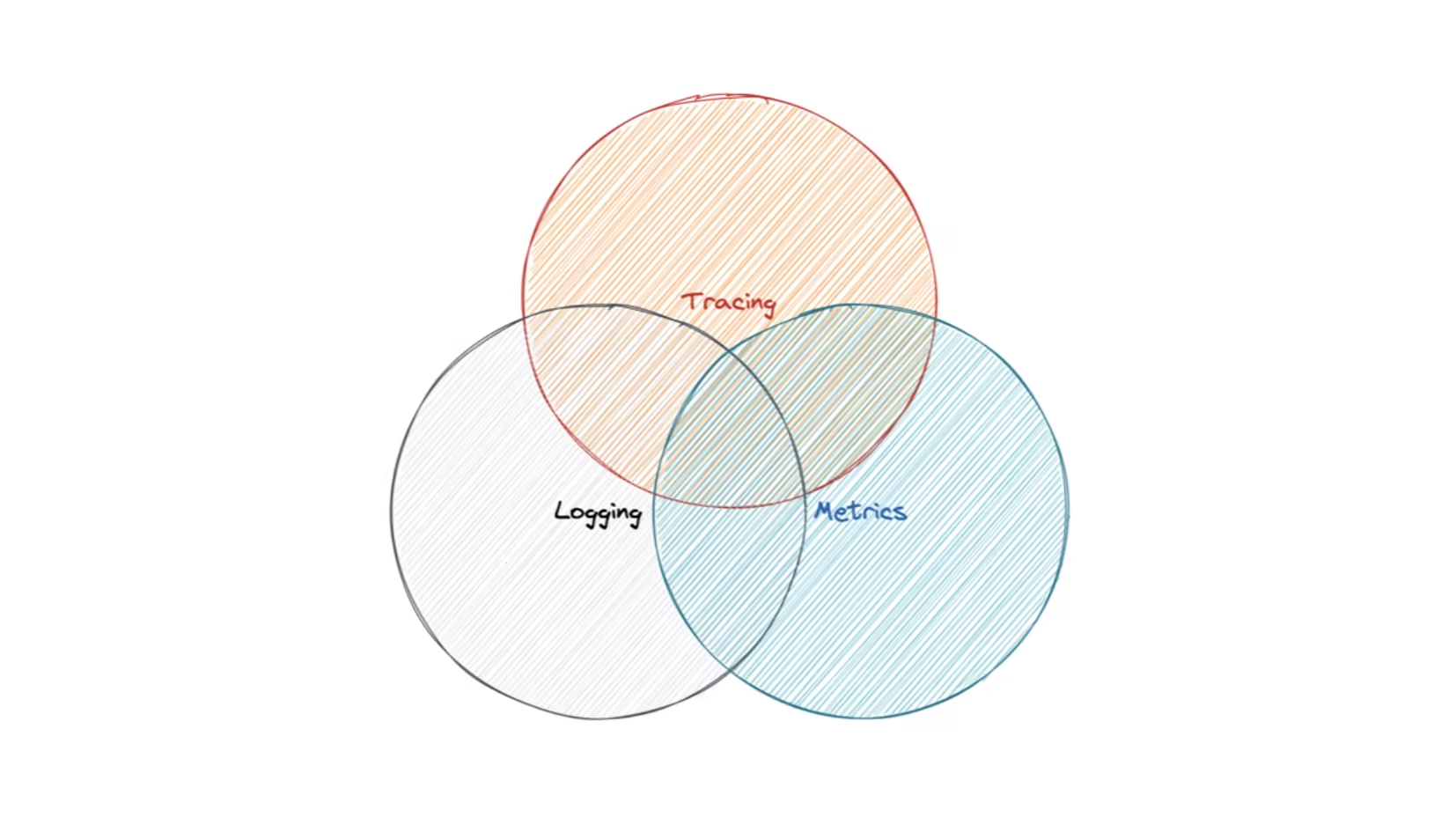
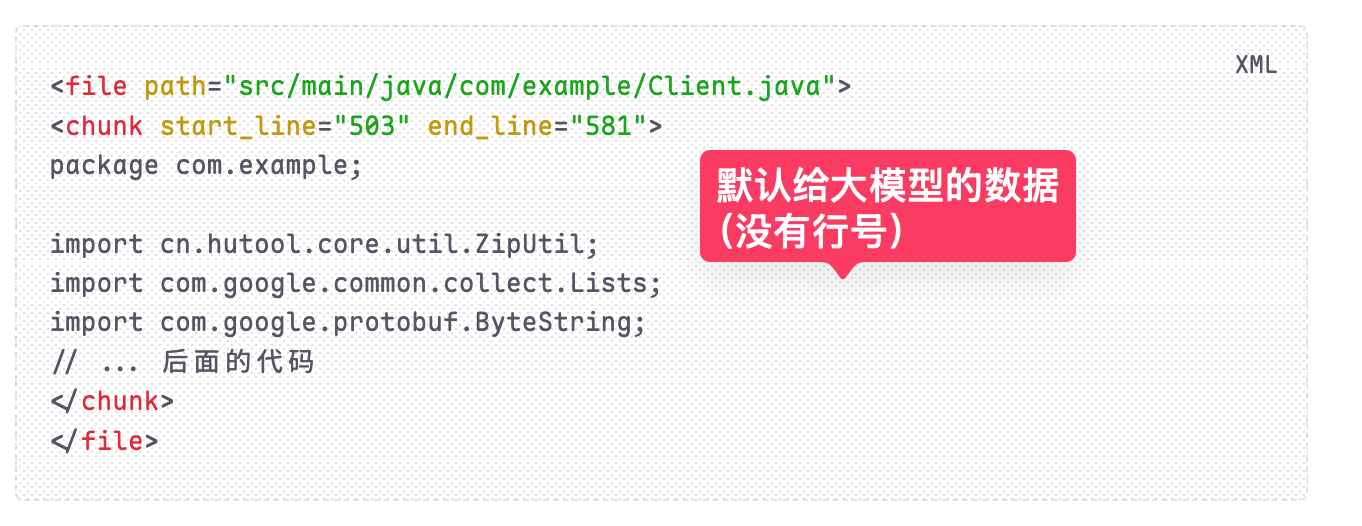
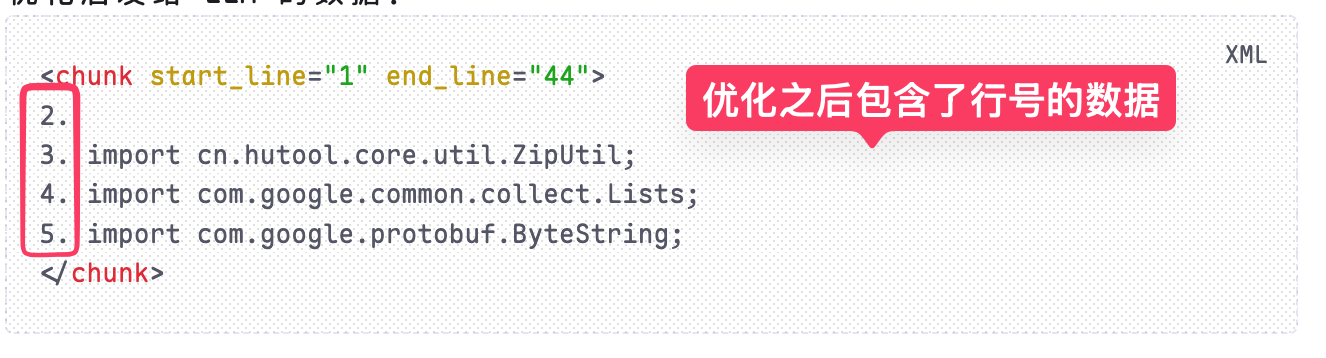
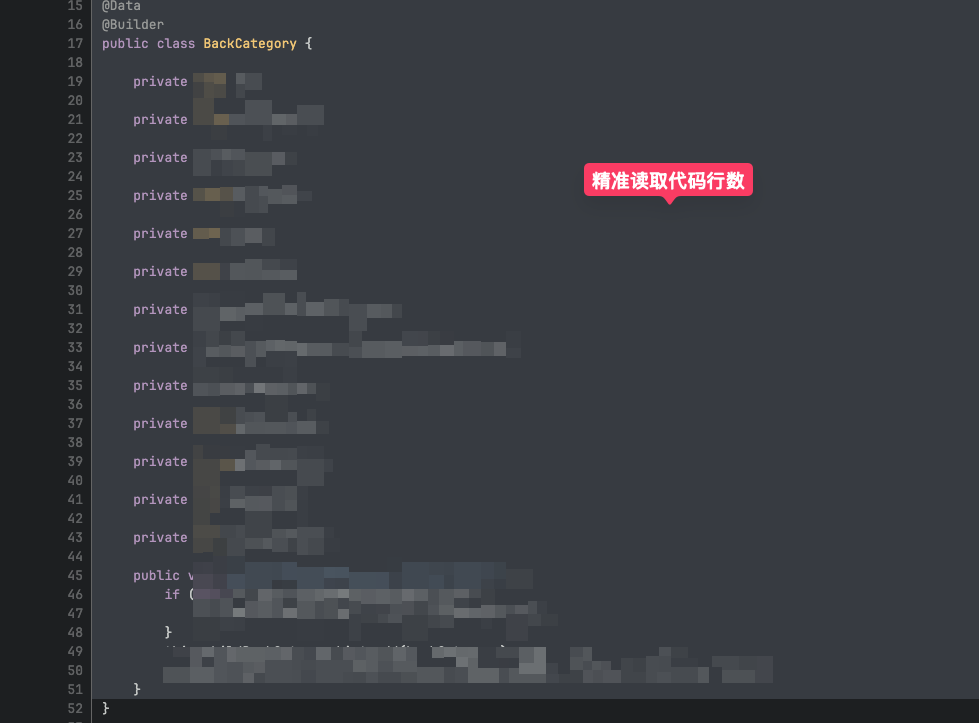
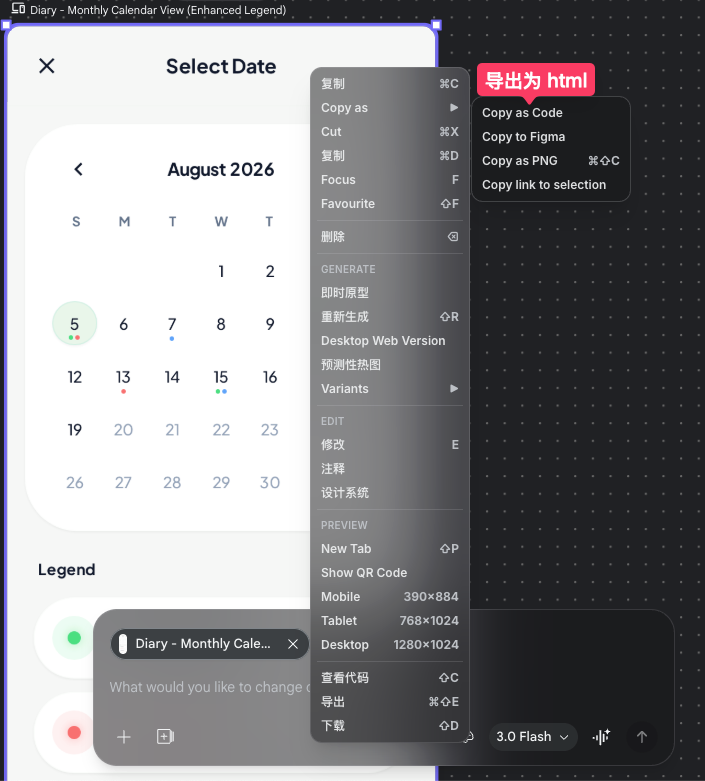
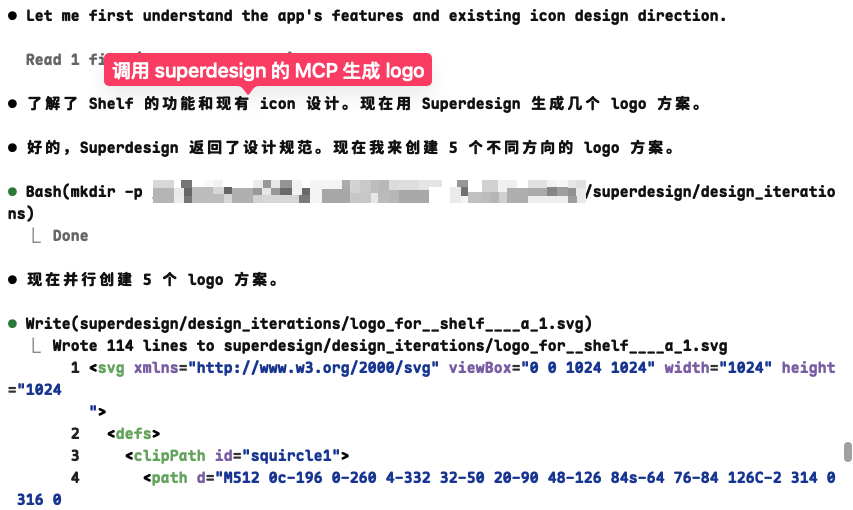
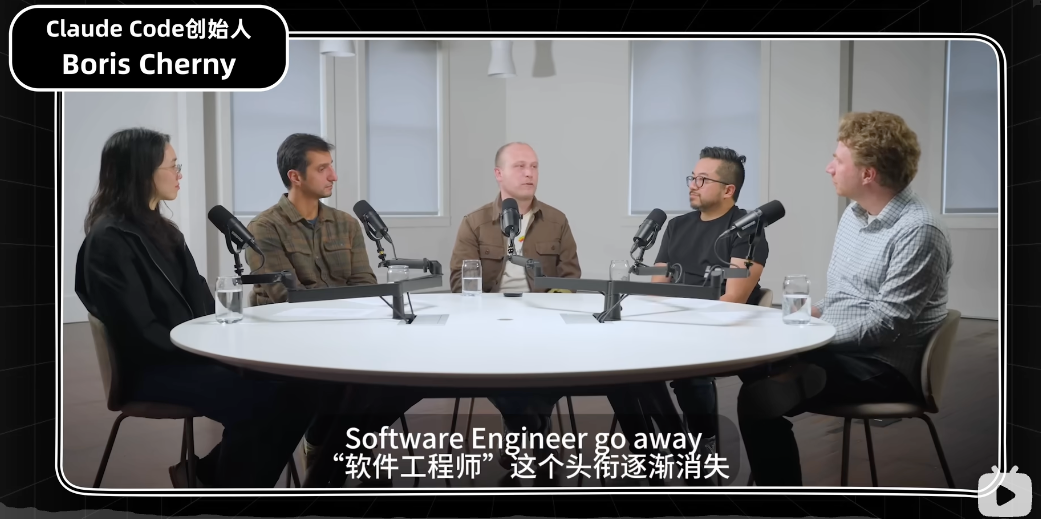
    <content type="html"><![CDATA[<h1 id="背景"><a href="#背景" class="headerlink" title="背景"></a>背景</h1><p><img src="https://cdn.jsdelivr.net/gh/crossoverJie/images@main/images/images20260324160917.png"></p><p>上周末参加了一个我们重庆本地的一个 AI 分享会，分享了一些企业大模型与 Vibe Coding 的实战经验，现在把它整理成一篇 blog。</p><span id="more"></span><h2 id="企业大模型应用实践"><a href="#企业大模型应用实践" class="headerlink" title="企业大模型应用实践"></a>企业大模型应用实践</h2><h3 id="利用-AI-提高故障排查效率"><a href="#利用-AI-提高故障排查效率" class="headerlink" title="利用 AI 提高故障排查效率"></a>利用 AI 提高故障排查效率</h3><p>首先是企业大模型的应用实践，我们利用现在的大模型结合可观测性来实现故障的自动分析。</p><p>最终可以实现的效果如下图所示，他可以直接分析当前 trace 下的所有链路、日志、指标、profile、内存布局，代码等信息整理在一起发给大模型，由大模型总结整理给出结论。</p><p>其实开发日常排查问题也是这样的过程，只是将它自动化了而已。</p><p><img src="https://cdn.jsdelivr.net/gh/crossoverJie/images@main/images/images20260320161930.png"></p><p>对可观测性有了解的朋友应该对这张图很熟悉，通过 trace_id 可以在日志系统里获取到日志、通过 trace 的时间戳也能获取到一个时间范围的指标监控数据。</p><p>本质上都是可以获取到这些结构化的数据，代码也是一样的，gitlab 也有相关的接口可以获取到代码信息。</p><p>这里的重点便是上下文可以给多少，给的越相关效果越好，目前我们也还在调试，给的信息多了可能也会导致大模型的幻觉。</p><p><img src="https://cdn.jsdelivr.net/gh/crossoverJie/images@main/images/images20260320164233.png"><br><img src="https://cdn.jsdelivr.net/gh/crossoverJie/images@main/images/images20260320170223.png"></p><p><img src="https://cdn.jsdelivr.net/gh/crossoverJie/images@main/images/images20260320165030.png"></p><p>重点：</p><ul><li>尽可能能多的采集应用数据（trace、日志、指标、代码、profile 等信息）</li><li>上下文内容尽量聚焦</li><li>数据获取的方式可以直接使用基建数据的接口或者是 MCP（推荐有接口就通过接口获取）</li></ul><h3 id="定制属于自己的-deepwiki"><a href="#定制属于自己的-deepwiki" class="headerlink" title="定制属于自己的 deepwiki"></a>定制属于自己的 deepwiki</h3><p>去年下半年火过一段时间的一个项目：<a href="https://deepwiki.com/">deepwiki</a>，利用大模型将 github 上开源的项目做成一个可多次对话的 wiki，方便我们更好的理解项目；下图是 <a href="https://deepwiki.com/openclaw/openclaw">openclaw</a> 的 deepwiki。<br>我们内部也有类似的需求，需要将所有的代码 repo 做成一个 deepwiki，方便新人或者不熟的同事快速了解一个项目。</p><p><img src="https://cdn.jsdelivr.net/gh/crossoverJie/images@main/images/images20260321105103.png"></p><p><img src="https://cdn.jsdelivr.net/gh/crossoverJie/images@main/images/images20260320171155.png"></p><h4 id="可以确定的数据不要交给-AI-生成"><a href="#可以确定的数据不要交给-AI-生成" class="headerlink" title="可以确定的数据不要交给 AI 生成"></a>可以确定的数据不要交给 AI 生成</h4><p>我们是用一个开源的 <a href="https://github.com/AsyncFuncAI/deepwiki-open">deepwiki-open</a> 系统来改造的，生成出来的代码行数和业务逻辑基本上对不上，经过分析发现是 LLM 自己估算的。</p><p>后续经过优化，我们自己将代码里的行号带上发送给大模型，这个问题就基本上被解决，重点是不要让大模型做逻辑计算，有现成的数据便让他直接读取。</p><p><img src="https://cdn.jsdelivr.net/gh/crossoverJie/images@main/images/images20260320173436.png"></p><p><img src="https://cdn.jsdelivr.net/gh/crossoverJie/images@main/images/images20260321002830.png"></p><p><img src="https://cdn.jsdelivr.net/gh/crossoverJie/images@main/images/images20260320174750.png"><br><img src="https://cdn.jsdelivr.net/gh/crossoverJie/images@main/images/images20260320174828.png"><br><img src="https://cdn.jsdelivr.net/gh/crossoverJie/images@main/images/images20260321002709.png"></p><h4 id="根据自己的业务做定制大模型应用"><a href="#根据自己的业务做定制大模型应用" class="headerlink" title="根据自己的业务做定制大模型应用"></a>根据自己的业务做定制大模型应用</h4><p>由于 <a href="https://github.com/AsyncFuncAI/deepwiki-open">deepwiki-open</a> 这个项目是一个开源通用的项目，所以他没法根据自己项目的情况做优化。</p><p>比如他为了更加通用，默认对代码的分割算法是 text 分割，也就是按照英文单词进行分割，因为有可能你的项目都不是代码，而是内部的纯文本知识库。</p><p>但是对于大量代码场景会导致分割的代码片段不连贯，比如一个完整的函数被分割成了多个 chunk，导致大模型理解困难。</p><p>而更好的方案应该是根据不同的编程语言选择不同的 AST（抽象语法树）进行分割</p><p>通用方案存在的问题：</p><ul><li>代码分割不够精准，需要使用指定语言的 AST（抽象语法树）进行分割。</li><li>目录生成太随意，应该根据项目的特征（前端后端、python、Java、Golang）生成目录树。</li></ul><p>这是没有经过优化的目录结构，非常通用（重新生成之后就会变化），适合放到任何项目里面。</p><p>而相对应的是针对我们项目背景优化的目录结构；这样一样便知道好坏。</p><p>至于是如何优化的？那又回到了刚才的提到的：可以确定的内容就不要交给 AI 生成。</p><p>这里的目录结构我们是确定的，无论怎么重复生成都是这个目录机构，对于我们的 Java 项目来说，我们希望目录结构可以根据对外提供的 grpc 生成，这样就可以系统的结构化的来理解整个项目。</p><p>至于目录结构是如何生成的，那也很简单，就是解析下 grpc 的 proto 文件，提取出接口声明，然后再遍历生成目录就可以了。</p><p>同样的道理，对于前端项目、或者是 Python 你项目，他们的关注点都不太相同，我们需要针对性的优化，不然就只能得到一个可用的玩具。</p><p><img src="https://cdn.jsdelivr.net/gh/crossoverJie/images@main/images/images20260321003759.png"></p><p><img src="https://cdn.jsdelivr.net/gh/crossoverJie/images@main/images/images20260321004033.png"></p><p>我的经验：</p><ul><li>任何可以确认的内容，尽量直接告诉大模型，而不是让他进行推理</li><li>大模型应用要做定制优化，通用的方案只能作为玩具。</li></ul><h2 id="Vibe-Coding-实战经验分享"><a href="#Vibe-Coding-实战经验分享" class="headerlink" title="Vibe Coding 实战经验分享"></a>Vibe Coding 实战经验分享</h2><p>接下来要分享的是我最近 Vibe Coding 的一些经验</p><p>首先是工具的推荐，我的工作流是好用的基座大模型+ Code Agent（Claude Code&#x2F;copolit-cli) + Skills</p><p>好的大模型可以节约很多时间，推荐有条件的尽量使用 Claude 的 opus4.6</p><p>而 Code Agent 可以直接帮我们编写 编译 调试代码，直接做事情，再也不需要手动复制聊天窗口里的代码到 IDE 里面再手动运行了。</p><p>Skill 可以将自己常用的工作流整理成一个可复用的模块，也可以使用行业大佬整理的 Skill，相当于偷师了各种大佬的最佳实践。</p><p>以上三者结合起来真的可以将个人打造成以往的产研小团队。</p><p>我的常用工具：</p><ul><li>Claude Opus4.6 &#x2F; Gemini3</li><li>Claude Code &#x2F; Copilot-CLI</li><li>Skill：偷师行业大佬经验，或者复用自己已有的工作流</li></ul><p><img src="https://cdn.jsdelivr.net/gh/crossoverJie/images@main/images/images20260321011733.png"></p><p>刚才的那个本地 <a href="https://github.com/crossoverJie/SkillDeck">Skill</a> 管理工具就是我用 Claude Code vibe Coding 开发出来的，在 github 上也有一定关注度，也证明纯靠 vibe Coding 也是可以解决问题的。</p><p><img src="https://cdn.jsdelivr.net/gh/crossoverJie/images@main/images/images20260321012148.png"></p><p>下面是这段时间总结的一些 VibeCoding 经验：<br>开发一个具体 feature 的时候尽量聚焦一些，每次都使用独立的 context 以及 分支开发，这样不容易出现幻觉</p><p>完成一个功能之后记得提交代码，这样更方便回滚，尽量不要用自然语言让 AI 进行回滚，而是自己操作 git 进行回滚。</p><p>这又和刚才提到的，能确定的事情尽量别让 AI 去做。</p><p>AI coding 过程中，自己消耗大量 token 总结出来的内容，如果暂时用不上可以让它整理成一个文档，方便自己下次直接加载这份文档恢复上下文，避免再次分析消耗 token。</p><p>或者直接使用 claude –resume 恢复上下文</p><p>定期使用 &#x2F;init 命令构建 claude.md，使得 Claude 的上下文更加准确</p><p>对于自己不熟的代码和领域，多让大模型写日志，方便他后续排查问题</p><p>在 claude.md 里声明单测优先，任何 PR 的创建都需要通过单测，尽可能的保证代码质量</p><p>多利用项目记忆以及全局记忆来约束大模型的行为，比如代码风格、输出的标准等。</p><p><img src="https://cdn.jsdelivr.net/gh/crossoverJie/images@main/images/images20260321013124.png"></p><p>经验总结：</p><ul><li>一个 feature 一个 context，避免上下文过长</li><li>一个 feature 一个分支，尽量使用 git 命令回滚，而不是让 AI 进行回滚（容易出错，能确定的事情就尽量确定）</li><li>保存好消耗大量 token 总结的文档（复杂功能的代码分析），后续可以复用，也可以使用 claude resume 恢复之前的会话</li><li>定期使用 <code>/init</code> 命令初始化 claude.md</li><li>关键逻辑让大模型多写日志，方便后续让他排查问题</li><li>在 claude.md 里声明单测优先（TDD），任何 PR 的创建都需要通过单测，尽可能的保证代码质量</li><li>多利用项目记忆以及全局记忆来约束大模型的行为，比如代码风格、输出的标准等。</li></ul><h3 id="独立开发工具链"><a href="#独立开发工具链" class="headerlink" title="独立开发工具链"></a>独立开发工具链</h3><ul><li>Gemini 生成产品 PRD 文档</li><li>将 PRD 导入 <a href="https://stitch.withgoogle.com/">https://stitch.withgoogle.com/</a> &amp; pencil.dev 生成 UI 设计稿</li><li>将 UI 设计稿导出成 html，或者是 MCP 到 Figma</li><li>由 Claude Code 读取设计稿实现页面</li><li>app logo 使用 superdesign MCP 生成 SVG</li></ul><p><img src="https://cdn.jsdelivr.net/gh/crossoverJie/images@main/images/images20260321103656.png"><br><img src="https://cdn.jsdelivr.net/gh/crossoverJie/images@main/images/images20260321103941.png"></p><h1 id="总结"><a href="#总结" class="headerlink" title="总结"></a>总结</h1><p>正如 anthropic CEO 在之前的播客里提到：未来 software engineer 这个 title 真的会消失，取而代之的可能是 product manager 或者叫做 builder。</p><p>放到前两年我是不太信的，这几个月我充分使用 AI Coding 之后我信了，对大部分开发者来说既是挑战也是机遇。</p><p><img src="https://cdn.jsdelivr.net/gh/crossoverJie/images@main/images/images20260321020731.png"><br><img src="https://cdn.jsdelivr.net/gh/crossoverJie/images@main/images/images20260321020817.png"></p>]]></content>
    
    
    <summary type="html">&lt;h1 id=&quot;背景&quot;&gt;&lt;a href=&quot;#背景&quot; class=&quot;headerlink&quot; title=&quot;背景&quot;&gt;&lt;/a&gt;背景&lt;/h1&gt;&lt;p&gt;&lt;img src=&quot;https://cdn.jsdelivr.net/gh/crossoverJie/images@main/images/images20260324160917.png&quot;&gt;&lt;/p&gt;
&lt;p&gt;上周末参加了一个我们重庆本地的一个 AI 分享会，分享了一些企业大模型与 Vibe Coding 的实战经验，现在把它整理成一篇 blog。&lt;/p&gt;</summary>


    <category term="AI" scheme="http://crossoverjie.top/categories/AI/"/>
    
    
    <category term="AI" scheme="http://crossoverjie.top/tags/AI/"/>
    
    <category term="VibeCoding" scheme="http://crossoverjie.top/tags/VibeCoding/"/>
    
    <category term="LLM" scheme="http://crossoverjie.top/tags/LLM/"/>
    
  </entry>
  
  <entry>
    <title>DeepWiki 优化实战：代码行号与确定性目录生成</title>
    <link href="http://crossoverjie.top/2026/03/17/AI/deepwiki-optimize-line-number/"/>
    <id>http://crossoverjie.top/2026/03/17/AI/deepwiki-optimize-line-number/</id>
    <published>2026-03-17T18:00:00.000Z</published>
    <updated>2026-03-24T10:51:28.441Z</updated>
    
    <content type="html"><![CDATA[<h1 id="背景"><a href="#背景" class="headerlink" title="背景"></a>背景</h1><p>最近在用 <a href="https://github.com/AsyncFuncAI/deepwiki-open/">deepwiki-open</a> 给内部的 Java 项目生成 wiki，发现一个很明显的问题：<strong>生成的 wiki 页面里引用的代码行号经常不准确</strong>，看起来是 LLM 根据上下文自己推算的。</p><p>比如一个函数明明在第 503 行，生成出来的 wiki 里可能标注成第 510 行甚至更离谱的数字。</p><p>之前我在 <a href="https://crossoverjie.top/2025/12/25/AI/deepwiki-rag-principle/">DeepWiki 一个常用 RAG 应用的开发流程</a> 里分析过它的整体流程，本文主要聊聊我们在实际使用中遇到的两个问题以及对应的优化方案。</p><span id="more"></span><h1 id="问题分析：LLM-为什么算不对行号"><a href="#问题分析：LLM-为什么算不对行号" class="headerlink" title="问题分析：LLM 为什么算不对行号"></a>问题分析：LLM 为什么算不对行号</h1><p>在我们的优化版本中，已经使用 <a href="https://crossoverjie.top/2026/01/14/AI/splitter-Algorithm-analyse/">tree-sitter</a> 基于 AST 将代码进行拆分存入了本地的向量数据库。</p><p>第一版存储的 chunk 格式是这样的：</p><figure class="highlight xml"><table><tr><td class="gutter"><pre><span class="line">1</span><br><span class="line">2</span><br><span class="line">3</span><br><span class="line">4</span><br><span class="line">5</span><br><span class="line">6</span><br><span class="line">7</span><br><span class="line">8</span><br><span class="line">9</span><br><span class="line">10</span><br></pre></td><td class="code"><pre><code class="hljs xml"><span class="hljs-tag">&lt;<span class="hljs-name">file</span> <span class="hljs-attr">path</span>=<span class="hljs-string">&quot;src/main/java/com/example/Client.java&quot;</span>&gt;</span><br><span class="hljs-tag">&lt;<span class="hljs-name">chunk</span> <span class="hljs-attr">start_line</span>=<span class="hljs-string">&quot;503&quot;</span> <span class="hljs-attr">end_line</span>=<span class="hljs-string">&quot;581&quot;</span>&gt;</span><br>package com.example;<br><br>import cn.hutool.core.util.ZipUtil;<br>import com.google.common.collect.Lists;<br>import com.google.protobuf.ByteString;<br>// ... 后面的代码<br><span class="hljs-tag">&lt;/<span class="hljs-name">chunk</span>&gt;</span><br><span class="hljs-tag">&lt;/<span class="hljs-name">file</span>&gt;</span><br></code></pre></td></tr></table></figure><p>看起来我们已经告诉 LLM 这段代码从第 503 行开始到第 581 行结束了，但问题在于：<strong>chunk 内部的代码是原始文本，没有行号标记</strong>。</p><p>当 LLM 需要引用某个具体函数的行号时，它必须从 <code>start_line=503</code> 开始，自己数第几行是哪个函数。</p><p>这对 LLM 来说太难了——众所周知 LLM 不擅长数学计算，让它去数几十行代码然后算出 <code>503 + 偏移量 = 实际行号</code>，幻觉就不可避免了。</p><blockquote><p>这就好比你让一个文科生做加法题还不让用计算器，虽然能算但准确率堪忧。</p></blockquote><h1 id="优化一：给代码加上行号前缀"><a href="#优化一：给代码加上行号前缀" class="headerlink" title="优化一：给代码加上行号前缀"></a>优化一：给代码加上行号前缀</h1><p>既然 LLM 算不准，那最好的办法就是<strong>直接把结果给它</strong>，让它只需要”读”而不需要”算”。</p><h2 id="改动思路"><a href="#改动思路" class="headerlink" title="改动思路"></a>改动思路</h2><p>核心改动很简单，在把 chunk 内容发给 LLM 之前，给每一行代码加上实际行号前缀：</p><figure class="highlight python"><table><tr><td class="gutter"><pre><span class="line">1</span><br><span class="line">2</span><br><span class="line">3</span><br><span class="line">4</span><br><span class="line">5</span><br><span class="line">6</span><br></pre></td><td class="code"><pre><code class="hljs python"><span class="hljs-keyword">def</span> <span class="hljs-title function_">_add_line_numbers</span>(<span class="hljs-params">text: <span class="hljs-built_in">str</span>, start_line: <span class="hljs-built_in">int</span></span>) -&gt; <span class="hljs-built_in">str</span>:<br>    <span class="hljs-string">&quot;&quot;&quot;给代码文本的每一行添加行号前缀&quot;&quot;&quot;</span><br>    <span class="hljs-keyword">return</span> <span class="hljs-string">&#x27;\n&#x27;</span>.join(<br>        <span class="hljs-string">f&quot;<span class="hljs-subst">&#123;start_line + i&#125;</span>. <span class="hljs-subst">&#123;line&#125;</span>&quot;</span><br>        <span class="hljs-keyword">for</span> i, line <span class="hljs-keyword">in</span> <span class="hljs-built_in">enumerate</span>(text.split(<span class="hljs-string">&#x27;\n&#x27;</span>))<br>    )<br></code></pre></td></tr></table></figure><h2 id="优化前后对比"><a href="#优化前后对比" class="headerlink" title="优化前后对比"></a>优化前后对比</h2><table><thead><tr><th></th><th>优化前</th><th>优化后</th></tr></thead><tbody><tr><td>chunk 内容</td><td>原始代码文本</td><td>每行带行号前缀</td></tr><tr><td>LLM 行为</td><td>从 start_line 推算偏移量</td><td>直接读取行号</td></tr><tr><td>准确率</td><td>经常偏差 5-20 行</td><td>基本准确</td></tr></tbody></table><p>优化前发给 LLM 的数据：</p><figure class="highlight xml"><table><tr><td class="gutter"><pre><span class="line">1</span><br><span class="line">2</span><br><span class="line">3</span><br><span class="line">4</span><br><span class="line">5</span><br><span class="line">6</span><br></pre></td><td class="code"><pre><code class="hljs xml"><span class="hljs-tag">&lt;<span class="hljs-name">chunk</span> <span class="hljs-attr">start_line</span>=<span class="hljs-string">&quot;503&quot;</span> <span class="hljs-attr">end_line</span>=<span class="hljs-string">&quot;581&quot;</span>&gt;</span><br>package com.example;<br><br>import cn.hutool.core.util.ZipUtil;<br>import com.google.common.collect.Lists;<br><span class="hljs-tag">&lt;/<span class="hljs-name">chunk</span>&gt;</span><br></code></pre></td></tr></table></figure><p>优化后发给 LLM 的数据：</p><figure class="highlight xml"><table><tr><td class="gutter"><pre><span class="line">1</span><br><span class="line">2</span><br><span class="line">3</span><br><span class="line">4</span><br><span class="line">5</span><br><span class="line">6</span><br></pre></td><td class="code"><pre><code class="hljs xml"><span class="hljs-tag">&lt;<span class="hljs-name">chunk</span> <span class="hljs-attr">start_line</span>=<span class="hljs-string">&quot;1&quot;</span> <span class="hljs-attr">end_line</span>=<span class="hljs-string">&quot;44&quot;</span>&gt;</span><br>2.<br>3. import cn.hutool.core.util.ZipUtil;<br>4. import com.google.common.collect.Lists;<br>5. import com.google.protobuf.ByteString;<br><span class="hljs-tag">&lt;/<span class="hljs-name">chunk</span>&gt;</span><br></code></pre></td></tr></table></figure><p>LLM 现在要引用 <code>ZipUtil</code> 的导入行，直接看到前缀 <code>3.</code> 就知道是第 3 行，不需要做任何计算。</p><h2 id="具体改动文件"><a href="#具体改动文件" class="headerlink" title="具体改动文件"></a>具体改动文件</h2><p>一共改了 4 个文件：</p><p><strong>1. <code>api/websocket_wiki.py</code></strong> — 添加 <code>_add_line_numbers()</code> 工具函数，在构建 chunk 内容时加上行号前缀：</p><figure class="highlight python"><table><tr><td class="gutter"><pre><span class="line">1</span><br><span class="line">2</span><br><span class="line">3</span><br><span class="line">4</span><br><span class="line">5</span><br></pre></td><td class="code"><pre><code class="hljs python"><span class="hljs-keyword">if</span> start_line <span class="hljs-keyword">is</span> <span class="hljs-keyword">not</span> <span class="hljs-literal">None</span> <span class="hljs-keyword">and</span> end_line <span class="hljs-keyword">is</span> <span class="hljs-keyword">not</span> <span class="hljs-literal">None</span>:<br>    numbered_text = _add_line_numbers(doc.text, start_line)<br>    doc_parts.append(<br>        <span class="hljs-string">f&#x27;&lt;chunk start_line=&quot;<span class="hljs-subst">&#123;start_line&#125;</span>&quot; end_line=&quot;<span class="hljs-subst">&#123;end_line&#125;</span>&quot;&gt;\n<span class="hljs-subst">&#123;numbered_text&#125;</span>\n&lt;/chunk&gt;&#x27;</span><br>    )<br></code></pre></td></tr></table></figure><p><strong>2. <code>api/websocket_wiki.py</code> 的 prompt 部分</strong> — 更新 <code>&lt;line_number_rules&gt;</code> 指令，告诉 LLM 直接读取行号前缀而不是自己计算：</p><figure class="highlight python"><table><tr><td class="gutter"><pre><span class="line">1</span><br><span class="line">2</span><br><span class="line">3</span><br><span class="line">4</span><br><span class="line">5</span><br></pre></td><td class="code"><pre><code class="hljs python"><span class="hljs-string">&quot;&lt;line_number_rules&gt;&quot;</span><br><span class="hljs-string">&quot;Each line in the code context is prefixed with its actual line number (e.g., &#x27;100. code here&#x27;). &quot;</span><br><span class="hljs-string">&quot;When citing source lines, read the line numbers directly from these prefixes. &quot;</span><br><span class="hljs-string">&quot;Do not count or calculate line numbers yourself. &quot;</span><br><span class="hljs-string">&quot;&lt;/line_number_rules&gt;&quot;</span><br></code></pre></td></tr></table></figure><h2 id="Token-成本"><a href="#Token-成本" class="headerlink" title="Token 成本"></a>Token 成本</h2><p>每行增加约 4-6 个字符（比如 <code>503. </code>），一个典型的 chunk 30-40 行，大概增加 150 字符。10-20 个 chunks 总共增加约 1500-3000 字符（约 500-1000 tokens），成本基本可以忽略。</p><h1 id="优化二：基于-Proto-文件生成确定性目录"><a href="#优化二：基于-Proto-文件生成确定性目录" class="headerlink" title="优化二：基于 Proto 文件生成确定性目录"></a>优化二：基于 Proto 文件生成确定性目录</h1><p>第二个问题是 wiki 的<strong>目录结构</strong>。</p><p>DeepWiki 默认的做法是把 repo 的目录树和 README 丢给 LLM，让它自由发挥来生成 wiki 目录（虽然有一些限制提示词，比如输出目录结构的大概要求）。这在通用场景下是合理的，但对我们的内部 Java 项目来说效果不好。</p><p>原因很简单：我们所有的业务都是围绕着 <strong>gRPC 接口</strong>来的，理想的 wiki 目录应该是按 Service 和 RPC 方法来组织的，而不是让 AI 自由发挥出一堆”Architecture Overview”、”Getting Started” 之类的通用章节。</p><h2 id="改动思路-1"><a href="#改动思路-1" class="headerlink" title="改动思路"></a>改动思路</h2><p>写代码读取 repo 里所有的 <code>*.proto</code> 文件，解析出所有的 Service 和 RPC 接口列表，然后直接构建出确定性的目录结构给前端，绕过 LLM 的目录生成步骤。</p><p>具体流程：</p><ol><li>扫描 repo 里所有 <code>.proto</code> 文件</li><li>用正则解析出 <code>package</code>、<code>service</code>、<code>rpc</code> 定义</li><li>构建固定格式的 <code>WikiStructure</code> JSON</li><li>前端检测到 proto 文件存在时，调用这个接口替代 LLM 生成</li></ol><h2 id="核心代码：proto-parser-py"><a href="#核心代码：proto-parser-py" class="headerlink" title="核心代码：proto_parser.py"></a>核心代码：proto_parser.py</h2><p>新增了一个 <code>api/proto_parser.py</code> 文件，主要做三件事：</p><p><strong>扫描 proto 文件：</strong></p><figure class="highlight python"><table><tr><td class="gutter"><pre><span class="line">1</span><br><span class="line">2</span><br><span class="line">3</span><br><span class="line">4</span><br><span class="line">5</span><br><span class="line">6</span><br><span class="line">7</span><br><span class="line">8</span><br><span class="line">9</span><br><span class="line">10</span><br><span class="line">11</span><br></pre></td><td class="code"><pre><code class="hljs python"><span class="hljs-keyword">def</span> <span class="hljs-title function_">find_proto_files</span>(<span class="hljs-params">repo_path: <span class="hljs-built_in">str</span>, excluded_dirs=<span class="hljs-literal">None</span></span>) -&gt; <span class="hljs-type">List</span>[<span class="hljs-built_in">str</span>]:<br>    <span class="hljs-string">&quot;&quot;&quot;遍历 repo 目录，返回所有 .proto 文件路径&quot;&quot;&quot;</span><br>    skip = <span class="hljs-built_in">set</span>(DEFAULT_EXCLUDED_DIRS)  <span class="hljs-comment"># 排除 vendor、node_modules 等</span><br>    proto_files = []<br>    <span class="hljs-keyword">for</span> root, dirs, files <span class="hljs-keyword">in</span> os.walk(repo_path):<br>        dirs[:] = [d <span class="hljs-keyword">for</span> d <span class="hljs-keyword">in</span> dirs <span class="hljs-keyword">if</span> d <span class="hljs-keyword">not</span> <span class="hljs-keyword">in</span> skip]<br>        <span class="hljs-keyword">for</span> f <span class="hljs-keyword">in</span> files:<br>            <span class="hljs-keyword">if</span> f.endswith(<span class="hljs-string">&quot;.proto&quot;</span>):<br>                proto_files.append(os.path.join(root, f))<br>    proto_files.sort()<br>    <span class="hljs-keyword">return</span> proto_files<br></code></pre></td></tr></table></figure><p><strong>解析 proto 内容：</strong></p><figure class="highlight python"><table><tr><td class="gutter"><pre><span class="line">1</span><br><span class="line">2</span><br><span class="line">3</span><br><span class="line">4</span><br></pre></td><td class="code"><pre><code class="hljs python">_RE_PACKAGE = re.<span class="hljs-built_in">compile</span>(<span class="hljs-string">r&quot;package\s+([\w.]+)\s*;&quot;</span>)<br>_RE_RPC = re.<span class="hljs-built_in">compile</span>(<br>    <span class="hljs-string">r&quot;rpc\s+(\w+)\s*\(\s*(stream\s+)?(\w+)\s*\)\s*returns\s*\(\s*(stream\s+)?(\w+)\s*\)&quot;</span>,<br>)<br></code></pre></td></tr></table></figure><p>通过平衡大括号匹配来提取 service block，再用正则提取每个 RPC 方法的签名，包括方法名、请求类型、响应类型以及是否是 streaming。</p><p><strong>构建 wiki 目录结构：</strong></p><p>生成的目录包含 3 个固定章节 + 每个 Service 一个独立章节：</p><table><thead><tr><th>章节</th><th>内容</th></tr></thead><tbody><tr><td>Overview</td><td>项目总览</td></tr><tr><td>System Architecture</td><td>系统架构</td></tr><tr><td>Core Features</td><td>gRPC 接口汇总</td></tr><tr><td>{ServiceName} Service</td><td>每个 RPC 方法一个子页面</td></tr></tbody></table><p>每个 RPC 方法的页面标题直接用方法签名，比如 <code>GetOrder(GetOrderRequest) returns (GetOrderResponse)</code>，非常清晰。</p><h2 id="前端改动：page-tsx"><a href="#前端改动：page-tsx" class="headerlink" title="前端改动：page.tsx"></a>前端改动：page.tsx</h2><p>在 <code>src/app/[owner]/[repo]/page.tsx</code> 里新增了一个检测逻辑：</p><figure class="highlight typescript"><table><tr><td class="gutter"><pre><span class="line">1</span><br><span class="line">2</span><br><span class="line">3</span><br></pre></td><td class="code"><pre><code class="hljs typescript"><span class="hljs-comment">// 检测 repo 是否包含 proto 文件</span><br><span class="hljs-comment">// 如果有，调用 /api/proto/wiki_structure 获取确定性目录</span><br><span class="hljs-comment">// 如果失败，fallback 到原来的 LLM 生成方式</span><br></code></pre></td></tr></table></figure><p>前端的核心逻辑是：</p><ol><li>先尝试调用 proto 解析接口获取确定性目录</li><li>如果 proto 接口返回了有效结构，直接使用（跳过 LLM 目录生成）</li><li>并发生成每个页面的具体内容（最多 5 个并行请求）</li><li>如果 proto 接口失败，fallback 到原来的 LLM 生成流程</li></ol><blockquote><p>这样做的好处是：目录结构 100% 准确，不会出现 LLM 瞎编目录的情况，同时还省了一次 LLM 调用的成本。</p></blockquote><h1 id="确定性-vs-不确定性：什么该交给-AI"><a href="#确定性-vs-不确定性：什么该交给-AI" class="headerlink" title="确定性 vs 不确定性：什么该交给 AI"></a>确定性 vs 不确定性：什么该交给 AI</h1><p>这两个优化背后其实是同一个思路：<strong>把确定的东西明确告诉 AI，不确定的才让 AI 来发挥</strong>。</p><table><thead><tr><th>类型</th><th>内容</th><th>处理方式</th></tr></thead><tbody><tr><td>确定的</td><td>代码行号</td><td>直接给 LLM 标注好</td></tr><tr><td>确定的</td><td>gRPC 接口列表、目录结构</td><td>代码解析，不经过 LLM</td></tr><tr><td>不确定的</td><td>函数功能解释</td><td>交给 LLM 归纳</td></tr><tr><td>不确定的</td><td>项目架构分析</td><td>交给 LLM 总结</td></tr><tr><td>不确定的</td><td>代码关联关系</td><td>交给 LLM 推理</td></tr></tbody></table><p>LLM 非常擅长理解、归纳和总结，但不擅长精确计算和结构化数据的生成。把它们分开处理，各取所长，效果就好很多了。</p><h1 id="总结"><a href="#总结" class="headerlink" title="总结"></a>总结</h1><p>这篇文章分享了我们在基于 DeepWiki 做内部项目 wiki 生成时的两个优化：</p><ol><li><strong>行号前缀</strong>：给代码 chunk 的每一行加上实际行号，让 LLM 直接读取而不是自己推算，token 成本几乎可以忽略但准确率大幅提升。</li><li><strong>确定性目录生成</strong>：通过代码解析 proto 文件直接构建目录结构，绕过 LLM 的自由发挥，保证目录 100% 准确。</li></ol><p>核心经验就一句话：<strong>需要定制自己的项目，尽量不要用通用的方案</strong>，不然就只是可用，但不精通。类似于现在的 <a href="https://crossoverjie.top/2026/03/11/AI/skilldeck-openclaw-support/">OpenClaw</a>，通用方案大家都能用，但真正好用的一定是针对你自己场景深度优化的。</p><p>对于确定的内容要明确告知 AI，不要让它自行发挥去推理，特别是和逻辑计算相关的，不然幻觉很严重。而不确定的、需要归纳总结的主观内容，则非常适合交给 AI 来输出。</p><p>#Blog</p>]]></content>
    
    
    <summary type="html">&lt;h1 id=&quot;背景&quot;&gt;&lt;a href=&quot;#背景&quot; class=&quot;headerlink&quot; title=&quot;背景&quot;&gt;&lt;/a&gt;背景&lt;/h1&gt;&lt;p&gt;最近在用 &lt;a href=&quot;https://github.com/AsyncFuncAI/deepwiki-open/&quot;&gt;deepwiki-open&lt;/a&gt; 给内部的 Java 项目生成 wiki，发现一个很明显的问题：&lt;strong&gt;生成的 wiki 页面里引用的代码行号经常不准确&lt;/strong&gt;，看起来是 LLM 根据上下文自己推算的。&lt;/p&gt;
&lt;p&gt;比如一个函数明明在第 503 行，生成出来的 wiki 里可能标注成第 510 行甚至更离谱的数字。&lt;/p&gt;
&lt;p&gt;之前我在 &lt;a href=&quot;https://crossoverjie.top/2025/12/25/AI/deepwiki-rag-principle/&quot;&gt;DeepWiki 一个常用 RAG 应用的开发流程&lt;/a&gt; 里分析过它的整体流程，本文主要聊聊我们在实际使用中遇到的两个问题以及对应的优化方案。&lt;/p&gt;</summary>


    <category term="AI" scheme="http://crossoverjie.top/categories/AI/"/>
    
    
    <category term="AI" scheme="http://crossoverjie.top/tags/AI/"/>
    
    <category term="DeepWiki" scheme="http://crossoverjie.top/tags/DeepWiki/"/>
    
    <category term="RAG" scheme="http://crossoverjie.top/tags/RAG/"/>
    
  </entry>
  
  <entry>
    <title>SkillDeck 支持 OpenClaw 了，顺便聊聊小龙虾</title>
    <link href="http://crossoverjie.top/2026/03/11/AI/skilldeck-openclaw-support/"/>
    <id>http://crossoverjie.top/2026/03/11/AI/skilldeck-openclaw-support/</id>
    <published>2026-03-11T22:00:00.000Z</published>
    <updated>2026-03-24T10:51:28.441Z</updated>
    
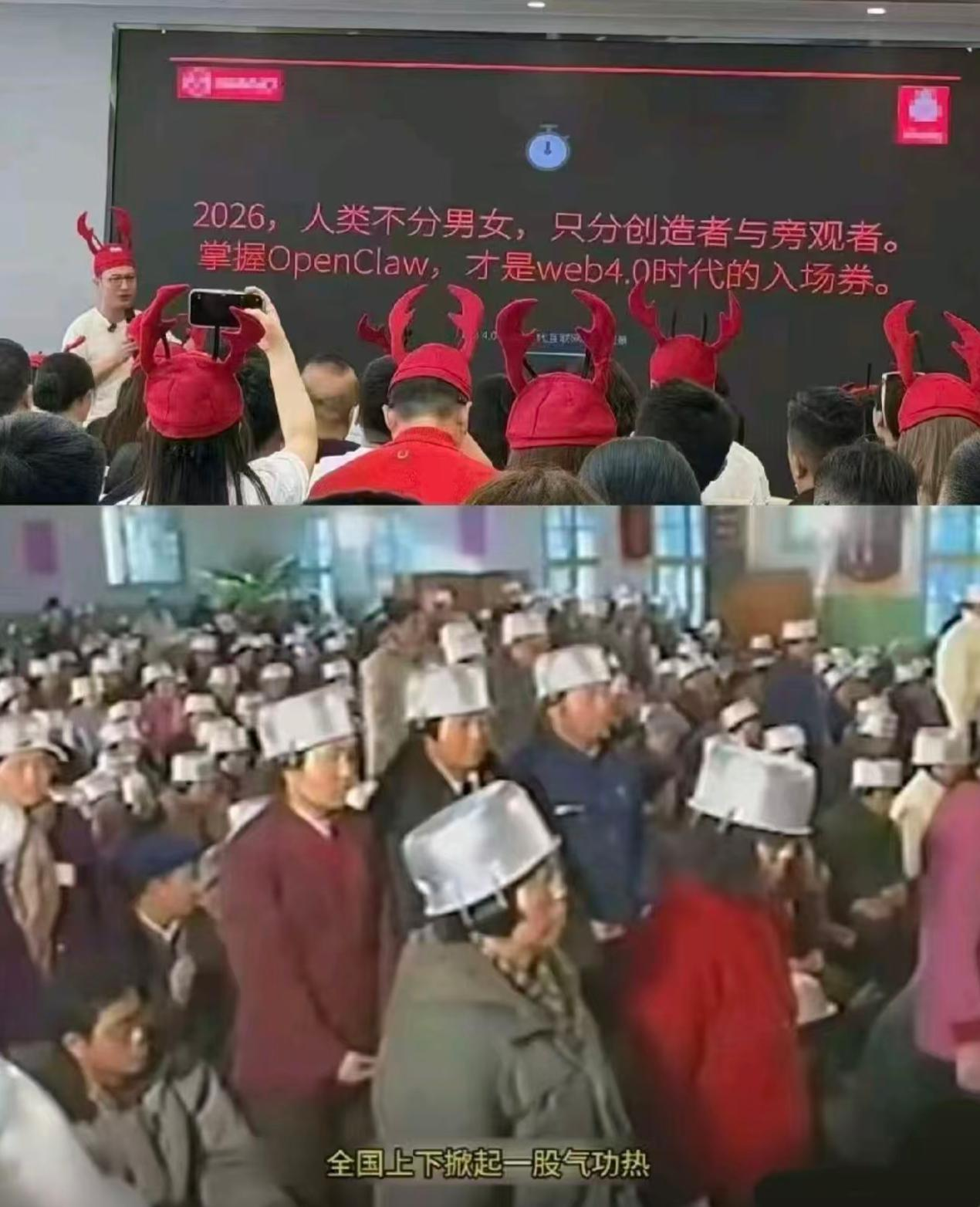
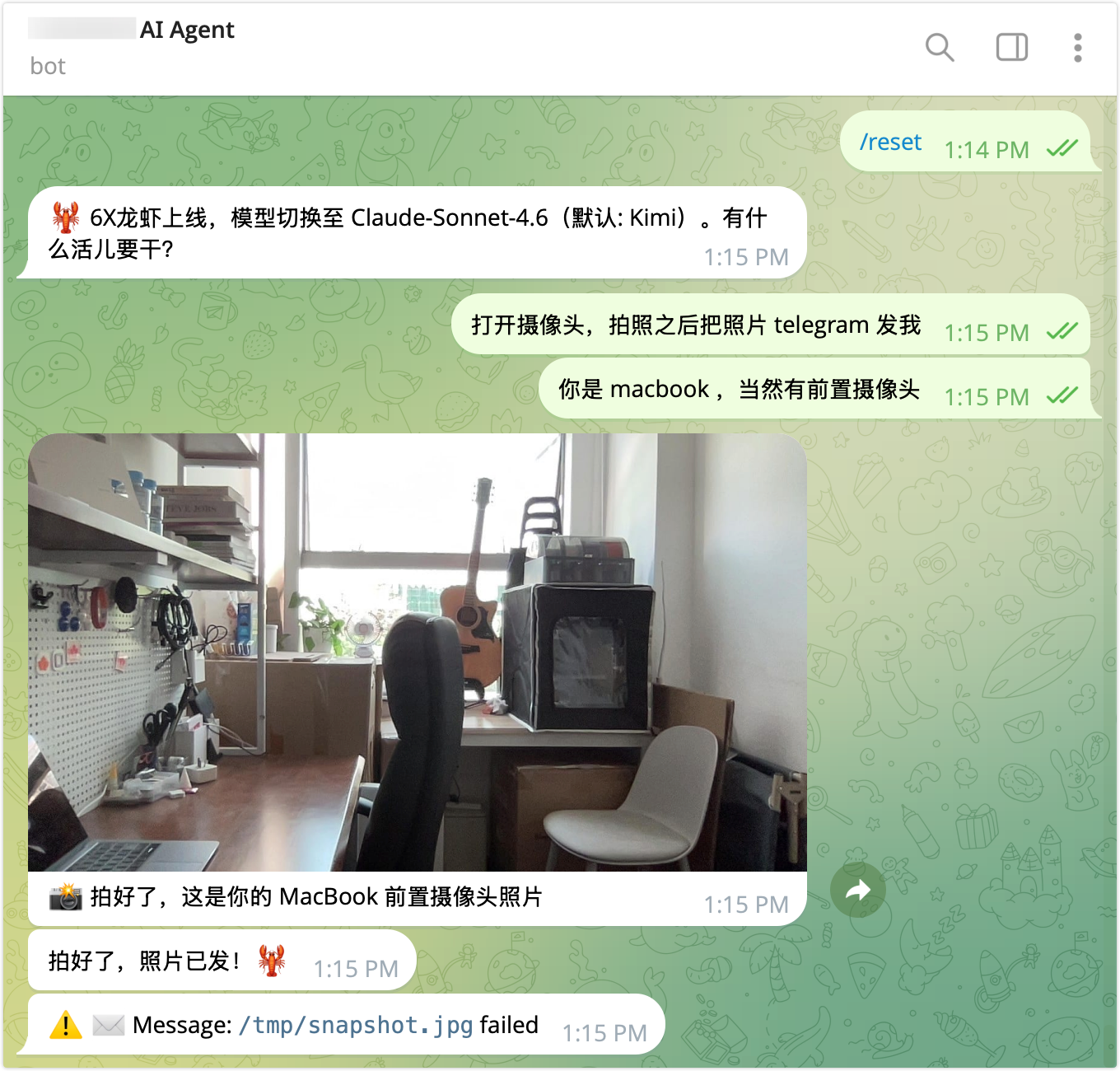
    <content type="html"><![CDATA[<h1 id="背景"><a href="#背景" class="headerlink" title="背景"></a>背景</h1><p>最近 OpenClaw 突然爆火，我的 <a href="https://github.com/crossoverJie/SkillDeck">SkillDeck</a> 也乘热打铁支持了 OpenClaw 的 Skills 管理和 ClawHub 市场浏览安装功能。</p><p>这篇文章一方面介绍下 SkillDeck <a href="https://github.com/crossoverJie/SkillDeck/releases/tag/v0.0.14">的更新内容</a>，另一方面也聊聊我对 OpenClaw 这波热度的一些看法。</p><p>安装命令：</p><figure class="highlight shell"><table><tr><td class="gutter"><pre><span class="line">1</span><br></pre></td><td class="code"><pre><code class="hljs shell">brew tap crossoverJie/skilldeck &amp;&amp; brew install --cask skilldeck<br></code></pre></td></tr></table></figure><span id="more"></span><h1 id="更新日志"><a href="#更新日志" class="headerlink" title="更新日志"></a>更新日志</h1><h2 id="支持更多-Agent"><a href="#支持更多-Agent" class="headerlink" title="支持更多 Agent"></a>支持更多 Agent</h2><p>SkillDeck 现在一共支持了 <strong>10 个</strong> AI coding agent，新增了以下几个：</p><table><thead><tr><th>Agent</th><th>Skills 目录</th><th>检测方式</th></tr></thead><tbody><tr><td>Antigravity</td><td><code>~/.gemini/antigravity/skills/</code></td><td>antigravity 二进制</td></tr><tr><td>Cursor</td><td><code>~/.cursor/skills/</code></td><td>cursor 二进制</td></tr><tr><td>Kiro</td><td><code>~/.kiro/skills/</code></td><td>kiro 二进制</td></tr><tr><td>CodeBuddy</td><td><code>~/.codebuddy/skills/</code></td><td>codebuddy 二进制</td></tr><tr><td>OpenClaw</td><td><code>~/.openclaw/skills/</code></td><td>openclaw 二进制</td></tr></tbody></table><p>加上之前就支持的 Claude Code、Codex、Gemini CLI、Copilot CLI、OpenCode，完整列表可以看：<a href="https://github.com/crossoverJie/SkillDeck#supported-agents">Supported Agents</a></p><!-- 截图占位：SkillDeck 多 Agent 侧边栏截图 --><p><img src="https://cdn.jsdelivr.net/gh/crossoverJie/images@main/images/images20260311110446.png"></p><h2 id="支持-ClawHub-市场"><a href="#支持-ClawHub-市场" class="headerlink" title="支持 ClawHub 市场"></a>支持 ClawHub 市场</h2><p>这次比较大的更新是集成了 <a href="https://github.com/crossoverJie/SkillDeck/pull/27">ClawHub</a> 市场，可以直接在 SkillDeck 里浏览、搜索、安装 ClawHub 上的 Skills，不需要再手动 clone 或者用命令行装了。</p><p>主要功能：</p><ul><li>侧边栏新增 ClawHub 入口，支持浏览和搜索</li><li>支持排序和筛选</li><li>一键安装到 OpenClaw 的 Skills 目录</li><li>安装时自动创建 symlink，不依赖 <code>clawhub</code> CLI</li></ul><!-- 截图占位：ClawHub 市场浏览页截图 --><p><img src="https://cdn.jsdelivr.net/gh/crossoverJie/images@main/images/images20260311110402.png"></p><blockquote><p>ClawHub 有 API 频率限制，如果触发了限流会自动降级为仅安装 SKILL.md 文件的模式，不影响基本使用。</p></blockquote><h1 id="OpenClaw-爆火背后的"><a href="#OpenClaw-爆火背后的" class="headerlink" title="OpenClaw 爆火背后的"></a>OpenClaw 爆火背后的</h1><p>OpenClaw 最近的热度确实夸张，但仔细想想，这波热度背后的推手其实挺有意思的：</p><ol><li><strong>自媒体传播焦虑</strong>：每个科技自媒体都怕错过热点，一窝蜂涌上来输出「你还不知道 OpenClaw？」「不会用 OpenClaw 你就要被淘汰了」这类内容，焦虑感拉满。</li><li><strong>AI 公司需要卖 token</strong>：OpenClaw 本质上是个疯狂消耗 token 的应用，每一次操作都在调大模型，AI 公司巴不得你 24 小时挂着跑。</li><li><strong>云厂商卖服务器</strong>：OpenClaw 需要部署、需要算力，云厂商的推广文章比谁都积极。</li><li><strong>甚至苹果还要卖 Mac mini</strong>：当然这是臆想，但你看各种「用 Mac mini 搭建 OpenClaw 私有部署」的教程确实很多。</li></ol><p>网友们也是有才，发了不少梗图：</p><!-- 梗图占位 --><p><img src="https://cdn.jsdelivr.net/gh/crossoverJie/images@main/images/images20260311110541.png"></p><!-- 梗图占位 --><p><img src="https://cdn.jsdelivr.net/gh/crossoverJie/images@main/images/images20260311110554.png"></p><h1 id="我理解的-OpenClaw"><a href="#我理解的-OpenClaw" class="headerlink" title="我理解的 OpenClaw"></a>我理解的 OpenClaw</h1><p>其实 OpenClaw 并不是什么全新的东西，之前昙花一现的豆包手机电脑版就是类似的思路——帮你自动化操作各种 app，本质上还是想解决人类「懒」的问题。</p><p>比如：</p><ul><li>每天自动帮我在某个 app 签到</li><li>帮我每天写日报</li><li>自动查询某些网站帮我做信息汇总</li></ul><p>这些说白了就是自动化功能，再结合 AI 可以理解我们模糊的语义，让你不用写精确的代码也能完成任务。并不是什么新奇的东西。</p><p>但其实很多人压根不知道自己装一个 openclaw 可以解决什么问题，大部分都是带着锤子找钉子，想着这么强一个工具我先装上，后面说不定就能拿来赚钱。</p><p>有这类需求的大概率在 openclaw 出现之前就自己写工具或者借助第三方实现了，如果等到现在都没有，那大概率你是没这个需求的。</p><p>目前为止 openclaw 最大的问题还是<strong>权限过大</strong>。</p><p><img src="https://cdn.jsdelivr.net/gh/crossoverJie/images@main/images/images6512d75ea640e5596579e05b0c0c2d41.png"></p><blockquote><p>远程让 openclaw 拍照</p></blockquote><p>现在网上已经有很多安全问题的案例了，比如很多人开了公网端口导致自己的电脑直接裸奔，任何人只要拿到了入口就可以让 OpenClaw 把电脑里的文件发出来，甚至拍照、录像都可以。</p><p>所以理想的方案还是之前苹果想做的那一套：各个 app 之间通过标准的 AI 可以识别的接口协议进行通信，而不是现在通过模拟点击、执行 shell 命令来绕过所有的权限校验。</p><p>只是这条路会影响这些 app 厂商的商业逻辑——用户不需要再打开他的 app 就可以进行消费，采集不到用户数据、用户也看不了广告等。</p><p><img src="https://cdn.jsdelivr.net/gh/crossoverJie/images@main/images/images20260311135859.png"></p><p>昨天还流行了一下午的<code>抽象提示词攻击</code>；在微信电脑版上根本不能直接发红包，也不能输入密码。</p><p>至于未来如何这还需要大厂之间继续进行博弈。</p><h1 id="总结"><a href="#总结" class="headerlink" title="总结"></a>总结</h1><p>我们不要过度关注现在 AI 带来的热度，就像去年初爆火的 DeepSeek，在现在养龙虾的热潮下已经没多少人讨论了；我认为到明年小龙虾也没啥人会继续讨论。</p><p>我们还是需要透过现象看本质，小龙虾背后依然是一个 AI Agent，和我们现在使用的 Claude Code、Codex 这些没有本质区别；只是它接入了很多 IM 通道，让普通人通过一个聊天窗口就可以指挥大模型去做很多具体的事情，让这个门槛看似降低了很多。</p><blockquote><p>现在 Claude Code 已经更新了 loop 模式和 cron 模式，已经可以执行许多循环任务和主动执行任务，和 OpenClaw 更没什么区别了。</p></blockquote><p>而且 OpenClaw 的代码复杂，接入的渠道很多，我们都知道代码量越多系统越复杂理论上出 bug 的几率也越大；所以之前也流行自己去裁剪自己的小龙虾，去掉一些不需要的渠道和代码。</p><p>归根结底，工具是拿来用的，不是拿来追的。与其焦虑「我是不是又错过了什么」，不如想想自己到底需要解决什么问题，再选合适的工具。</p>]]></content>
    
    
    <summary type="html">&lt;h1 id=&quot;背景&quot;&gt;&lt;a href=&quot;#背景&quot; class=&quot;headerlink&quot; title=&quot;背景&quot;&gt;&lt;/a&gt;背景&lt;/h1&gt;&lt;p&gt;最近 OpenClaw 突然爆火，我的 &lt;a href=&quot;https://github.com/crossoverJie/SkillDeck&quot;&gt;SkillDeck&lt;/a&gt; 也乘热打铁支持了 OpenClaw 的 Skills 管理和 ClawHub 市场浏览安装功能。&lt;/p&gt;
&lt;p&gt;这篇文章一方面介绍下 SkillDeck &lt;a href=&quot;https://github.com/crossoverJie/SkillDeck/releases/tag/v0.0.14&quot;&gt;的更新内容&lt;/a&gt;，另一方面也聊聊我对 OpenClaw 这波热度的一些看法。&lt;/p&gt;
&lt;p&gt;安装命令：&lt;/p&gt;
&lt;figure class=&quot;highlight shell&quot;&gt;&lt;table&gt;&lt;tr&gt;&lt;td class=&quot;gutter&quot;&gt;&lt;pre&gt;&lt;span class=&quot;line&quot;&gt;1&lt;/span&gt;&lt;br&gt;&lt;/pre&gt;&lt;/td&gt;&lt;td class=&quot;code&quot;&gt;&lt;pre&gt;&lt;code class=&quot;hljs shell&quot;&gt;brew tap crossoverJie/skilldeck &amp;amp;&amp;amp; brew install --cask skilldeck&lt;br&gt;&lt;/code&gt;&lt;/pre&gt;&lt;/td&gt;&lt;/tr&gt;&lt;/table&gt;&lt;/figure&gt;</summary>


    <category term="AI" scheme="http://crossoverjie.top/categories/AI/"/>
    
    
    <category term="AI" scheme="http://crossoverjie.top/tags/AI/"/>
    
    <category term="Skills" scheme="http://crossoverjie.top/tags/Skills/"/>
    
    <category term="OpenClaw" scheme="http://crossoverjie.top/tags/OpenClaw/"/>
    
    <category term="SkillDeck" scheme="http://crossoverjie.top/tags/SkillDeck/"/>
    
  </entry>
  
  <entry>
    <title>全程用 Claude Code 搓了一个 macOS 原生应用：SkillDeck</title>
    <link href="http://crossoverjie.top/2026/02/24/AI/skilldeck-intro/"/>
    <id>http://crossoverjie.top/2026/02/24/AI/skilldeck-intro/</id>
    <published>2026-02-24T23:00:00.000Z</published>
    <updated>2026-03-24T10:51:28.441Z</updated>
    
    <content type="html"><![CDATA[<h1 id="背景"><a href="#背景" class="headerlink" title="背景"></a>背景</h1><p>最近在同时用多个 AI coding agent的过程中，Skills 管理起来比较麻烦，</p><p>我日常在 Claude Code、Codex、Copilot CLI 之间切换，每个 Agent 的 Skills 存放在不同的目录下（<code>~/.claude/skills/</code>、<code>~/.agents/skills/</code>、<code>~/.gemini/skills/</code>、<code>~/.copilot/skills/</code>），安装一个 Skill 的流程大概是这样的：</p><ol><li>找到 Skill 的 GitHub 仓库</li><li><code>git clone</code> 到本地</li><li>手动创建 symlink 到对应 Agent 的 Skills 目录</li><li>如果要装到多个 Agent，以上步骤重复 N 遍</li></ol><p>卸载的时候也一样繁琐：删目录、清 symlink，漏了哪步就会留下残留。</p><p>当然也可以用命令行工具安装：</p><figure class="highlight bash"><table><tr><td class="gutter"><pre><span class="line">1</span><br></pre></td><td class="code"><pre><code class="hljs bash">npx skills add https://github.com/github/awesome-copilot --skill git-commit<br></code></pre></td></tr></table></figure><p>但这也只是解决了安装的问题，对所有 Agent 的 Skills 缺乏统一的可视化管理——装了哪些 Skill、哪些有更新、哪些该删掉，全靠自己记。</p><p>所以作为一个写过多年后端，但完全没碰过 Swift 和前端的人，我决定用 Claude Code 全程手搓一个 macOS 原生桌面应用来解决这个问题——这就是 <a href="https://github.com/crossoverJie/SkillDeck">SkillDeck</a>。它不仅提供安装能力，还提供了统一的发现、更新、删除等全生命周期管理。</p><span id="more"></span><h1 id="核心功能"><a href="#核心功能" class="headerlink" title="核心功能"></a>核心功能</h1><h2 id="统一仪表盘"><a href="#统一仪表盘" class="headerlink" title="统一仪表盘"></a>统一仪表盘</h2><p>三栏布局的 macOS 原生界面：左边是 Agent 列表和筛选，中间是 Skill 列表，右边是详情。支持按名称、描述、作者搜索，还能按 Agent 过滤和排序。</p><blockquote><p>symlink 去重是一个比较实用的设计——同一个 Skill 通过 symlink 安装到多个 Agent 时，只会显示一次，不会在列表里看到重复项。</p></blockquote><p><img src="https://jsd.cdn.zzko.cn/gh/crossoverJie/images@main/images/images20260213123118.png" alt="Dashboard Overview"></p><h2 id="Skills-市场浏览"><a href="#Skills-市场浏览" class="headerlink" title="Skills 市场浏览"></a>Skills 市场浏览</h2><p>内置了 <a href="https://skills.sh/">skills.sh</a> 的排行榜浏览，支持 All Time、Trending、Hot 三种排序方式，还有搜索功能。看到喜欢的 Skill 可以直接一键安装，不用再手动 clone 了。</p><p><img src="https://jsd.cdn.zzko.cn/gh/crossoverJie/images@main/images/images20260224114425.png" alt="Registry Browser"></p><h2 id="安装与更新"><a href="#安装与更新" class="headerlink" title="安装与更新"></a>安装与更新</h2><p>从 GitHub 安装只需要输入仓库地址（支持 <code>owner/repo</code> 格式），SkillDeck 会自动 clone、扫描可用 Skills、创建 symlink、更新 lock 文件。</p><p>更新检测也是一键的：会对比本地和远程的 tree hash，有变更就显示橙色角标，点一下就能拉取最新代码。</p><p><img src="https://jsd.cdn.zzko.cn/gh/crossoverJie/images@main/images/images20260213122805.png" alt="Install &amp; Update"></p><h2 id="SKILL-md-编辑器"><a href="#SKILL-md-编辑器" class="headerlink" title="SKILL.md 编辑器"></a>SKILL.md 编辑器</h2><p>分栏设计：左边是表单 + Markdown 编辑区，右边是实时预览。改完 <code>Cmd+S</code> 保存，<code>Esc</code> 取消。</p><blockquote><p>这个功能用的少，但也聊胜于无。</p></blockquote><h2 id="Agent-分配"><a href="#Agent-分配" class="headerlink" title="Agent 分配"></a>Agent 分配</h2><p>每个 Skill 的详情页有一组 toggle 开关，控制这个 Skill 安装到哪些 Agent。打开就自动创建 symlink，关掉就自动删除，不用再手动跑命令了。</p><p>这样也不用每个 Agent 都去安装 skill，只保留一份。</p><h2 id="文件系统监听"><a href="#文件系统监听" class="headerlink" title="文件系统监听"></a>文件系统监听</h2><p>SkillDeck 会自动监听 Skills 目录的变化，所以如果你从 CLI 侧做了什么操作（比如用 <code>claude skills add</code> 安装了新 Skill），GUI 这边会自动刷新，不需要手动点刷新按钮。</p><hr><p>目前支持的 Agent 和对应的 Skills 目录：</p><table><thead><tr><th>Agent</th><th>Skills 目录</th><th>检测方式</th></tr></thead><tbody><tr><td>Claude Code</td><td><code>~/.claude/skills/</code></td><td><code>claude</code> 二进制 + <code>~/.claude/</code> 目录</td></tr><tr><td>Codex</td><td><code>~/.agents/skills/</code>（共享）</td><td><code>codex</code> 二进制</td></tr><tr><td>Gemini CLI</td><td><code>~/.gemini/skills/</code></td><td><code>gemini</code> 二进制 + <code>~/.gemini/</code> 目录</td></tr><tr><td>Copilot CLI</td><td><code>~/.copilot/skills/</code></td><td><code>gh</code> 二进制</td></tr></tbody></table><h1 id="开发过程"><a href="#开发过程" class="headerlink" title="开发过程"></a>开发过程</h1><p>整个项目从第一行代码到现在，全程都是用 Claude Code 开发的。</p><p>我自己的技术背景是 Java&#x2F;Go&#x2F;Python，Swift 之前一行都没写过，SwiftUI 和 macOS 平台开发更是零经验。但这次的体验让我感触很深——<strong>AI Coding 真的把跨语言开发的门槛拉低了很多</strong>。</p><p>开发节奏基本上就是一个循环：</p><figure class="highlight"><table><tr><td class="gutter"><pre><span class="line">1</span><br></pre></td><td class="code"><pre><code class="hljs">提需求 → AI 实现 → 我测试 → 发现问题 → AI 修复 → 再测试<br></code></pre></td></tr></table></figure><p>跟之前<a href="https://crossoverjie.top/2026/02/07/AI/create-skills/">用 AI 搓 Skills</a> 的流程差不多，但这次的复杂度高了不少——毕竟是一个完整的 macOS 桌面应用，涉及 UI 布局、文件系统操作、网络请求、并发处理等等。</p><p>我不需要先花几周系统学习 Swift 和 SwiftUI，遇到不懂的语法或 API 直接问 AI 就行。当然，这不代表可以完全当甩手掌柜——你得能看懂代码逻辑、能写清楚需求、能有效测试和反馈问题，AI 才能帮你持续推进。</p><blockquote><p>说白了就是：你不需要会写 Swift，但你得会”验收”Swift 代码。能跑起来、功能正确、边界情况覆盖到，这些判断能力还是需要你自己具备的。</p></blockquote><h1 id="AI-Coding-小-Tips"><a href="#AI-Coding-小-Tips" class="headerlink" title="AI Coding 小 Tips"></a>AI Coding 小 Tips</h1><p>这段时间用 Claude Code 开发积累了一些经验，分享几个我觉得比较实用的 tips。</p><h2 id="1-每个功能新开一个-context"><a href="#1-每个功能新开一个-context" class="headerlink" title="1. 每个功能新开一个 context"></a>1. 每个功能新开一个 context</h2><p>不要在一个超长的对话里做所有事情。每个功能开一个新的 context 会更聚焦，AI 不容易被之前的上下文带偏。</p><p>完成一个功能后记得 commit，这样如果 AI 后续改错了什么，你可以很方便地回滚到之前的状态。</p><blockquote><p>尽量不要使用 AI 来回滚，不然会有不好的事情发生，血的教训。<br>精确的回滚还是交给靠谱的 git 工具来实现。</p></blockquote><h2 id="2-大量-token-总结的内容保存成文档"><a href="#2-大量-token-总结的内容保存成文档" class="headerlink" title="2. 大量 token 总结的内容保存成文档"></a>2. 大量 token 总结的内容保存成文档</h2><p>有时候让 AI 做了一大堆分析（比如梳理项目架构、分析某个复杂模块的实现），这些内容当下可能用不上，但后面很可能会再用到。</p><p>我的做法是让 AI 把分析结果整理成文档保存到项目的 memory 目录，下次开新 context 的时候直接加载这个文档，不用重新消耗 token 再分析一遍。</p><h2 id="3-claude-resume-恢复历史会话"><a href="#3-claude-resume-恢复历史会话" class="headerlink" title="3. claude --resume 恢复历史会话"></a>3. <code>claude --resume</code> 恢复历史会话</h2><p>如果你中途关掉了某个对话，后面又想继续，可以用 <code>--resume</code> 恢复：</p><figure class="highlight bash"><table><tr><td class="gutter"><pre><span class="line">1</span><br><span class="line">2</span><br></pre></td><td class="code"><pre><code class="hljs bash">claude --resume <span class="hljs-string">&quot;hotkey&quot;</span><br>claude --resume <span class="hljs-string">&quot;架构&quot;</span><br></code></pre></td></tr></table></figure><p>它会搜索历史 session 的内容，列出匹配的会话让你选择。不过搜索不是百分百精准，有时候需要换几个关键词试试。</p><h2 id="4-Session-保留策略"><a href="#4-Session-保留策略" class="headerlink" title="4. Session 保留策略"></a>4. Session 保留策略</h2><p>Claude Code 默认 30 天自动清理历史 session，可以在 <code>~/.claude/settings.json</code> 里修改保留时间：</p><figure class="highlight json"><table><tr><td class="gutter"><pre><span class="line">1</span><br></pre></td><td class="code"><pre><code class="hljs json"><span class="hljs-punctuation">&#123;</span> <span class="hljs-attr">&quot;cleanupPeriodDays&quot;</span><span class="hljs-punctuation">:</span> <span class="hljs-number">90</span> <span class="hljs-punctuation">&#125;</span><br></code></pre></td></tr></table></figure><p>所以 <code>--resume</code> 只适合短期内继续某个对话，不适合当作长期知识存储。长期需要保留的内容还是整理成文档更靠谱。</p><p>我建议还是使用刚才的方案，将你觉得消耗 token 的结论存储到专门的文档里，后期你需要使用的时候直接加载即可。</p><p>而不需要存放到 Claude Code 的系统提示词里，这样可能会浪费 token。</p><h2 id="5-用-CLAUDE-md-约束-AI-的开发规范"><a href="#5-用-CLAUDE-md-约束-AI-的开发规范" class="headerlink" title="5. 用 CLAUDE.md 约束 AI 的开发规范"></a>5. 用 CLAUDE.md 约束 AI 的开发规范</h2><p>这个我觉得是最重要的一条。</p><p>把开发规范写进 <code>CLAUDE.md</code>，AI 每次开新对话都会自动加载这些规则，就像给团队新人定 code review 规范一样。我在项目里定了这些规则：</p><ul><li><strong>Git 工作流</strong>：代码改动必须新建分支，禁止直接提交到 main</li><li><strong>测试要求</strong>：每次代码修改都应包含对应的单元测试</li><li><strong>提交确认</strong>：AI 不能自动 commit&#x2F;push，必须等我确认</li><li><strong>PR 规范</strong>：每个 PR 必须包含「Manual Verification Required」（人工验证清单）和「Regression Checklist」（回归测试清单）</li></ul><blockquote><p>这里有一个关键区分：<strong>每个项目都通用的规则</strong>（比如分支策略、测试要求），可以放到 <code>~/.claude/CLAUDE.md</code>（全局配置），所有项目自动生效，不用每个项目重复写。<strong>项目特有的规范</strong>才放到项目根目录的 <code>CLAUDE.md</code> 里。</p></blockquote><h1 id="总结"><a href="#总结" class="headerlink" title="总结"></a>总结</h1><p>SkillDeck 解决的核心痛点就一个：<strong>让多个 AI Agent 的 Skills 管理更直观易用</strong>。从安装、更新、分配到删除，全部在一个 GUI 里搞定。</p><p>全程用 Claude Code 开发这个项目的感受是：跨语言开发的门槛被 AI 大幅拉低了。我一行 Swift 都不会写，但靠着 AI 辅助，从零产出了一个完整的 macOS 原生应用。当然前提是你得有基本的软件工程能力——需求拆解、测试验证、问题排查这些还是得自己来。</p><p>项目开源，MIT 协议，欢迎 star&#x2F;issue&#x2F;PR：<a href="https://github.com/crossoverJie/SkillDeck">GitHub</a> | <a href="https://crossoverjie.top/SkillDeck/">项目主页</a></p><p>安装方式：</p><figure class="highlight bash"><table><tr><td class="gutter"><pre><span class="line">1</span><br></pre></td><td class="code"><pre><code class="hljs bash">brew tap crossoverJie/skilldeck &amp;&amp; brew install --cask skilldeck<br></code></pre></td></tr></table></figure><p>#Blog</p>]]></content>
    
    
    <summary type="html">&lt;h1 id=&quot;背景&quot;&gt;&lt;a href=&quot;#背景&quot; class=&quot;headerlink&quot; title=&quot;背景&quot;&gt;&lt;/a&gt;背景&lt;/h1&gt;&lt;p&gt;最近在同时用多个 AI coding agent的过程中，Skills 管理起来比较麻烦，&lt;/p&gt;
&lt;p&gt;我日常在 Claude Code、Codex、Copilot CLI 之间切换，每个 Agent 的 Skills 存放在不同的目录下（&lt;code&gt;~/.claude/skills/&lt;/code&gt;、&lt;code&gt;~/.agents/skills/&lt;/code&gt;、&lt;code&gt;~/.gemini/skills/&lt;/code&gt;、&lt;code&gt;~/.copilot/skills/&lt;/code&gt;），安装一个 Skill 的流程大概是这样的：&lt;/p&gt;
&lt;ol&gt;
&lt;li&gt;找到 Skill 的 GitHub 仓库&lt;/li&gt;
&lt;li&gt;&lt;code&gt;git clone&lt;/code&gt; 到本地&lt;/li&gt;
&lt;li&gt;手动创建 symlink 到对应 Agent 的 Skills 目录&lt;/li&gt;
&lt;li&gt;如果要装到多个 Agent，以上步骤重复 N 遍&lt;/li&gt;
&lt;/ol&gt;
&lt;p&gt;卸载的时候也一样繁琐：删目录、清 symlink，漏了哪步就会留下残留。&lt;/p&gt;
&lt;p&gt;当然也可以用命令行工具安装：&lt;/p&gt;
&lt;figure class=&quot;highlight bash&quot;&gt;&lt;table&gt;&lt;tr&gt;&lt;td class=&quot;gutter&quot;&gt;&lt;pre&gt;&lt;span class=&quot;line&quot;&gt;1&lt;/span&gt;&lt;br&gt;&lt;/pre&gt;&lt;/td&gt;&lt;td class=&quot;code&quot;&gt;&lt;pre&gt;&lt;code class=&quot;hljs bash&quot;&gt;npx skills add https://github.com/github/awesome-copilot --skill git-commit&lt;br&gt;&lt;/code&gt;&lt;/pre&gt;&lt;/td&gt;&lt;/tr&gt;&lt;/table&gt;&lt;/figure&gt;

&lt;p&gt;但这也只是解决了安装的问题，对所有 Agent 的 Skills 缺乏统一的可视化管理——装了哪些 Skill、哪些有更新、哪些该删掉，全靠自己记。&lt;/p&gt;
&lt;p&gt;所以作为一个写过多年后端，但完全没碰过 Swift 和前端的人，我决定用 Claude Code 全程手搓一个 macOS 原生桌面应用来解决这个问题——这就是 &lt;a href=&quot;https://github.com/crossoverJie/SkillDeck&quot;&gt;SkillDeck&lt;/a&gt;。它不仅提供安装能力，还提供了统一的发现、更新、删除等全生命周期管理。&lt;/p&gt;</summary>


    <category term="AI" scheme="http://crossoverjie.top/categories/AI/"/>
    
    
    <category term="AI" scheme="http://crossoverjie.top/tags/AI/"/>
    
    <category term="Claude" scheme="http://crossoverjie.top/tags/Claude/"/>
    
    <category term="Skills" scheme="http://crossoverjie.top/tags/Skills/"/>
    
    <category term="macOS" scheme="http://crossoverjie.top/tags/macOS/"/>
    
    <category term="SwiftUI" scheme="http://crossoverjie.top/tags/SwiftUI/"/>
    
  </entry>
  
  <entry>
    <title>别再傻等了，给 Claude Code 装个通知铃铛</title>
    <link href="http://crossoverjie.top/2026/02/09/AI/agent-notifier-skill/"/>
    <id>http://crossoverjie.top/2026/02/09/AI/agent-notifier-skill/</id>
    <published>2026-02-09T14:00:00.000Z</published>
    <updated>2026-03-24T10:51:28.441Z</updated>
    
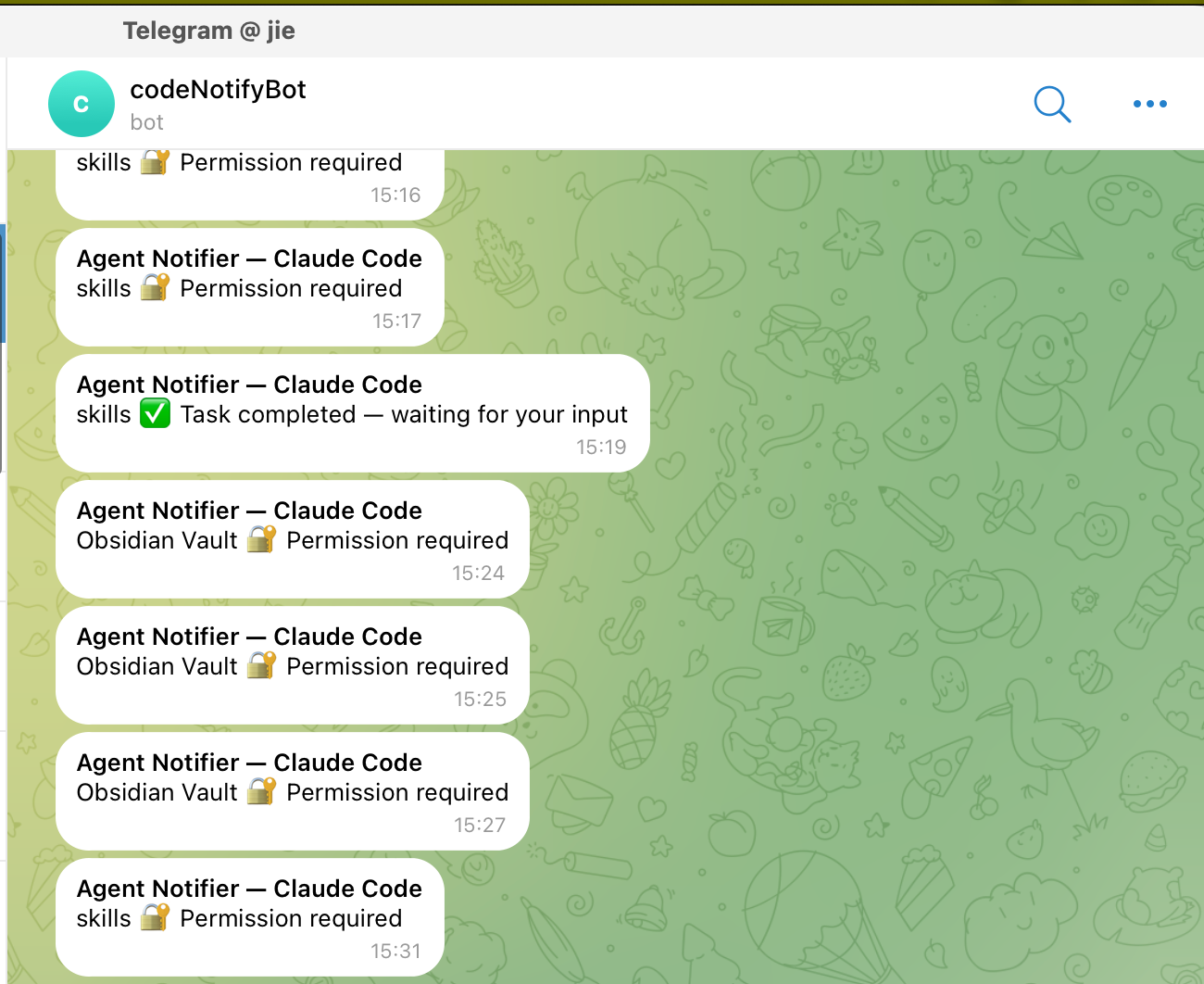
    <content type="html"><![CDATA[<h1 id="背景"><a href="#背景" class="headerlink" title="背景"></a>背景</h1><p>最近用 Claude Code、Copilot CLI 这类 AI Agent 工具的时候，有一个挺烦人的问题：让 AI 在后台跑任务，我总是会忍不住去查看他的执行状态，有时候比较复杂的任务可能会耗时十来分钟，每次来回切换非常浪费时间。</p><p>更惨的是有时候 AI 需要我授权某个操作（比如执行 shell 命令），我没注意到，它就一直卡在那里等。</p><p>所以我一直想找一个靠谱的通知方案。</p><p>灵感来源于播客「<a href="https://justinyan.me/post/6623">枫言枫语</a>」，主播自力提到可以用 Hook 来实现 Agent 通知。</p><p>不过一开始我偷了个懒，让 AI 自己给方案。AI 给出的方案很”AI”：在 <code>~/.claude/CLAUDE.md</code> 里加一段系统提示词，指示 LLM 任务完成后用 <code>afplay</code> 播放一个提示音。</p><figure class="highlight markdown"><table><tr><td class="gutter"><pre><span class="line">1</span><br><span class="line">2</span><br><span class="line">3</span><br></pre></td><td class="code"><pre><code class="hljs markdown"><span class="hljs-section">## Task Completion Sound</span><br>When you complete a task, play a sound:<br>afplay /System/Library/Sounds/Glass.aiff<br></code></pre></td></tr></table></figure><p>测试了几次发现这玩意不靠谱——有时候响，有时候不响，完全看 LLM 心情。</p><p>最终我还是回到了 Hook 方案，用各平台的 Hooks 系统实现确定性触发，并封装成了一个可复用的 <a href="https://github.com/crossoverJie/skills">SKILL</a>。</p><p>最终的效果如下：</p><p><img src="https://cdn.jsdelivr.net/gh/crossoverJie/images@main/images/images20260210161908.png"></p><span id="more"></span><h1 id="问题分析"><a href="#问题分析" class="headerlink" title="问题分析"></a>问题分析</h1><p>为什么 LLM 提示词方案不靠谱？主要三个原因：</p><ol><li><strong>LLM 不会 100% 遵循附带操作类指令</strong>：LLM 对”生成文本”以外的操作指令（比如”运行 bash 命令”）本来就不太可靠，它可能觉得当前场景”不需要”播放声音就跳过了</li><li><strong>上下文压缩会丢失指令</strong>：长对话中，系统会自动压缩上下文，提示词的优先级会被降低甚至直接丢掉</li><li><strong>LLM 对触发时机的判定不一致</strong>：什么算”任务完成”？LLM 每次的理解可能都不一样，导致触发行为不稳定</li></ol><p>本质上，这是一个”软提示” vs “硬触发”的问题。用提示词去控制 LLM 行为，就像是”拜托你帮我做一件事”；而用 Hooks 就是”当这个事件发生时，自动执行这段代码”——确定性完全不同。</p><table><thead><tr><th>对比项</th><th>提示词方案</th><th>Hooks 方案</th></tr></thead><tbody><tr><td>触发可靠性</td><td>不确定，取决于 LLM 判断</td><td>确定性 100% 触发</td></tr><tr><td>上下文影响</td><td>长对话会被压缩丢失</td><td>不受上下文影响</td></tr><tr><td>配置方式</td><td>Markdown 文本</td><td>JSON 配置 + 脚本</td></tr><tr><td>可扩展性</td><td>基本不可扩展</td><td>支持多平台、多渠道</td></tr><tr><td>维护成本</td><td>每次换模型可能要调提示词</td><td>一次配置，持续生效</td></tr></tbody></table><p>有点类似于现在的 LLM 和 Agent 的区别，Agent 是干活的，大模型是负责思考的。</p><p>确定的事情还是要交给确定的 Agent 去做。</p><h1 id="agent-notifier-介绍"><a href="#agent-notifier-介绍" class="headerlink" title="agent-notifier 介绍"></a>agent-notifier 介绍</h1><p>基于以上分析，我开发了 <a href="https://github.com/crossoverJie/skills/tree/main/skills/agent-notifier">agent-notifier</a> 这个 SKILL，用 Hooks 实现确定性通知。</p><h2 id="功能概览"><a href="#功能概览" class="headerlink" title="功能概览"></a>功能概览</h2><p>支持的 AI Agent 平台：</p><table><thead><tr><th>平台</th><th>Hook 机制</th><th>触发事件</th></tr></thead><tbody><tr><td>Claude Code</td><td>settings.json hooks</td><td><code>Notification</code>（idle_prompt, permission_prompt）</td></tr><tr><td>GitHub Copilot CLI</td><td>hooks.json</td><td><code>sessionEnd</code>, <code>postToolUse</code></td></tr><tr><td>Cursor</td><td>hooks.json</td><td><code>stop</code>, <code>afterFileEdit</code></td></tr><tr><td>Codex（OpenAI）</td><td>notify setting</td><td><code>agent-turn-complete</code></td></tr><tr><td>Aider</td><td>CLI flag</td><td><code>--notifications-command</code></td></tr></tbody></table><p>支持的通知渠道：</p><table><thead><tr><th>渠道</th><th>默认状态</th><th>说明</th></tr></thead><tbody><tr><td>Sound</td><td>启用</td><td>macOS 用 <code>afplay</code>，Linux 用 <code>paplay</code>&#x2F;<code>aplay</code></td></tr><tr><td>macOS 通知中心</td><td>启用</td><td>通过 <code>osascript</code> 弹出系统通知</td></tr><tr><td>Telegram</td><td>禁用</td><td>需要 Bot Token + Chat ID</td></tr><tr><td>Email</td><td>禁用</td><td>SMTP 发送</td></tr><tr><td>Slack</td><td>禁用</td><td>Incoming Webhook</td></tr><tr><td>Discord</td><td>禁用</td><td>Webhook URL</td></tr></tbody></table><h2 id="架构设计"><a href="#架构设计" class="headerlink" title="架构设计"></a>架构设计</h2><p>核心思路是<strong>统一事件模型 + 并发多渠道分发</strong>：</p><figure class="highlight pgsql"><table><tr><td class="gutter"><pre><span class="line">1</span><br><span class="line">2</span><br><span class="line">3</span><br><span class="line">4</span><br><span class="line">5</span><br><span class="line">6</span><br><span class="line">7</span><br><span class="line">8</span><br><span class="line">9</span><br></pre></td><td class="code"><pre><code class="hljs pgsql">各平台 Hook 触发<br>       ↓<br>  stdin <span class="hljs-type">JSON</span> 输入（各平台格式不同）<br>       ↓<br>  <span class="hljs-keyword">notify</span>.py 解析为统一事件：&#123;platform, event, message&#125;<br>       ↓<br>  读取 <span class="hljs-keyword">notify</span>-config.json 配置<br>       ↓<br>  ThreadPoolExecutor 并发分发到所有启用的渠道<br></code></pre></td></tr></table></figure><p>每个平台传过来的 JSON 格式不一样，比如 Claude Code 是 <code>&#123;&quot;notification_type&quot;: &quot;idle_prompt&quot;, ...&#125;</code>，Copilot CLI 是 <code>&#123;&quot;hook_event_name&quot;: &quot;sessionEnd&quot;, ...&#125;</code>。<code>notify.py</code> 会把这些不同的格式统一解析成 <code>&#123;platform, event, message&#125;</code> 三元组，然后根据配置分发到各个通知渠道。</p><blockquote><p>一个关键设计：单个渠道发送失败不影响其他渠道。比如 Telegram 网络超时了，Sound 和 macOS 通知该响还是响。错误信息只输出到 stderr，不会中断流程。</p></blockquote><h2 id="核心设计决策：纯标准库、零依赖"><a href="#核心设计决策：纯标准库、零依赖" class="headerlink" title="核心设计决策：纯标准库、零依赖"></a>核心设计决策：纯标准库、零依赖</h2><p>整个 <code>notify.py</code> 只用了 Python 标准库，没有任何 <code>pip</code> 依赖：</p><ul><li>HTTP 请求用 <code>urllib.request</code>（发 Telegram、Slack、Discord）</li><li>邮件用 <code>smtplib</code></li><li>播放声音用 <code>subprocess</code> 调系统命令</li><li>并发用 <code>concurrent.futures</code></li></ul><p>这意味着只要机器上有 Python，拿来就能用，不需要 <code>pip install</code> 任何东西。</p><h1 id="开发过程"><a href="#开发过程" class="headerlink" title="开发过程"></a>开发过程</h1><p>整个 SKILL 的开发也是和 AI 对话完成的，下面分阶段回顾。</p><h2 id="阶段一：核心通知脚本-notify-py"><a href="#阶段一：核心通知脚本-notify-py" class="headerlink" title="阶段一：核心通知脚本 notify.py"></a>阶段一：核心通知脚本 notify.py</h2><p>这是最核心的部分，负责三件事：</p><ol><li><strong>解析输入</strong>：从 stdin 读取各平台传过来的 JSON，识别平台类型和事件</li><li><strong>统一事件模型</strong>：不管哪个平台，统一解析为 <code>&#123;platform, event, message&#125;</code></li><li><strong>多渠道发送</strong>：并发调用所有启用的通知渠道</li></ol><p>比如 Claude Code 的 Hook 会通过 stdin 传入：</p><figure class="highlight json"><table><tr><td class="gutter"><pre><span class="line">1</span><br></pre></td><td class="code"><pre><code class="hljs json"><span class="hljs-punctuation">&#123;</span><span class="hljs-attr">&quot;notification_type&quot;</span><span class="hljs-punctuation">:</span> <span class="hljs-string">&quot;idle_prompt&quot;</span><span class="hljs-punctuation">,</span> <span class="hljs-attr">&quot;message&quot;</span><span class="hljs-punctuation">:</span> <span class="hljs-string">&quot;Claude is waiting for your input&quot;</span><span class="hljs-punctuation">&#125;</span><br></code></pre></td></tr></table></figure><p>脚本解析后生成通知：**”✅ Task completed — waiting for your input”**，然后同时发到 Sound、macOS 通知中心、Telegram 等所有启用的渠道。</p><h2 id="阶段二：配置与安装"><a href="#阶段二：配置与安装" class="headerlink" title="阶段二：配置与安装"></a>阶段二：配置与安装</h2><p>光有核心脚本还不够，还需要让用户能方便地配置和安装。所以又搞了两个文件：</p><p><strong>notify-config.json</strong>：配置模板，定义了所有渠道的开关和参数。默认只启用 Sound 和 macOS 通知，Telegram、Email 这些需要手动启用并填入凭据。</p><p><strong>setup.py</strong>：交互式安装脚本，运行后会：</p><ol><li>自动检测你装了哪些 AI Agent 平台</li><li>引导你配置通知渠道（要不要 Telegram？Bot Token 是什么？）</li><li>自动在对应平台写入 Hook 配置</li><li>发一条测试通知验证配置</li></ol><h2 id="阶段三：集成测试"><a href="#阶段三：集成测试" class="headerlink" title="阶段三：集成测试"></a>阶段三：集成测试</h2><p>代码写完了，关键是跑起来验证。</p><p>首先在 Claude Code 的 <code>~/.claude/settings.json</code> 里配置 Hook：</p><figure class="highlight json"><table><tr><td class="gutter"><pre><span class="line">1</span><br><span class="line">2</span><br><span class="line">3</span><br><span class="line">4</span><br><span class="line">5</span><br><span class="line">6</span><br><span class="line">7</span><br><span class="line">8</span><br><span class="line">9</span><br><span class="line">10</span><br><span class="line">11</span><br><span class="line">12</span><br><span class="line">13</span><br><span class="line">14</span><br><span class="line">15</span><br></pre></td><td class="code"><pre><code class="hljs json"><span class="hljs-punctuation">&#123;</span><br>  <span class="hljs-attr">&quot;hooks&quot;</span><span class="hljs-punctuation">:</span> <span class="hljs-punctuation">&#123;</span><br>    <span class="hljs-attr">&quot;Notification&quot;</span><span class="hljs-punctuation">:</span> <span class="hljs-punctuation">[</span><br>      <span class="hljs-punctuation">&#123;</span><br>        <span class="hljs-attr">&quot;matcher&quot;</span><span class="hljs-punctuation">:</span> <span class="hljs-string">&quot;&quot;</span><span class="hljs-punctuation">,</span><br>        <span class="hljs-attr">&quot;hooks&quot;</span><span class="hljs-punctuation">:</span> <span class="hljs-punctuation">[</span><br>          <span class="hljs-punctuation">&#123;</span><br>            <span class="hljs-attr">&quot;type&quot;</span><span class="hljs-punctuation">:</span> <span class="hljs-string">&quot;command&quot;</span><span class="hljs-punctuation">,</span><br>            <span class="hljs-attr">&quot;command&quot;</span><span class="hljs-punctuation">:</span> <span class="hljs-string">&quot;python3 ~/.claude/skills/agent-notifier/notify.py&quot;</span><br>          <span class="hljs-punctuation">&#125;</span><br>        <span class="hljs-punctuation">]</span><br>      <span class="hljs-punctuation">&#125;</span><br>    <span class="hljs-punctuation">]</span><br>  <span class="hljs-punctuation">&#125;</span><br><span class="hljs-punctuation">&#125;</span><br></code></pre></td></tr></table></figure><p>然后手动测试：</p><figure class="highlight bash"><table><tr><td class="gutter"><pre><span class="line">1</span><br><span class="line">2</span><br><span class="line">3</span><br><span class="line">4</span><br><span class="line">5</span><br></pre></td><td class="code"><pre><code class="hljs bash"><span class="hljs-comment"># 模拟任务完成通知</span><br><span class="hljs-built_in">echo</span> <span class="hljs-string">&#x27;&#123;&quot;notification_type&quot;:&quot;idle_prompt&quot;,&quot;message&quot;:&quot;test&quot;&#125;&#x27;</span> | python3 notify.py<br><br><span class="hljs-comment"># 模拟权限请求通知</span><br><span class="hljs-built_in">echo</span> <span class="hljs-string">&#x27;&#123;&quot;notification_type&quot;:&quot;permission_prompt&quot;,&quot;message&quot;:&quot;needs permission&quot;&#125;&#x27;</span> | python3 notify.py<br></code></pre></td></tr></table></figure><p>Sound 和 macOS 通知都正常。接着启用 Telegram，配好 Bot Token 和 Chat ID，再跑一次——Telegram 也收到了消息。</p><p>最后让 Claude Code 执行一个真实任务，然后等它跑完。果然，任务结束后 Telegram 弹出通知，Sound 也响了，搞定。</p><h2 id="阶段四：修-bug-改文案"><a href="#阶段四：修-bug-改文案" class="headerlink" title="阶段四：修 bug 改文案"></a>阶段四：修 bug 改文案</h2><p>实际使用中发现一个问题：<code>idle_prompt</code> 的通知消息是 “Claude is waiting for your input”，但这个消息不够直观——我更想知道的是”任务完成了”，而不是”在等你输入”。</p><p>虽然本质上 <code>idle_prompt</code> 就是任务完成后等待输入的信号，但消息文案会影响用户感知。于是改成了：</p><ul><li><code>idle_prompt</code> → <strong>“✅ Task completed — waiting for your input”</strong></li><li><code>permission_prompt</code> → <strong>“🔐 Permission required”</strong></li></ul><p>改完之后再测，Telegram 消息一目了然，不用再猜它到底是什么状态了。</p><h1 id="总结"><a href="#总结" class="headerlink" title="总结"></a>总结</h1><p>这次开发最核心的观点就一句话：<strong>Hooks &gt; 提示词</strong>。</p><p>凡是需要确定性执行的操作，都不应该用提示词去”请求”LLM 来做，而是应该用平台提供的 Hook 机制来保证。提示词适合控制生成内容的风格和方向，但不适合控制”是否执行某个操作”这类二元决策。</p><p>另外，对话式开发的体验依然很好。从最初的想法到最终可用的 SKILL，整个过程就是不断对话、测试、修复的循环。像 Telegram 消息文案不够直观这种问题，也是在实测中才发现的。</p><p>感兴趣的可以去 <a href="https://github.com/crossoverJie/skills">GitHub 仓库</a> 看看源码，<code>agent-notifier</code> 在 <code>skills/agent-notifier/</code> 目录下。</p><p>#Blog</p>]]></content>
    
    
    <summary type="html">&lt;h1 id=&quot;背景&quot;&gt;&lt;a href=&quot;#背景&quot; class=&quot;headerlink&quot; title=&quot;背景&quot;&gt;&lt;/a&gt;背景&lt;/h1&gt;&lt;p&gt;最近用 Claude Code、Copilot CLI 这类 AI Agent 工具的时候，有一个挺烦人的问题：让 AI 在后台跑任务，我总是会忍不住去查看他的执行状态，有时候比较复杂的任务可能会耗时十来分钟，每次来回切换非常浪费时间。&lt;/p&gt;
&lt;p&gt;更惨的是有时候 AI 需要我授权某个操作（比如执行 shell 命令），我没注意到，它就一直卡在那里等。&lt;/p&gt;
&lt;p&gt;所以我一直想找一个靠谱的通知方案。&lt;/p&gt;
&lt;p&gt;灵感来源于播客「&lt;a href=&quot;https://justinyan.me/post/6623&quot;&gt;枫言枫语&lt;/a&gt;」，主播自力提到可以用 Hook 来实现 Agent 通知。&lt;/p&gt;
&lt;p&gt;不过一开始我偷了个懒，让 AI 自己给方案。AI 给出的方案很”AI”：在 &lt;code&gt;~/.claude/CLAUDE.md&lt;/code&gt; 里加一段系统提示词，指示 LLM 任务完成后用 &lt;code&gt;afplay&lt;/code&gt; 播放一个提示音。&lt;/p&gt;
&lt;figure class=&quot;highlight markdown&quot;&gt;&lt;table&gt;&lt;tr&gt;&lt;td class=&quot;gutter&quot;&gt;&lt;pre&gt;&lt;span class=&quot;line&quot;&gt;1&lt;/span&gt;&lt;br&gt;&lt;span class=&quot;line&quot;&gt;2&lt;/span&gt;&lt;br&gt;&lt;span class=&quot;line&quot;&gt;3&lt;/span&gt;&lt;br&gt;&lt;/pre&gt;&lt;/td&gt;&lt;td class=&quot;code&quot;&gt;&lt;pre&gt;&lt;code class=&quot;hljs markdown&quot;&gt;&lt;span class=&quot;hljs-section&quot;&gt;## Task Completion Sound&lt;/span&gt;&lt;br&gt;When you complete a task, play a sound:&lt;br&gt;afplay /System/Library/Sounds/Glass.aiff&lt;br&gt;&lt;/code&gt;&lt;/pre&gt;&lt;/td&gt;&lt;/tr&gt;&lt;/table&gt;&lt;/figure&gt;

&lt;p&gt;测试了几次发现这玩意不靠谱——有时候响，有时候不响，完全看 LLM 心情。&lt;/p&gt;
&lt;p&gt;最终我还是回到了 Hook 方案，用各平台的 Hooks 系统实现确定性触发，并封装成了一个可复用的 &lt;a href=&quot;https://github.com/crossoverJie/skills&quot;&gt;SKILL&lt;/a&gt;。&lt;/p&gt;
&lt;p&gt;最终的效果如下：&lt;/p&gt;
&lt;p&gt;&lt;img src=&quot;https://cdn.jsdelivr.net/gh/crossoverJie/images@main/images/images20260210161908.png&quot;&gt;&lt;/p&gt;</summary>


    <category term="AI" scheme="http://crossoverjie.top/categories/AI/"/>
    
    
    <category term="AI" scheme="http://crossoverjie.top/tags/AI/"/>
    
    <category term="Claude" scheme="http://crossoverjie.top/tags/Claude/"/>
    
    <category term="Skills" scheme="http://crossoverjie.top/tags/Skills/"/>
    
    <category term="Hooks" scheme="http://crossoverjie.top/tags/Hooks/"/>
    
  </entry>
  
  <entry>
    <title>一行代码没写，用 AI 搓出三个实用 SKILLS</title>
    <link href="http://crossoverjie.top/2026/02/07/AI/create-skills/"/>
    <id>http://crossoverjie.top/2026/02/07/AI/create-skills/</id>
    <published>2026-02-07T17:56:51.000Z</published>
    <updated>2026-03-24T10:51:28.441Z</updated>
    
    <content type="html"><![CDATA[<h1 id="背景"><a href="#背景" class="headerlink" title="背景"></a>背景</h1><p>最近上一篇文章里答应过要分享下我那三个 <a href="https://github.com/crossoverJie/skills">SKILLS</a> 的创建过程，乘热打铁赶紧写出来。</p><p>上篇提到过我写博客的一个痛点：每次写完文章都要手动找封面图 → 上传图床 → 粘贴链接，这套流程走下来虽然不复杂，但每次都要做一遍确实烦。</p><p>所以我就想着把这个流程自动化掉，而且全程一行代码没写，完全和 AI 对话搞定。</p><span id="more"></span><h1 id="Skills-介绍"><a href="#Skills-介绍" class="headerlink" title="Skills 介绍"></a>Skills 介绍</h1><p>先整体介绍一下最终产出的三个 SKILLS：</p><table><thead><tr><th>Skill 名称</th><th>用途</th><th>关键特性</th></tr></thead><tbody><tr><td>image-uploader</td><td>上传图片到图床</td><td>支持 sm.ms，抽象基类方便扩展，多来源 token 配置</td></tr><tr><td>cover-generator</td><td>生成渐变封面图</td><td>基于 Pillow，4 种主题，支持中文，可选自动上传</td></tr><tr><td>auto-blog-cover</td><td>端到端博客配图</td><td>解析 Markdown → 提取标题 → 生成封面 → 上传 → 更新 frontmatter</td></tr></tbody></table><p>三个 SKILLS 之间存在依赖关系：</p><figure class="highlight arduino"><table><tr><td class="gutter"><pre><span class="line">1</span><br></pre></td><td class="code"><pre><code class="hljs arduino"><span class="hljs-keyword">auto</span>-blog-cover → cover-generator → image-uploader<br></code></pre></td></tr></table></figure><p><code>auto-blog-cover</code> 是最上层的入口，调用 <code>cover-generator</code> 生成图片，<code>cover-generator</code> 再调用 <code>image-uploader</code> 上传到图床。最终我只需要跑一条命令，整个流程就搞定了。</p><blockquote><p>这里分成三个 skill 的好处是：更好的分层可以帮助其他用户选择合适自己的 skill，比如有些人可能只需要一个上传图片的 skill 而已。</p></blockquote><p>计算机经典架构之一：遇事不决先分层😊。</p><h2 id="image-uploader"><a href="#image-uploader" class="headerlink" title="image-uploader"></a><a href="https://github.com/crossoverJie/skills/tree/main/skills/image-uploader">image-uploader</a></h2><p>这是最底层的基础 SKILL，负责把本地图片上传到图床，目前支持 <code>sm.ms</code>。</p><p>设计上用了抽象基类 <code>BaseUploader</code>，后期想接入腾讯云、阿里云这些只需要新增一个实现类就行：</p><figure class="highlight python"><table><tr><td class="gutter"><pre><span class="line">1</span><br><span class="line">2</span><br><span class="line">3</span><br><span class="line">4</span><br><span class="line">5</span><br><span class="line">6</span><br><span class="line">7</span><br><span class="line">8</span><br></pre></td><td class="code"><pre><code class="hljs python"><span class="hljs-keyword">class</span> <span class="hljs-title class_">BaseUploader</span>(<span class="hljs-title class_ inherited__">ABC</span>):<br><span class="hljs-meta">    @abstractmethod</span><br>    <span class="hljs-keyword">def</span> <span class="hljs-title function_">upload</span>(<span class="hljs-params">self, image_path</span>):<br>        <span class="hljs-keyword">pass</span><br><br><span class="hljs-keyword">class</span> <span class="hljs-title class_">SmMsUploader</span>(<span class="hljs-title class_ inherited__">BaseUploader</span>):<br>    API_URL = <span class="hljs-string">&quot;https://sm.ms/api/v2/upload&quot;</span><br>    <span class="hljs-comment"># ...</span><br></code></pre></td></tr></table></figure><p>token 配置支持三种方式，优先级从高到低：</p><ol><li>命令行参数 <code>--token</code></li><li>环境变量 <code>SMMS_TOKEN</code></li><li>配置文件 <code>config.json</code></li></ol><blockquote><p>这个优先级设计是在对话中讨论出来的，一开始只有命令行参数，后来考虑到分享给其他人使用的场景才加上了环境变量和配置文件。</p></blockquote><h2 id="cover-generator"><a href="#cover-generator" class="headerlink" title="cover-generator"></a><a href="https://github.com/crossoverJie/skills/tree/main/skills/cover-generator">cover-generator</a></h2><p>这个 SKILL 用 Pillow 生成渐变风格的封面图（1200x630），支持四种主题：</p><table><thead><tr><th>主题</th><th>效果</th></tr></thead><tbody><tr><td>random</td><td>随机渐变色</td></tr><tr><td>dark</td><td>深色系</td></tr><tr><td>light</td><td>浅色系</td></tr><tr><td>blue</td><td>蓝紫渐变</td></tr></tbody></table><p>核心就是生成一个渐变背景，然后把标题和副标题居中渲染上去。加了 <code>--upload</code> 参数可以生成后直接调用 <code>image-uploader</code> 上传。</p><p>上传完成后会自动清理本地临时文件，上传失败还会自动重试最多 3 次。</p><h2 id="auto-blog-cover"><a href="#auto-blog-cover" class="headerlink" title="auto-blog-cover"></a><a href="https://github.com/crossoverJie/skills/tree/main/skills/auto-blog-cover">auto-blog-cover</a></h2><p>这是最终面向用户的 SKILL，把整个工作流串起来：</p><ol><li>读取 Markdown 文件，解析 frontmatter</li><li>提取标题（支持手动传入覆盖）</li><li>调用 <code>cover-generator</code> 生成封面并上传</li><li>用正则替换更新 frontmatter 中的 <code>banner_img</code> 和 <code>index_img</code></li></ol><blockquote><p>这里用正则替换而不是直接用 <code>python-frontmatter</code> 库回写，是因为后者会重排 YAML 字段的顺序，导致我博客的 frontmatter 格式被打乱。</p></blockquote><p>使用起来很简单：</p><figure class="highlight bash"><table><tr><td class="gutter"><pre><span class="line">1</span><br><span class="line">2</span><br><span class="line">3</span><br><span class="line">4</span><br><span class="line">5</span><br></pre></td><td class="code"><pre><code class="hljs bash"><span class="hljs-comment"># 全自动模式</span><br>python3 skills/auto-blog-cover/auto_blog_cover.py /path/to/blog.md<br><br><span class="hljs-comment"># 手动指定标题</span><br>python3 skills/auto-blog-cover/auto_blog_cover.py blog.md --title <span class="hljs-string">&quot;AI Evolution&quot;</span> --subtitle <span class="hljs-string">&quot;From Function Call to MCP&quot;</span><br></code></pre></td></tr></table></figure><h1 id="创建过程"><a href="#创建过程" class="headerlink" title="创建过程"></a>创建过程</h1><p>整个创建过程就是和 AI 不断对话、迭代出来的，下面分阶段回顾下。</p><h2 id="阶段一：从-image-uploader-开始"><a href="#阶段一：从-image-uploader-开始" class="headerlink" title="阶段一：从 image-uploader 开始"></a>阶段一：从 image-uploader 开始</h2><p>一开始我的需求很简单：我需要一个上传图片到 sm.ms 的工具。</p><p>我给 AI 提供了 sm.ms 的<a href="https://doc.sm.ms/#api-Image-Upload">接口文档</a>，然后让它帮我实现。AI 先问了我几个问题：用什么语言？做成什么形式？我选了 Python 脚本 + 独立 CLI 工具。</p><p>然后就是一个很有意思的讨论——token 怎么传递。</p><p>AI 一开始的方案是通过命令行参数传入：</p><figure class="highlight bash"><table><tr><td class="gutter"><pre><span class="line">1</span><br></pre></td><td class="code"><pre><code class="hljs bash">python skills/image_uploader.py image.png --token YOUR_TOKEN<br></code></pre></td></tr></table></figure><p>我提了一个问题：”token 如果从命令行中获取是否方便其他人使用这个 SKILLS？”</p><p>这一下就打开了思路，于是补充了环境变量和配置文件两种方式，形成了三级优先级的配置体系。</p><p>跑起来测试的时候，AI 直接从我的 <code>.zshrc</code> 里找到了 <code>SMMS_TOKEN</code> 环境变量（之前配好的），上传了一张壁纸验证通过。</p><h2 id="阶段二：cover-generator-的诞生"><a href="#阶段二：cover-generator-的诞生" class="headerlink" title="阶段二：cover-generator 的诞生"></a>阶段二：cover-generator 的诞生</h2><p>接着我提了第二个需求：我想给博客文章生成封面图。</p><p>这里我不想直接调用类似于  <code>Nano Banana</code> 这里的专门文生图模型，就只需要一个简单背景+文字的图片即可；</p><p>所以 AI 给了我一个方案：算法生成艺术图 vs 文字+背景，本地用 Pillow 就能生成。</p><p>生成的图片效果还不错，简洁的渐变背景加上标题文字，虽然比不上专业设计，但作为博客封面还是够用了。</p><p>后来我又提了几个优化：</p><ul><li>图片生成后要自动清理本地文件（不占存储）</li><li>上传失败要能重试</li></ul><p>AI 都逐一实现了，加了 retry 逻辑和 <code>finally</code> 块里的清理代码。</p><h2 id="阶段三：auto-blog-cover-串联一切"><a href="#阶段三：auto-blog-cover-串联一切" class="headerlink" title="阶段三：auto-blog-cover 串联一切"></a>阶段三：auto-blog-cover 串联一切</h2><p>前两个 SKILLS 搞定后，我描述了一下我的实际工作流：</p><blockquote><p>我会在 Obsidian 里写博客，写完之后打开 CLI，让它读取博客内容，调用 cover-generator 生成封面并上传，然后把图片地址更新到博客的 frontmatter 里。</p></blockquote><p>AI 认为这个流程完全可以自动化，建议我再创建一个 SKILL 来串联。我觉得很有道理，一个独立的 SKILL 也方便其他有类似需求的人使用。</p><p>这中间有两个值得一提的坑：</p><p><strong>中文乱码问题</strong>：第一次跑 auto-blog-cover 时，生成的封面图里中文全是乱码。原因是 Pillow 默认字体不支持中文。AI 把字体改成了 <code>STHeiti Light</code>（macOS 系统自带的中文字体），同时加了 Linux 和 Windows 的字体回退列表。</p><p><strong>YAML 字段排序问题</strong>：一开始用 <code>python-frontmatter</code> 库回写文件时，它会把我的 YAML 字段重新排序。比如原来是 <code>title → date → categories → tags → banner_img</code>，回写后变成了按字母排序的 <code>banner_img → categories → date → ...</code>。AI 改用正则表达式直接替换字段值，这样就不会动其他字段的顺序了。</p><p>修复这两个问题后再跑了一次，效果完美——中文正常显示，frontmatter 格式完好。</p><h2 id="迭代的节奏"><a href="#迭代的节奏" class="headerlink" title="迭代的节奏"></a>迭代的节奏</h2><p>回顾整个过程，基本上就是这样一个循环：</p><figure class="highlight"><table><tr><td class="gutter"><pre><span class="line">1</span><br></pre></td><td class="code"><pre><code class="hljs">提需求 → AI 实现 → 我测试 → 发现问题 → AI 修复 → 再测试<br></code></pre></td></tr></table></figure><p>每一轮对话都在不断完善功能、补全边界情况。从最初的单个上传脚本，逐步演化出三个分层的 SKILLS，整个过程非常自然。</p><h1 id="总结"><a href="#总结" class="headerlink" title="总结"></a>总结</h1><p>这次体验下来，最大的感受是：<strong>把重复性的工作流固化成 SKILLS 真的很香</strong>。</p><p>以前每次写完博客要手动配图、上传、粘贴链接，虽然每次也就几分钟，但积少成多也挺烦的。现在一条命令搞定，而且整个创建过程我确实一行代码没写，全程和 AI 对话完成。</p><p>对话式开发的好处在于：你不需要事先想好所有细节，可以边做边想、边测边改。像 token 配置方案、中文字体、YAML 排序这些问题，都是在实际使用中发现并解决的。</p><p>感兴趣的可以去 <a href="https://github.com/crossoverJie/skills">GitHub 仓库</a> 看看源码，也欢迎提 issue 和 PR。</p><p>#Blog</p>]]></content>
    
    
    <summary type="html">&lt;h1 id=&quot;背景&quot;&gt;&lt;a href=&quot;#背景&quot; class=&quot;headerlink&quot; title=&quot;背景&quot;&gt;&lt;/a&gt;背景&lt;/h1&gt;&lt;p&gt;最近上一篇文章里答应过要分享下我那三个 &lt;a href=&quot;https://github.com/crossoverJie/skills&quot;&gt;SKILLS&lt;/a&gt; 的创建过程，乘热打铁赶紧写出来。&lt;/p&gt;
&lt;p&gt;上篇提到过我写博客的一个痛点：每次写完文章都要手动找封面图 → 上传图床 → 粘贴链接，这套流程走下来虽然不复杂，但每次都要做一遍确实烦。&lt;/p&gt;
&lt;p&gt;所以我就想着把这个流程自动化掉，而且全程一行代码没写，完全和 AI 对话搞定。&lt;/p&gt;</summary>


    <category term="AI" scheme="http://crossoverjie.top/categories/AI/"/>
    
    
    <category term="AI" scheme="http://crossoverjie.top/tags/AI/"/>
    
    <category term="Claude" scheme="http://crossoverjie.top/tags/Claude/"/>
    
    <category term="Skills" scheme="http://crossoverjie.top/tags/Skills/"/>
    
  </entry>
  
  <entry>
    <title>从 Function Call 到 MCP-&gt; SKILLS：AI Agent 能力扩展的演进之路</title>
    <link href="http://crossoverjie.top/2026/02/03/AI/MCP-Skills-intro/"/>
    <id>http://crossoverjie.top/2026/02/03/AI/MCP-Skills-intro/</id>
    <published>2026-02-03T17:56:51.000Z</published>
    <updated>2026-03-24T10:51:28.441Z</updated>
    
    <content type="html"><![CDATA[<h1 id="背景"><a href="#背景" class="headerlink" title="背景"></a>背景</h1><p>最近 Claude 的 SKILLS 很火，忍不住也来体验了一下，发现确实是有些东西的；但也发现身边的一些同事对这些新出的概念总是很懵逼，所以便有了这篇文章。</p><p>从最早的 Function Call，到 MCP 协议，再到如今的 Agent Skills。</p><p>本文将从技术演进的角度，带你理解这些概念之间的关系，以及它们如何让 AI 从一个”只会说话的聊天机器人”变成真正能”动手做事”的智能助手。</p><span id="more"></span><p>再开始之前还是要澄清下大模型和 Agent 的关系，今天刷到一个<a href="https://www.bilibili.com/video/BV1ojfDBSEPv/?share_source=copy_web&vd_source=358858ab808efe832b0dda9dbc4701da&t=13">视频</a>觉得讲的非常浅显易懂：</p><p>所谓智能体就是把非智能的部分整合在一起，也就是说大模型帮我们做模糊自然语言的理解与决策，然后然后交给 agent 去调用一些非智能化的能力，比如：</p><ul><li>把 word 转换成 PDF</li><li>编译运行代码</li><li>调用飞书的推送接口，把一些内容推送给你的机器人。<blockquote><p>这些能力可能是需要编码完成的，也可能是第三方提供的 API，不管是哪种都是一些确定的东西。</p></blockquote></li></ul><p>让大模型摆脱了只能在网页里做一个 chatbot，从而进化到可以真正干具体事情的能力（以往我们需要手动去复制大模型给的代码到本地进行编译运行，这些重复机械的步骤直接交给 agent 来运行）</p><p>比如现在流行的 claude code 他可以帮你修改代码，直接运行代码获取结果，充当你和大模型沟通的桥梁。</p><p>而最近大火的 <a href="https://github.com/openclaw/openclaw/">openclaw</a> 本质上也是一个 agent，只是相比于 claude code 多了 gui 界面，对接更多的工具（各种 IM），本质上他们没有任何区别。</p><h1 id="发展历史"><a href="#发展历史" class="headerlink" title="发展历史"></a>发展历史</h1><h2 id="Function-Call：让大模型学会”使用工具”"><a href="#Function-Call：让大模型学会”使用工具”" class="headerlink" title="Function Call：让大模型学会”使用工具”"></a>Function Call：让大模型学会”使用工具”</h2><p>在 Function Call 出现之前，大模型只能做一件事：<strong>生成文本</strong>。你问它天气，它只能根据训练数据猜测；你让它查数据库，它只能编造一个”看起来合理”的答案。</p><p>2023 年，OpenAI 发布了 <a href="https://platform.openai.com/docs/guides/function-calling">Function Calling</a> 功能，这是大模型能力扩展的第一个里程碑。</p><p><strong>核心思路</strong>：告诉大模型”你有哪些工具可以用”，当它判断需要使用工具时，输出一个结构化的 JSON 调用请求，由外部程序执行后再把结果返回给模型。</p><figure class="highlight json"><table><tr><td class="gutter"><pre><span class="line">1</span><br><span class="line">2</span><br><span class="line">3</span><br><span class="line">4</span><br><span class="line">5</span><br><span class="line">6</span><br><span class="line">7</span><br></pre></td><td class="code"><pre><code class="hljs json"><span class="hljs-punctuation">&#123;</span><br>  <span class="hljs-attr">&quot;name&quot;</span><span class="hljs-punctuation">:</span> <span class="hljs-string">&quot;get_weather&quot;</span><span class="hljs-punctuation">,</span><br>  <span class="hljs-attr">&quot;arguments&quot;</span><span class="hljs-punctuation">:</span> <span class="hljs-punctuation">&#123;</span><br>    <span class="hljs-attr">&quot;location&quot;</span><span class="hljs-punctuation">:</span> <span class="hljs-string">&quot;北京&quot;</span><span class="hljs-punctuation">,</span><br>    <span class="hljs-attr">&quot;unit&quot;</span><span class="hljs-punctuation">:</span> <span class="hljs-string">&quot;celsius&quot;</span><br>  <span class="hljs-punctuation">&#125;</span><br><span class="hljs-punctuation">&#125;</span><br></code></pre></td></tr></table></figure><p><strong>局限性</strong>：</p><ul><li>每个应用都要自己定义和实现工具</li><li>工具之间没有统一标准，无法复用</li><li>工具定义需要全部放在 System Prompt 里，token 消耗大</li></ul><h2 id="MCP：建立统一的”工具接口标准”"><a href="#MCP：建立统一的”工具接口标准”" class="headerlink" title="MCP：建立统一的”工具接口标准”"></a>MCP：建立统一的”工具接口标准”</h2><p>2024 年，Anthropic 发布了 **<a href="https://www.anthropic.com/news/model-context-protocol">MCP (Model Context Protocol)</a>**，可以把它理解为 AI 工具的 RPC 协议。</p><p><strong>解决的核心问题</strong>：让不同开发者写的工具，AI 都能听得懂、用得上。</p><table><thead><tr><th>对比维度</th><th>Function Call</th><th>MCP</th></tr></thead><tbody><tr><td>定义方式</td><td>每个应用自己定义</td><td>统一协议标准</td></tr><tr><td>工具发现</td><td>静态配置</td><td>动态发现</td></tr><tr><td>生态复用</td><td>难以复用</td><td>一次开发，处处可用</td></tr><tr><td>跨模型支持</td><td>绑定特定模型</td><td>开放标准，多模型支持</td></tr></tbody></table><p><strong>MCP 的工作流程</strong>：</p><figure class="highlight scss"><table><tr><td class="gutter"><pre><span class="line">1</span><br><span class="line">2</span><br><span class="line">3</span><br><span class="line">4</span><br><span class="line">5</span><br><span class="line">6</span><br><span class="line">7</span><br><span class="line">8</span><br><span class="line">9</span><br><span class="line">10</span><br><span class="line">11</span><br><span class="line">12</span><br><span class="line">13</span><br><span class="line">14</span><br><span class="line">15</span><br><span class="line">16</span><br><span class="line">17</span><br><span class="line">18</span><br></pre></td><td class="code"><pre><code class="hljs scss">MCP Client (Claude)                MCP Server (如数据库读取器)<br>     │                                  │<br>     │  <span class="hljs-number">1</span>. 连接并发送 list_tools        │<br>     │ ──────────────────────────────▶  │<br>     │                                  │<br>     │  <span class="hljs-number">2</span>. 返回工具列表                 │<br>     │  (query_db, search_files...)     │<br>     │ ◀──────────────────────────────  │<br>     │                                  │<br>     │  <span class="hljs-number">3</span>. 用户提问，Claude 决定调用    │<br>     │     call_tool: query_db          │<br>     │ ──────────────────────────────▶  │<br>     │                                  │ ← 执行 SQL 查询<br>     │  <span class="hljs-number">4</span>. 返回执行结果                 │<br>     │ ◀──────────────────────────────  │<br>     │                                  │<br>     ▼<br>Claude 整合结果，组织成回答<br></code></pre></td></tr></table></figure><h2 id="Agent-Skills：从”工具”到”技能包”"><a href="#Agent-Skills：从”工具”到”技能包”" class="headerlink" title="Agent Skills：从”工具”到”技能包”"></a>Agent Skills：从”工具”到”技能包”</h2><p>2025 年 10 月，Anthropic 发布了 **<a href="https://www.anthropic.com/news/skills">Agent Skills</a>**，这是在 MCP 基础上的进一步抽象。</p><p><strong>时间线</strong>：</p><table><thead><tr><th>时间</th><th>事件</th></tr></thead><tbody><tr><td>2025年10月9日</td><td><a href="https://www.anthropic.com/news/claude-code-plugins">Anthropic 发布 Plugins 系统</a></td></tr><tr><td>2025年10月16日</td><td><a href="https://www.anthropic.com/news/skills">Anthropic 发布 Agent Skills</a></td></tr><tr><td>2025年10月16日</td><td><a href="https://www.anthropic.com/engineering/equipping-agents-for-the-real-world-with-agent-skills">Agent Skills 作为开放标准发布</a></td></tr></tbody></table><p><strong>Skills 是什么</strong>：</p><blockquote><p>“Skills are organized folders of instructions, scripts, and resources that agents can discover and load dynamically to perform better at specific tasks.”</p></blockquote><p>可以把 Skills 理解为”分类后的系统提示词”，但它比传统的 System Prompt 更智能——<strong>按需加载，而不是全量加载</strong>。</p><table><thead><tr><th>维度</th><th>传统系统提示词</th><th>Agent Skills</th></tr></thead><tbody><tr><td>加载方式</td><td>全量加载：每次对话都要发一遍</td><td>按需调用：只加载需要的技能</td></tr><tr><td>Token 消耗</td><td>高：Prompt 长度随功能增多而爆炸</td><td>低：结合 Prompt Caching 降低成本</td></tr><tr><td>复杂度上限</td><td>低：Prompt 太长会”注意力失焦”</td><td>高：每个技能独立，互不干扰</td></tr><tr><td>执行能力</td><td>仅限”说话”</td><td>可关联 Tool Use，真正执行操作</td></tr></tbody></table><p><strong>Skills 的本质：提示词工程的进化</strong></p><p>说到底，Skills 的本质还是前几年流行的<strong>提示词工程（Prompt Engineering）</strong>。</p><p>回想一下 2023 年 ChatGPT 刚火的时候，网上到处都是”万能提示词模板”、”让 AI 效率翻倍的 prompt 技巧”。那时候大家都在研究怎么写出更好的 System Prompt，让 AI 扮演各种角色：翻译官、程序员、文案专家…</p><p>Skills 做的事情本质上没变——**还是在告诉 AI “你是谁、你能做什么、你应该怎么做”**。</p><p>说的更好理解一点：可以把自己日常的一些固定流程固化为一个 SKILLS，比如我写博客需要为一篇文章配一个封面图，我之前的流程是：</p><ul><li>写好文章后根据文章的内容想一个标题</li><li>根据这个标题去网上照一张合适的图</li><li>把图片上传到图床</li><li>然后把图床链接贴到博客的顶部</li></ul><p>这些流程其实都是机械化的毫无智能而言，但是每次做法都是一样的；所以我将这些流程写到一个 SKILL.md 文档里。</p><p>让 AI 给我总结文章标题、生成配图、上传图床、然后粘贴到文章顶部。</p><p>这样我写好文章后，只需要对 Claude Code&#x2F;Codex 这类 agent 说：把 &#x2F;xx&#x2F;xx&#x2F;blog.md 配图。</p><p>之后 AI 就会自动加载我在 <code>SKILL.md</code> 里定义的流程进行处理。</p><p>同理，我们日常工作中这些繁琐的流程都可以抽象为一个个的 <code>SKILL</code>，想想是不是可玩性非常强。</p><p>区别在于：</p><ul><li><strong>以前</strong>：把所有提示词塞进一个巨大的 System Prompt，不管用不用得上都要带着</li><li><strong>现在</strong>：把提示词拆分成独立的 Skill 文件，AI 自己判断什么时候需要加载哪个</li></ul><p>所以如果你之前积累了很多好用的提示词模板，现在可以直接把它们改造成 Skills——加上 frontmatter 元数据，放到 <code>~/.claude/skills/</code> 目录下，就能让 Claude 按需调用了。</p><h1 id="现状"><a href="#现状" class="headerlink" title="现状"></a>现状</h1><h2 id="Skills-与-MCP-的关系"><a href="#Skills-与-MCP-的关系" class="headerlink" title="Skills 与 MCP 的关系"></a>Skills 与 MCP 的关系</h2><p>用一个类比来说明：</p><ul><li><strong>MCP是 RPC 接口协议”</strong></li><li><strong>Skills 是”接口实现里的一个个具体的函数（函数的抽象级别需要定义好，不然维护性也不强）”</strong></li></ul><p>它们不是互相替代的关系，而是”协议”与”实现”的关系。一个 “GitHub Skill” 内部就是通过 MCP 协议去和 GitHub 服务器通讯的。</p><h2 id="Skills-的两阶段加载机制"><a href="#Skills-的两阶段加载机制" class="headerlink" title="Skills 的两阶段加载机制"></a>Skills 的两阶段加载机制</h2><p>这是 Skills 设计中很精妙的部分——<strong>不会导致 token 激增</strong>。</p><table><thead><tr><th>阶段</th><th>加载内容</th><th>Token 消耗</th></tr></thead><tbody><tr><td>启动时</td><td>只加载元数据（name + description）</td><td>~30-100 tokens&#x2F;skill</td></tr><tr><td>匹配后</td><td>加载完整 skill 内容</td><td>视 skill 大小而定</td></tr></tbody></table><p><strong>工作原理</strong>：</p><figure class="highlight sqf"><table><tr><td class="gutter"><pre><span class="line">1</span><br></pre></td><td class="code"><pre><code class="hljs sqf">用户请求 → Claude 匹配 <span class="hljs-built_in">skill</span> descriptions → 只注入相关 <span class="hljs-built_in">skill</span> 的完整内容<br></code></pre></td></tr></table></figure><p>以 Obsidian skills 为例：</p><ul><li><strong>启动时</strong>：只加载 <code>obsidian-markdown</code>、<code>obsidian-bases</code> 的 name 和 description（约 100-300 tokens）</li><li><strong>当你说</strong> “帮我创建一个 Obsidian 笔记”：才加载 <code>obsidian-markdown</code> 的完整内容</li><li><strong>如果不涉及 Obsidian</strong>：完整内容永远不会加载</li></ul><h2 id="匹配逻辑：完全由大模型决定"><a href="#匹配逻辑：完全由大模型决定" class="headerlink" title="匹配逻辑：完全由大模型决定"></a>匹配逻辑：完全由大模型决定</h2><p>这里我其实有一个问题：谁来判断是否需要加载某个 Skill？</p><p><strong>答案是：完全由大模型决定，不是客户端</strong>。</p><p>任何需要做模糊语义判断的地方都是大模型来处理、Agent 只做具体确定的事情。</p><figure class="highlight armasm"><table><tr><td class="gutter"><pre><span class="line">1</span><br><span class="line">2</span><br><span class="line">3</span><br><span class="line">4</span><br><span class="line">5</span><br><span class="line">6</span><br><span class="line">7</span><br><span class="line">8</span><br><span class="line">9</span><br><span class="line">10</span><br><span class="line">11</span><br><span class="line">12</span><br></pre></td><td class="code"><pre><code class="hljs armasm"><span class="hljs-symbol">Claude</span> <span class="hljs-meta">Code</span> 客户端                    大模型<br>     │                                  │<br>     │  所有 skills 元数据              │<br>     │  (name + description)            │<br>     │ ──────────────────────────────▶  │<br>     │                                  │ ← 模型阅读、理解、判断<br>     │                                  │<br>     │  调用 Skill 工具                 │<br>     │ ◀──────────────────────────────  │<br>     │                                  │<br>     │  注入完整 SKILL.md 内容          │<br>     │ ──────────────────────────────▶  │<br></code></pre></td></tr></table></figure><p>客户端做的事：收集元数据、打包发送、执行工具调用。</p><p>客户端<strong>不做</strong>的事：没有关键词匹配、没有正则、没有向量嵌入、没有意图分类器。</p><blockquote><p>客户端做的越轻越能体现 AI 的特点，也跟通用。</p></blockquote><p>由于完全依赖模型判断，存在不可靠性。skills 有可能没有被自动激活，模型会直接跳过它们，这就是大模型的概率问题，如果确定要使用某个 SKILL，可以用一下方案：</p><ol><li>直接使用 &#x2F;skill-name 强制使用</li><li>关键规则放在 <strong>CLAUDE.md</strong> 中（始终在上下文里）</li><li>设置 <code>disable-model-invocation: true</code> 改为手动调用</li></ol><h2 id="Skills-的安装方式"><a href="#Skills-的安装方式" class="headerlink" title="Skills 的安装方式"></a>Skills 的安装方式</h2><p>目前有两种安装方式：</p><table><thead><tr><th>特性</th><th><code>/plugin</code> 命令安装</th><th>手动复制到 <code>~/.claude/skills</code></th></tr></thead><tbody><tr><td>版本追踪</td><td>有</td><td>无</td></tr><tr><td>自动更新</td><td><code>/plugin update</code></td><td>手动</td></tr><tr><td>来源记录</td><td>有</td><td>无</td></tr><tr><td>适用场景</td><td>第三方&#x2F;远程 skill</td><td>本地开发&#x2F;简单使用</td></tr><tr><td>开放标准</td><td>Claude Code 专属（但一些其他 agent 也兼容读取了 cc 的目录来实现兼容性）</td><td>Agent Skills 标准实现</td></tr></tbody></table><p><code>~/.claude/skills</code> 目录是 Agent Skills 开放标准的本地实现。Agent Skills 已发布为开放标准（<a href="https://agentskills.io/">agentskills.io</a>），不仅 Claude Code 支持，OpenAI Codex CLI 等其他工具也可以使用。</p><h2 id="Skills-的存储层级"><a href="#Skills-的存储层级" class="headerlink" title="Skills 的存储层级"></a>Skills 的存储层级</h2><p>Skills 的存储架构类似于 Java 生态中的依赖管理体系，分为三个层级：</p><figure class="highlight nix"><table><tr><td class="gutter"><pre><span class="line">1</span><br><span class="line">2</span><br><span class="line">3</span><br><span class="line">4</span><br><span class="line">5</span><br><span class="line">6</span><br><span class="line">7</span><br><span class="line">8</span><br><span class="line">9</span><br><span class="line">10</span><br><span class="line">11</span><br><span class="line">12</span><br><span class="line">13</span><br><span class="line">14</span><br><span class="line">15</span><br><span class="line">16</span><br><span class="line">17</span><br><span class="line">18</span><br><span class="line">19</span><br></pre></td><td class="code"><pre><code class="hljs nix">┌─────────────────────────────────────────────────────────────────┐<br>│                    公共云端层 (Public Hub)                        │<br>│         类似 Maven Central <span class="hljs-symbol">/</span> npm registry                        │<br>│         未来可能的 Anthropic Skills Hub                           │<br>└───────────────────────────┬─────────────────────────────────────┘<br>                            │<br>                            ▼<br>┌─────────────────────────────────────────────────────────────────┐<br>│                    企业私服层 (Enterprise Hub)                    │<br>│         类似 Nexus 私服 <span class="hljs-symbol">/</span> npm private registry                   │<br>│         公司内部的 MCP Server，统一管理员工通用技能                  │<br>└───────────────────────────┬─────────────────────────────────────┘<br>                            │<br>                            ▼<br>┌─────────────────────────────────────────────────────────────────┐<br>│                    本地层 (Local)                                 │<br>│         类似本地 .m2 目录 <span class="hljs-symbol">/</span> node_modules                          │<br>│         ~<span class="hljs-operator">/</span>.claude<span class="hljs-operator">/</span>skills<span class="hljs-symbol">/</span> 或项目内 .claude<span class="hljs-operator">/</span>skills<span class="hljs-symbol">/</span>               │<br>└─────────────────────────────────────────────────────────────────┘<br></code></pre></td></tr></table></figure><table><thead><tr><th>层级</th><th>类比 Java 生态</th><th>Skills 对应</th><th>适用场景</th></tr></thead><tbody><tr><td>本地层</td><td><code>~/.m2/repository</code></td><td><code>~/.claude/skills/</code></td><td>个人开发的私有 Skills、本地调试</td></tr><tr><td>企业私服层</td><td>Nexus&#x2F;Artifactory 私服</td><td>企业 MCP Hub</td><td>公司内部通用 Skills，如审批流、内部系统对接</td></tr><tr><td>公共云端层</td><td>Maven Central</td><td>未来的 Skills Hub</td><td>社区贡献的通用 Skills，如 GitHub、Slack 集成</td></tr></tbody></table><p><strong>查找优先级</strong>：与 Maven 依赖解析类似，Skills 也遵循”就近原则”——本地 &gt; 企业私服 &gt; 公共 Hub。当同名 Skill 存在于多个层级时，优先使用本地版本。</p><h1 id="未来"><a href="#未来" class="headerlink" title="未来"></a>未来</h1><h2 id="三阶段演进"><a href="#三阶段演进" class="headerlink" title="三阶段演进"></a>三阶段演进</h2><p>基于当前的发展趋势，我认为 AI Agent 的能力扩展可能会经历三个阶段：</p><h3 id="第一阶段：手动时代（现在）"><a href="#第一阶段：手动时代（现在）" class="headerlink" title="第一阶段：手动时代（现在）"></a>第一阶段：手动时代（现在）</h3><p>用户需要手动配置 MCP Server、安装 Skills，感知强烈，门槛高。</p><h3 id="第二阶段：发现时代（近未来）"><a href="#第二阶段：发现时代（近未来）" class="headerlink" title="第二阶段：发现时代（近未来）"></a>第二阶段：发现时代（近未来）</h3><p>通过 MCP 自动发现。可能会出现类似 npm 或 Docker Hub 的 <strong>Skill Registry</strong>：</p><ul><li>配置文件里写：<code>&quot;skills&quot;: [&quot;@github/search&quot;, &quot;@linear/issue-manager&quot;]</code></li><li>启动时自动去地址获取 SKILLS，通过 MCP 协议下载技能定义</li><li>用户知道 AI 有这些能力，但不需要管背后代码</li></ul><h3 id="第三阶段：隐形时代（终极目标）"><a href="#第三阶段：隐形时代（终极目标）" class="headerlink" title="第三阶段：隐形时代（终极目标）"></a>第三阶段：隐形时代（终极目标）</h3><p>这是最值得期待的阶段：**Skills 彻底消失，变成大模型的”潜意识”**。</p><ol><li><strong>海量技能池</strong>：云端存在数百万个 MCP 服务</li><li><strong>意图识别与自动路由</strong>：Claude 自动分析任务并拆解步骤</li><li><strong>即时加载</strong>：毫秒级自动调用对应 Skill，无需用户干预</li></ol><p>**未来的 AI 就像”电力”**：100 年前你需要了解发电机的原理；现在你只需要插上插头。未来的大模型也会进化到——你只要说出需求，它会自动在后台调动千千万万个你从未听说过的”Skills”去帮你达成。</p><h2 id="安全与信任"><a href="#安全与信任" class="headerlink" title="安全与信任"></a>安全与信任</h2><p>当 Skills 变得越来越自动化，安全问题会变得尤为重要：</p><table><thead><tr><th>层级</th><th>存储位置</th><th>适用场景</th></tr></thead><tbody><tr><td>本地&#x2F;私有层</td><td>本地电脑或公司内网</td><td>敏感业务逻辑、本地硬件交互</td></tr><tr><td>企业中台层</td><td>公司 MCP Hub</td><td>统一管理员工通用技能</td></tr><tr><td>公共云端层</td><td>类似 App Store</td><td>第三方开发者贡献的通用 Skills</td></tr></tbody></table><p>公共仓库里的 Skill 需要经过：权限声明、运行时沙箱、代码审计与签名。这需要一个有信用背书的大厂（如 Anthropic，Google 等）来提供官方的审核与分发平台。</p><h1 id="总结"><a href="#总结" class="headerlink" title="总结"></a>总结</h1><p>从 Function Call 到 MCP 再到 Agent Skills，AI 能力扩展的演进遵循着一个清晰的流程：</p><ol><li><strong>Function Call</strong>：让大模型学会使用工具，但每个应用各自为战</li><li><strong>MCP</strong>：建立统一的工具接口标准，实现生态复用</li><li><strong>Agent Skills</strong>：在 MCP 基础上进一步抽象，实现按需加载、token 优化</li></ol><p>这个演进过程的本质是：**让 AI 从一个”什么都懂一点但包袱很重”的聊天机器人，变成一个可以根据任务场景，随时调用不同工具来实现需求的关键，比如最近大热的 <a href="https://github.com/openclaw/openclaw/">OpenClaw</a> **</p><p>随着大模型的持续进步，这些基础设施最终会变得”隐形”——用户不再需要知道 Skills 的存在，只需要表达意图，AI 就能自动调用合适的能力来完成任务。</p><p>这才是 AI Agent 的终极形态。</p><p>最后接着写这篇文章的过程，我也编写了几个 <a href="https://github.com/crossoverJie/skills">SKILLS</a>可以用于我在写文章的过程中自动生成文章的封面然后上传到图床。</p><p>有类似需求的朋友可以试用下。</p><blockquote><p>当然这个 SKILLS 也是一行代码没写，全部交给 AI 生成的，感兴趣的再下一篇分享下相关流程。</p></blockquote><p>#Blog</p>]]></content>
    
    
    <summary type="html">&lt;h1 id=&quot;背景&quot;&gt;&lt;a href=&quot;#背景&quot; class=&quot;headerlink&quot; title=&quot;背景&quot;&gt;&lt;/a&gt;背景&lt;/h1&gt;&lt;p&gt;最近 Claude 的 SKILLS 很火，忍不住也来体验了一下，发现确实是有些东西的；但也发现身边的一些同事对这些新出的概念总是很懵逼，所以便有了这篇文章。&lt;/p&gt;
&lt;p&gt;从最早的 Function Call，到 MCP 协议，再到如今的 Agent Skills。&lt;/p&gt;
&lt;p&gt;本文将从技术演进的角度，带你理解这些概念之间的关系，以及它们如何让 AI 从一个”只会说话的聊天机器人”变成真正能”动手做事”的智能助手。&lt;/p&gt;</summary>


    <category term="AI" scheme="http://crossoverjie.top/categories/AI/"/>
    
    
    <category term="AI" scheme="http://crossoverjie.top/tags/AI/"/>
    
    <category term="MCP" scheme="http://crossoverjie.top/tags/MCP/"/>
    
    <category term="Claude" scheme="http://crossoverjie.top/tags/Claude/"/>
    
  </entry>
  
  <entry>
    <title>对 AI 更友好的代码分割算法分析</title>
    <link href="http://crossoverjie.top/2026/01/14/AI/splitter-Algorithm-analyse/"/>
    <id>http://crossoverjie.top/2026/01/14/AI/splitter-Algorithm-analyse/</id>
    <published>2026-01-14T17:56:51.000Z</published>
    <updated>2026-03-24T10:51:28.441Z</updated>
    
    <content type="html"><![CDATA[<p><img src="https://s2.loli.net/2026/01/13/WZuvxgBJw5MSC8E.png"></p><h1 id="背景"><a href="#背景" class="headerlink" title="背景"></a>背景</h1><p>因为最近在基于 <a href="https://crossoverjie.top/2025/12/25/AI/deepwiki-rag-principle/">RAG</a> 对我们的 code repo 做 AI 分析，其中有一个非常核心的流程就是需要将我们的代码库里的源码进行分割，分割之后会作为 chunk 供 RAG 查询；然后再将查询到的 chunk 提交给 LLM 做分析。</p><span id="more"></span><p>目前我们所使用的 <a href="https://github.com/AsyncFuncAI/deepwiki-open/">deepwiki-open</a>对代码的分析使用的是最通用的 <code>text_splitter</code>:</p><p><img src="https://s2.loli.net/2025/12/24/CVtdMlnwZzuHDGT.png"></p><p>分割方法也是最简单的按照 word 进行分割，普通场景下 <code>text_splitter</code> 够用，但对于我们这种存代码的场景就需要使用特殊的 <code>Spitter</code> 了；主要问题是它不理解语言结构，容易把函数&#x2F;类等语义单元切断，导致检索召回片段不完整、上下文丢失。</p><h1 id="算法对比"><a href="#算法对比" class="headerlink" title="算法对比"></a>算法对比</h1><h3 id="1-基础文本切分"><a href="#1-基础文本切分" class="headerlink" title="1. 基础文本切分"></a>1. 基础文本切分</h3><p><strong>简介</strong>： 最原始的方法。不管代码逻辑，直接按字符长度或者空格硬切。就像切西瓜不管瓜瓤结构，每一刀切固定的厚度。</p><ul><li><strong>优点</strong>：简单，适用于所有文本项目</li><li><strong>缺点</strong>：不适合代码项目，经常把一个完整的函数拦腰截断，大模型读起来云里雾里。</li></ul><p><strong>代码示例</strong>：</p><figure class="highlight python"><table><tr><td class="gutter"><pre><span class="line">1</span><br><span class="line">2</span><br></pre></td><td class="code"><pre><code class="hljs Python">splitter = TextSplitter(**configs[<span class="hljs-string">&quot;text_splitter&quot;</span>])<br>document = splitter.split_text(code)<br></code></pre></td></tr></table></figure><h3 id="手搓-Tree-Sitter-参考Claude-context"><a href="#手搓-Tree-Sitter-参考Claude-context" class="headerlink" title="手搓 Tree-Sitter (参考Claude-context)"></a>手搓 Tree-Sitter (参考<a href="https://github.com/zilliztech/claude-context">Claude-context</a>)</h3><figure class="highlight ts"><table><tr><td class="gutter"><pre><span class="line">1</span><br><span class="line">2</span><br><span class="line">3</span><br><span class="line">4</span><br><span class="line">5</span><br><span class="line">6</span><br><span class="line">7</span><br><span class="line">8</span><br><span class="line">9</span><br><span class="line">10</span><br><span class="line">11</span><br><span class="line">12</span><br><span class="line">13</span><br><span class="line">14</span><br><span class="line">15</span><br><span class="line">16</span><br><span class="line">17</span><br><span class="line">18</span><br><span class="line">19</span><br></pre></td><td class="code"><pre><code class="hljs ts"><span class="hljs-title function_">it</span>(<span class="hljs-string">&#x27;should split Java code from external file&#x27;</span>, <span class="hljs-title function_">async</span> () =&gt; &#123;  <br>    <span class="hljs-keyword">const</span> filePath = <span class="hljs-string">&#x27;AppService.java&#x27;</span>;  <br>      <br>    <span class="hljs-keyword">if</span> (fs.<span class="hljs-title function_">existsSync</span>(filePath)) &#123;  <br>        <span class="hljs-keyword">const</span> code = fs.<span class="hljs-title function_">readFileSync</span>(filePath, <span class="hljs-string">&#x27;utf-8&#x27;</span>);  <br>        <span class="hljs-variable language_">console</span>.<span class="hljs-title function_">log</span>(<span class="hljs-string">`Reading Java file from: <span class="hljs-subst">$&#123;filePath&#125;</span>`</span>);  <br>        <span class="hljs-variable language_">console</span>.<span class="hljs-title function_">log</span>(<span class="hljs-string">`File size: <span class="hljs-subst">$&#123;code.length&#125;</span> characters`</span>);  <br>          <br>        <span class="hljs-keyword">const</span> chunks = <span class="hljs-keyword">await</span> splitter.<span class="hljs-title function_">split</span>(code, <span class="hljs-string">&#x27;java&#x27;</span>, filePath);  <br>          <br>        <span class="hljs-variable language_">console</span>.<span class="hljs-title function_">log</span>(<span class="hljs-string">`Split into <span class="hljs-subst">$&#123;chunks.length&#125;</span> chunks`</span>);  <br>        chunks.<span class="hljs-title function_">forEach</span>(<span class="hljs-function">(<span class="hljs-params">chunk, index</span>) =&gt;</span> &#123;  <br>            <span class="hljs-variable language_">console</span>.<span class="hljs-title function_">log</span>(<span class="hljs-string">`&gt;&gt;&gt;&gt;Chunk <span class="hljs-subst">$&#123;index&#125;</span>: <span class="hljs-subst">$&#123;chunk.content&#125;</span>\n`</span>);  <br>            <span class="hljs-variable language_">console</span>.<span class="hljs-title function_">log</span>(<span class="hljs-string">`Metadata:`</span>, chunk.<span class="hljs-property">metadata</span>);  <br>            <span class="hljs-variable language_">console</span>.<span class="hljs-title function_">log</span>(<span class="hljs-string">`Content preview: <span class="hljs-subst">$&#123;chunk.content.substring(<span class="hljs-number">0</span>, <span class="hljs-number">100</span>)&#125;</span>...`</span>);        &#125;);  <br>    &#125; <span class="hljs-keyword">else</span> &#123;  <br>        <span class="hljs-variable language_">console</span>.<span class="hljs-title function_">warn</span>(<span class="hljs-string">`File not found: <span class="hljs-subst">$&#123;filePath&#125;</span>`</span>);  <br>    &#125;  <br>&#125;);<br></code></pre></td></tr></table></figure><p>原本是 <a href="https://github.com/zilliztech/claude-context/blob/2efe1e9aaf59f4f8c9aa3635b27326a2ae94fa1b/packages/core/src/splitter/ast-splitter.ts#L44">TS</a> 写的，核心是使用 <code>tree-sitter</code> 做 AST 分析之后进行拆分，只是会在解析 AST 失败的时候使用 <code>LangChainCodeSplitter</code> 作为兜底。</p><p><img src="https://s2.loli.net/2026/01/13/IyDPuQ1WK7RJfzS.png"></p><p>这部分没有找到现成的开源方案，于是我就按照 ts 代码翻译了一份 Python 的版本：</p><figure class="highlight python"><table><tr><td class="gutter"><pre><span class="line">1</span><br><span class="line">2</span><br><span class="line">3</span><br><span class="line">4</span><br></pre></td><td class="code"><pre><code class="hljs python">splitter = AstCodeSplitter(chunk_size, chunk_overlap)  <br>chunks = splitter.split(code, <span class="hljs-string">&quot;java&quot;</span>, file_path)  <br><span class="hljs-keyword">for</span> i, chunk <span class="hljs-keyword">in</span> <span class="hljs-built_in">enumerate</span>(chunks):  <br>    <span class="hljs-built_in">print</span>(<span class="hljs-string">f&quot;&gt;&gt;&gt;&gt;Chunk <span class="hljs-subst">&#123;i&#125;</span>: <span class="hljs-subst">&#123;chunk.content&#125;</span>\n&quot;</span>)<br></code></pre></td></tr></table></figure><table><thead><tr><th>方案</th><th>主要原理</th><th>代码友好度</th><th>适合场景</th><th>主要缺点</th></tr></thead><tbody><tr><td><strong>现有：deepwiki-open 的 TextSplitter（split_by&#x3D;word）</strong></td><td>纯通用文本切分：按 word&#x2F;长度 + overlap 切块</td><td>弱</td><td>快速起步；纯文本&#x2F;注释类内容较多；对精度要求不高</td><td>容易把函数&#x2F;类切断；chunk 语义不完整；对代码检索召回不稳</td></tr><tr><td><strong><a href="https://github.com/zilliztech/claude-context">claude-context</a>，没有 Python 库，得自己实现。</strong><br><br><strong>使用了  <a href="https://reference.langchain.com/python/langchain_text_splitters/?_gl=1*1wsspz*_gcl_au*MTQxMjAyNDczOS4xNzY1NDQ2MTUx*_ga*NDcyOTM2OTM2LjE3NjU0NDYxNTI.*_ga_47WX3HKKY2*czE3NjY0NjkxODUkbzYkZzEkdDE3NjY0NzA0MDkkajYwJGwwJGgw#langchain_text_splitters.RecursiveCharacterTextSplitter.from_language">LangChain CodeTextSplitter</a> 兜底。</strong></td><td>使用 tree-sitter 解析 AST，支持 chunk_size 和 overlap。<br><br>生成 chunk 后再处理是否超过 chunk_size，内存占用大于 code-spitter<br><br><a href="https://github.com/zilliztech/claude-context/blob/2efe1e9aaf59f4f8c9aa3635b27326a2ae94fa1b/packages/core/src/splitter/ast-splitter.ts#L109">相关代码</a></td><td>很强</td><td>多语言代码库 RAG、希望按函数&#x2F;类分块</td><td><strong>内存占用大于 code-spitter</strong></td></tr><tr><td><strong><a href="https://github.com/wangxj03/code-splitter">wangxj03&#x2F;code-splitter</a>（rust 编写有提供 <a href="https://pypi.org/project/code-splitter/">Python</a> binding库）</strong><br><br><strong>参考了 <strong><a href="https://github.com/benbrandt/text-splitter">benbrandt&#x2F;text</a><a href="https://github.com/wangxj03/code-splitter">-splitter</a></strong> &amp; <a href="https://developers.llamaindex.ai/python/framework/module_guides/loading/node_parsers/modules/#codesplitter">LlamaIndex’s CodeSpiller</a>（提供了 Python 库）</strong></td><td>用 <a href="https://tree-sitter.github.io/tree-sitter/">tree-sitter</a> 解析 AST，再按语法节点+ chunk 长度合并。<br><br>边遍历边合并，内存占用较小；<a href="https://github.com/wangxj03/code-splitter/blob/aa9a37e967c242b481a8a0ad1f663e5113d12a04/src/splitter.rs#L118">相关代码</a>。<br><br>直接将语法数按照 chunk 分割，<strong>没有处理 overlap；</strong></td><td>很强</td><td>多语言代码库 RAG、希望按函数&#x2F;类分块</td><td>依赖 tree-sitter grammar；集成复杂度略高<br><br><strong>没有处理 overlap，生成的上下文可能会不连续。</strong></td></tr><tr><td><strong><a href="https://reference.langchain.com/python/langchain_text_splitters/?_gl=1*1wsspz*_gcl_au*MTQxMjAyNDczOS4xNzY1NDQ2MTUx*_ga*NDcyOTM2OTM2LjE3NjU0NDYxNTI.*_ga_47WX3HKKY2*czE3NjY0NjkxODUkbzYkZzEkdDE3NjY0NzA0MDkkajYwJGwwJGgw#langchain_text_splitters.RecursiveCharacterTextSplitter.from_language">LangChain CodeTextSplitter</a></strong></td><td>按语言特征分隔符（def&#x2F;class&#x2F;function等）切分（部分场景可结构化）<br><br>预设了一些语言的<a href="https://github.com/langchain-ai/langchain/blob/master/libs/text-splitters/langchain_text_splitters/character.py#L172">关键字</a>。</td><td>中-强</td><td>想快速落地、LangChain 生态、主流语言</td><td>多数实现偏“规则&#x2F;正则”，复杂嵌套不如 AST 稳</td></tr><tr><td><strong><a href="https://github.com/benbrandt/text-splitter">benbrandt&#x2F;text</a><a href="https://github.com/wangxj03/code-splitter">-splitter</a>（语义&#x2F;边界优先），rust 编写，</strong><a href="https://pypi.org/project/semantic-text-splitter/">有提供 Python binding 库</a><strong>。</strong></td><td>用 <a href="https://tree-sitter.github.io/tree-sitter/">tree-sitter</a> 解析 AST。</td><td>强</td><td></td><td></td></tr><tr><td><strong><a href="https://developers.llamaindex.ai/python/framework/module_guides/loading/node_parsers/modules/#codesplitter">LlamaIndex CodeSplitter</a></strong></td><td>用 <a href="https://tree-sitter.github.io/tree-sitter/">tree-sitter</a> 解析 AST。只使用了最大字符分割，<strong>没有处理 overlap；</strong></td><td>强</td><td></td><td><strong>没有处理 overlap；</strong></td></tr></tbody></table><h1 id="总结"><a href="#总结" class="headerlink" title="总结"></a>总结</h1><p>我们对同一个 Java 源码文件分别使用了 <a href="https://github.com/zilliztech/claude-context">claude-context</a> 和 <a href="https://github.com/benbrandt/text-splitter">text-splitter</a>进行了对比。</p><table><thead><tr><th>特性</th><th><code>benbrandt:text-splitter-rust</code></th><th><code>claude-context-ts</code> &#x2F; <code>claude-py-impl</code></th></tr></thead><tbody><tr><td><strong>行边界对齐</strong></td><td><strong>极佳</strong>。每个 Chunk 都从新行开始，在行末结束。</td><td><strong>较差</strong>。经常在行中间甚至单词中间切断（如 <code>esDO</code>）。</td></tr><tr><td><strong>语法完整性</strong></td><td><strong>高</strong>。尽量保持了方法签名或逻辑块的完整。</td><td><strong>低</strong>。由于是基于字符&#x2F;Token 硬切，导致代码语义破碎。</td></tr><tr><td><strong>重叠策略 (Overlap)</strong></td><td><strong>有意义的逻辑重叠</strong>。在方法交界处进行重叠。</td><td><strong>机械重叠</strong>。简单的滑动窗口，不考虑代码逻辑。</td></tr><tr><td><strong>Embedding 质量</strong></td><td><strong>高</strong>。由于没有破碎单词，向量表示的语义更精准。</td><td><strong>中</strong>。存在破碎的单词</td></tr></tbody></table><p>最后我们选择了 <code>benbrandt:text-splitter-rust</code> 的版本（提供了 Python binding 库）。</p><p>但对某个代码 repo 分析的效果与许多因素有关，比如 LLM 大模型质量、Embeding 的质量、提示词是否合理；其中的 Code Splitter 算法只是较小的一个环节。</p><p>这类需求随着大模型的迭代也需要常用常新，后续也会继续迭代相关知识。<br>#Blog </p>]]></content>
    
    
    <summary type="html">&lt;p&gt;&lt;img src=&quot;https://s2.loli.net/2026/01/13/WZuvxgBJw5MSC8E.png&quot;&gt;&lt;/p&gt;
&lt;h1 id=&quot;背景&quot;&gt;&lt;a href=&quot;#背景&quot; class=&quot;headerlink&quot; title=&quot;背景&quot;&gt;&lt;/a&gt;背景&lt;/h1&gt;&lt;p&gt;因为最近在基于 &lt;a href=&quot;https://crossoverjie.top/2025/12/25/AI/deepwiki-rag-principle/&quot;&gt;RAG&lt;/a&gt; 对我们的 code repo 做 AI 分析，其中有一个非常核心的流程就是需要将我们的代码库里的源码进行分割，分割之后会作为 chunk 供 RAG 查询；然后再将查询到的 chunk 提交给 LLM 做分析。&lt;/p&gt;</summary>


    <category term="AI" scheme="http://crossoverjie.top/categories/AI/"/>
    
    
    <category term="AI" scheme="http://crossoverjie.top/tags/AI/"/>
    
  </entry>
  
  <entry>
    <title>AI 如何用 AST 每天对 200 万+ 文件做高质量分块（用于代码搜索）</title>
    <link href="http://crossoverjie.top/2025/12/29/AI/chunking-2m-files/"/>
    <id>http://crossoverjie.top/2025/12/29/AI/chunking-2m-files/</id>
    <published>2025-12-29T17:56:51.000Z</published>
    <updated>2026-03-24T10:51:28.441Z</updated>
    
    <content type="html"><![CDATA[<p><img src="https://s2.loli.net/2025/12/29/4WHveihZ6utrx9O.png"></p><p>原文链接：<a href="https://github.com/sweepai/sweep/blob/main/docs/pages/blogs/chunking-2m-files.mdx">https://github.com/sweepai/sweep/blob/main/docs/pages/blogs/chunking-2m-files.mdx</a></p><hr><p>最近在研究 Code Splitter 的算法，发现 <a href="https://developers.llamaindex.ai/python/framework/module_guides/loading/node_parsers/modules/#codesplitter">llama_index</a> 的代码分割使用的是 sweepai 的代码分割算法，同时还提供了一篇博客，也就有了这篇文章。</p><p><img src="https://s2.loli.net/2025/12/29/pVsnHRh3FUacw5e.png"></p><span id="more"></span><p>初始化任何向量存储都需要对大型文档进行切分（chunking）以进行高效搜索。</p><p>为什么不能直接对整个文件做嵌入（embed）？以我们主 API 的 <a href="https://github.com/sweepai/sweep/blob/b267b613d4c706eaf959fe6789f11e9a856521d1/sweepai/api.py">endpoint 文件</a> 为例：</p><ol><li>导入包</li><li>常量声明</li><li>辅助函数</li><li>每个 webhook endpoint 的业务逻辑</li></ol><p>如果我搜索 “GitHub Action run”，它应该匹配检查 “check_runs completed” 事件的那个 switch case 块（参见 <a href="https://github.com/sweepai/sweep/blob/b267b613d4c706eaf959fe6789f11e9a856521d1/sweepai/api.py#L295-L313">代码片段</a>）。但那只是 400 多行代码中的大约 20 行，即使是完美的搜索算法也只会把相似性视为 5%。如果我们把 400 行切成 20 个每个 20 行的块，就更容易匹配到正确的 switch case 块。</p><p><img src="https://s2.loli.net/2025/12/29/GPSgUirMceTzKQ6.png"></p><p>那我们如何产生 20 行的块？一个简单的办法是均匀地把 400 行切成每 20 行一块。</p><p>但是，这种方法行不通。语义上相关的代码不会被保留在一起，且会丢失上下文。例如，函数头可能会被和实现体分离。</p><p>我们当前的代码切分算法每天处理 <strong>200 万+ 文件</strong>，并且已经<a href="https://github.com/sweepai/sweep/blob/b267b613d4c706eaf959fe6789f11e9a856521d1/sweepai/utils/utils.py#L48-L126">开源了</a>！</p><h2 id="约束-🚧"><a href="#约束-🚧" class="headerlink" title="约束 🚧"></a>约束 🚧</h2><p>大多数用于 RAG（检索增强生成）的切分器按 token 数量做上限。为简化处理，我们决定使用字符数，上限设为 1500。</p><p>这是因为代码的平均 token 与字符比约为 1:5（300 tokens），而嵌入模型通常受 512 tokens 限制。进一步地，1500 字符大约对应 40 行，大致等同于一个小到中等大小的函数或类。</p><p>挑战在于尽可能接近 1500 字符，同时保证块在语义上保持一致且相关上下文被保留。</p><h2 id="开箱即用的解决方案-📦"><a href="#开箱即用的解决方案-📦" class="headerlink" title="开箱即用的解决方案 📦"></a>开箱即用的解决方案 📦</h2><p>最简单的现成解决方案是 <a href="https://reference.langchain.com/python/langchain_text_splitters/?_gl=1*1wsspz*_gcl_au*MTQxMjAyNDczOS4xNzY1NDQ2MTUx*_ga*NDcyOTM2OTM2LjE3NjU0NDYxNTI.*_ga_47WX3HKKY2*czE3NjY0NjkxODUkbzYkZzEkdDE3NjY0NzA0MDkkajYwJGwwJGgw#langchain_text_splitters.RecursiveCharacterTextSplitter.split_text">Langchain 的递归切分器（recursive chunker）</a>。总体思路：</p><ol><li>用顶层分隔符拆分文本（先用 class，然后是 function 定义，然后是方法等）</li><li>迭代每个区块并贪心地把它们串联直到超过字符限制。对于过大的区块，使用下一级分隔符递归切分。</li></ol><p>示例伪代码：</p><figure class="highlight python"><table><tr><td class="gutter"><pre><span class="line">1</span><br><span class="line">2</span><br><span class="line">3</span><br><span class="line">4</span><br><span class="line">5</span><br><span class="line">6</span><br><span class="line">7</span><br><span class="line">8</span><br><span class="line">9</span><br><span class="line">10</span><br><span class="line">11</span><br><span class="line">12</span><br><span class="line">13</span><br><span class="line">14</span><br><span class="line">15</span><br><span class="line">16</span><br><span class="line">17</span><br><span class="line">18</span><br><span class="line">19</span><br></pre></td><td class="code"><pre><code class="hljs python">delimiters = [<span class="hljs-string">&quot;\nclass &quot;</span>, <span class="hljs-string">&quot;\ndef &quot;</span>, <span class="hljs-string">&quot;\n\tdef &quot;</span>, <span class="hljs-string">&quot;\n\n&quot;</span>, <span class="hljs-string">&quot;\n&quot;</span>, <span class="hljs-string">&quot; &quot;</span>, <span class="hljs-string">&quot;&quot;</span>]<br><span class="hljs-keyword">def</span> <span class="hljs-title function_">chunk</span>(<span class="hljs-params">text: <span class="hljs-built_in">str</span>, delimiter_index: <span class="hljs-built_in">int</span> = <span class="hljs-number">0</span>, MAX_CHARS: <span class="hljs-built_in">int</span> = <span class="hljs-number">1500</span></span>) -&gt; <span class="hljs-built_in">list</span>[<span class="hljs-built_in">str</span>]:<br>delimiter = delimiters[delimiter_index]<br>new_chunks = []<br>current_chunk = <span class="hljs-string">&quot;&quot;</span><br><span class="hljs-keyword">for</span> section <span class="hljs-keyword">in</span> text.split(delimiter):<br><span class="hljs-keyword">if</span> <span class="hljs-built_in">len</span>(section) &gt; MAX_CHARS:<br><span class="hljs-comment"># Section is too big, recursively chunk this section</span><br>new_chunks.append(current_chunk)<br>current_chunk = <span class="hljs-string">&quot;&quot;</span><br>new_chunks.extend(chunk(section, delimiter_index + <span class="hljs-number">1</span>, MAX_CHARS)<br><span class="hljs-keyword">elif</span> <span class="hljs-built_in">len</span>(current_chunk) + <span class="hljs-built_in">len</span>(section) &gt; MAX_CHARS:<br><span class="hljs-comment"># Current chunk is max size</span><br>new_chunks.append(current_chunk)<br>current_chunk = section<br><span class="hljs-keyword">else</span>:<br><span class="hljs-comment"># Concatenate section to current_chunk</span><br>current_chunk += section<br><span class="hljs-keyword">return</span> new_chunks<br></code></pre></td></tr></table></figure><p>针对每种语言我们会使用不同的分隔符。</p><h3 id="示例"><a href="#示例" class="headerlink" title="示例"></a>示例</h3><p>完整示例文件请见：<a href="https://gist.github.com/kevinlu1248/ded3ea33dcd8a9bd08078f4c64eb9268">https://gist.github.com/kevinlu1248/ded3ea33dcd8a9bd08078f4c64eb9268</a></p><h4 id="示例-1"><a href="#示例-1" class="headerlink" title="示例 #1"></a>示例 #1</h4><p>基于我们处理 GitHub Action 运行的 <code>on_check_suite.py</code> 文件。一个糟糕的切分把字符串拼接声明与其内容分开了。❌</p><figure class="highlight python"><table><tr><td class="gutter"><pre><span class="line">1</span><br><span class="line">2</span><br><span class="line">3</span><br><span class="line">4</span><br><span class="line">5</span><br><span class="line">6</span><br><span class="line">7</span><br><span class="line">8</span><br><span class="line">9</span><br><span class="line">10</span><br><span class="line">11</span><br><span class="line">12</span><br><span class="line">13</span><br><span class="line">14</span><br><span class="line">15</span><br><span class="line">16</span><br><span class="line">17</span><br><span class="line">18</span><br><span class="line">19</span><br><span class="line">20</span><br><span class="line">21</span><br><span class="line">22</span><br><span class="line">23</span><br><span class="line">24</span><br><span class="line">25</span><br><span class="line">26</span><br><span class="line">27</span><br><span class="line">28</span><br><span class="line">29</span><br><span class="line">30</span><br><span class="line">31</span><br><span class="line">32</span><br><span class="line">33</span><br><span class="line">34</span><br><span class="line">35</span><br><span class="line">36</span><br><span class="line">37</span><br><span class="line">38</span><br><span class="line">39</span><br><span class="line">40</span><br><span class="line">41</span><br><span class="line">42</span><br><span class="line">43</span><br><span class="line">44</span><br><span class="line">45</span><br><span class="line">46</span><br><span class="line">47</span><br><span class="line">48</span><br><span class="line">49</span><br><span class="line">50</span><br><span class="line">51</span><br><span class="line">52</span><br><span class="line">53</span><br><span class="line">54</span><br><span class="line">55</span><br></pre></td><td class="code"><pre><code class="hljs python">...<br><br><span class="hljs-keyword">def</span> <span class="hljs-title function_">on_check_suite</span>(<span class="hljs-params">request: CheckRunCompleted</span>):<br>    logger.info(<span class="hljs-string">f&quot;Received check run completed event for <span class="hljs-subst">&#123;request.repository.full_name&#125;</span>&quot;</span>)<br>    g = get_github_client(request.installation.<span class="hljs-built_in">id</span>)<br>    repo = g.get_repo(request.repository.full_name)<br>    <span class="hljs-keyword">if</span> <span class="hljs-keyword">not</span> get_gha_enabled(repo):<br>        logger.info(<span class="hljs-string">f&quot;Skipping github action for <span class="hljs-subst">&#123;request.repository.full_name&#125;</span> because it is not enabled&quot;</span>)<br>        <span class="hljs-keyword">return</span> <span class="hljs-literal">None</span><br>    pr = repo.get_pull(request.check_run.pull_requests[<span class="hljs-number">0</span>].number)<br>    num_pr_commits = <span class="hljs-built_in">len</span>(<span class="hljs-built_in">list</span>(pr.get_commits()))<br>    <span class="hljs-keyword">if</span> num_pr_commits &gt; <span class="hljs-number">20</span>:<br>        logger.info(<span class="hljs-string">f&quot;Skipping github action for PR with <span class="hljs-subst">&#123;num_pr_commits&#125;</span> commits&quot;</span>)<br>        <span class="hljs-keyword">return</span> <span class="hljs-literal">None</span><br>    logger.info(<span class="hljs-string">f&quot;Running github action for PR with <span class="hljs-subst">&#123;num_pr_commits&#125;</span> commits&quot;</span>)<br>    logs = download_logs(<br>        request.repository.full_name,<br>        request.check_run.run_id,<br>        request.installation.<span class="hljs-built_in">id</span><br>    )<br>    <span class="hljs-keyword">if</span> <span class="hljs-keyword">not</span> logs:<br>        <span class="hljs-keyword">return</span> <span class="hljs-literal">None</span><br>    logs = clean_logs(logs)<br>    extractor = GHAExtractor()<br>    logger.info(<span class="hljs-string">f&quot;Extracting logs from <span class="hljs-subst">&#123;request.repository.full_name&#125;</span>, logs: <span class="hljs-subst">&#123;logs&#125;</span>&quot;</span>)<br>    problematic_logs = extractor.gha_extract(logs)<br>    <span class="hljs-keyword">if</span> problematic_logs.count(<span class="hljs-string">&quot;</span><br><span class="hljs-string">&quot;</span>) &gt; <span class="hljs-number">15</span>:<br>        problematic_logs += <span class="hljs-string">&quot;</span><br><span class="hljs-string"></span><br><span class="hljs-string">========================================</span><br><span class="hljs-string"></span><br><span class="hljs-string">There are a lot of errors. This is likely a larger issue with the PR and not a small linting/type-checking issue.&quot;</span><br>    comments = <span class="hljs-built_in">list</span>(pr.get_issue_comments())<br>    <span class="hljs-keyword">if</span> <span class="hljs-built_in">len</span>(comments) &gt;= <span class="hljs-number">2</span> <span class="hljs-keyword">and</span> problematic_logs == comments[-<span class="hljs-number">1</span>].body <span class="hljs-keyword">and</span> comments[-<span class="hljs-number">2</span>].body == comments[-<span class="hljs-number">1</span>].body:<br>        comment = pr.as_issue().create_comment(log_message.<span class="hljs-built_in">format</span>(error_logs=problematic_logs) + <span class="hljs-string">&quot;</span><br><span class="hljs-string"></span><br><span class="hljs-string">I&#x27;m getting the same errors 3 times in a row, so I will stop working on fixing this PR.&quot;</span>)<br>        logger.warning(<span class="hljs-string">&quot;Skipping logs because it is duplicated&quot;</span>)<br>        <span class="hljs-keyword">raise</span> Exception(<span class="hljs-string">&quot;Duplicate error logs&quot;</span>)<br>    <span class="hljs-built_in">print</span>(problematic_logs)<br>    comment = pr.as_issue().create_comment(log_message.<span class="hljs-built_in">format</span>(error_logs=problematic_logs))<br>    on_comment(<br>        repo_full_name=request.repository.full_name,<br>        repo_description=request.repository.description,<br>        comment=problematic_logs,<br>        pr_path=<span class="hljs-literal">None</span>,<br>        pr_line_position=<span class="hljs-literal">None</span>,<br>        username=request.sender.login,<br>        installation_id=request.installation.<span class="hljs-built_in">id</span>,<br>        pr_number=request.check_run.pull_requests[<span class="hljs-number">0</span>].number,<br>        comment_id=comment.<span class="hljs-built_in">id</span>,<br>        repo=repo,<br>    )<br>    <span class="hljs-keyword">return</span> &#123;<span class="hljs-string">&quot;success&quot;</span>: <span class="hljs-literal">True</span>&#125;<br></code></pre></td></tr></table></figure><h4 id="示例-2"><a href="#示例-2" class="headerlink" title="示例 #2"></a>示例 #2</h4><p>基于 LlamaIndex 的 <code>BaseIndex.ts</code> 文件（声明向量存储的 ABC）。糟糕的切分把类的方法实现与其头部分离了。❌</p><figure class="highlight tsx"><table><tr><td class="gutter"><pre><span class="line">1</span><br><span class="line">2</span><br><span class="line">3</span><br><span class="line">4</span><br><span class="line">5</span><br><span class="line">6</span><br><span class="line">7</span><br><span class="line">8</span><br><span class="line">9</span><br><span class="line">10</span><br><span class="line">11</span><br><span class="line">12</span><br><span class="line">13</span><br><span class="line">14</span><br><span class="line">15</span><br><span class="line">16</span><br><span class="line">17</span><br><span class="line">18</span><br><span class="line">19</span><br><span class="line">20</span><br><span class="line">21</span><br><span class="line">22</span><br><span class="line">23</span><br><span class="line">24</span><br><span class="line">25</span><br><span class="line">26</span><br><span class="line">27</span><br><span class="line">28</span><br><span class="line">29</span><br><span class="line">30</span><br><span class="line">31</span><br></pre></td><td class="code"><pre><code class="hljs tsx">...<br><br><span class="hljs-keyword">export</span> <span class="hljs-keyword">class</span> <span class="hljs-title class_">IndexDict</span> <span class="hljs-keyword">extends</span> <span class="hljs-title class_ inherited__">IndexStruct</span> &#123;<br>  <span class="hljs-attr">nodesDict</span>: <span class="hljs-title class_">Record</span>&lt;<span class="hljs-built_in">string</span>, <span class="hljs-title class_">BaseNode</span>&gt; = &#123;&#125;;<br>  <span class="hljs-attr">docStore</span>: <span class="hljs-title class_">Record</span>&lt;<span class="hljs-built_in">string</span>, <span class="hljs-title class_">Document</span>&gt; = &#123;&#125;; <span class="hljs-comment">// <span class="hljs-doctag">FIXME:</span> this should be implemented in storageContext</span><br>  <span class="hljs-attr">type</span>: <span class="hljs-title class_">IndexStructType</span> = <span class="hljs-title class_">IndexStructType</span>.<span class="hljs-property">SIMPLE_DICT</span>;<br><br>========================================<br><br><span class="hljs-title function_">getSummary</span>(): <span class="hljs-built_in">string</span> &#123;<br>    <span class="hljs-keyword">if</span> (<span class="hljs-variable language_">this</span>.<span class="hljs-property">summary</span> === <span class="hljs-literal">undefined</span>) &#123;<br>      <span class="hljs-keyword">throw</span> <span class="hljs-keyword">new</span> <span class="hljs-title class_">Error</span>(<span class="hljs-string">&quot;summary field of the index dict is not set&quot;</span>);<br>    &#125;<br>    <span class="hljs-keyword">return</span> <span class="hljs-variable language_">this</span>.<span class="hljs-property">summary</span>;<br>  &#125;<br><br>  <span class="hljs-title function_">addNode</span>(<span class="hljs-params"><span class="hljs-attr">node</span>: <span class="hljs-title class_">BaseNode</span>, <span class="hljs-attr">textId</span>?: <span class="hljs-built_in">string</span></span>) &#123;<br>    <span class="hljs-keyword">const</span> vectorId = textId ?? node.<span class="hljs-property">id_</span>;<br>    <span class="hljs-variable language_">this</span>.<span class="hljs-property">nodesDict</span>[vectorId] = node;<br>  &#125;<br><br>  <span class="hljs-title function_">toJson</span>(): <span class="hljs-title class_">Record</span>&lt;<span class="hljs-built_in">string</span>, <span class="hljs-built_in">unknown</span>&gt; &#123;<br>    <span class="hljs-keyword">return</span> &#123;<br>      ...<span class="hljs-variable language_">super</span>.<span class="hljs-title function_">toJson</span>(),<br>      <span class="hljs-attr">nodesDict</span>: <span class="hljs-variable language_">this</span>.<span class="hljs-property">nodesDict</span>,<br>      <span class="hljs-attr">type</span>: <span class="hljs-variable language_">this</span>.<span class="hljs-property">type</span>,<br>    &#125;;<br>  &#125;<br>&#125;<br><br>...<br></code></pre></td></tr></table></figure><h3 id="问题-🤔"><a href="#问题-🤔" class="headerlink" title="问题 🤔"></a>问题 🤔</h3><p>然而，这个切分器存在严重问题：</p><ol><li>对 Python 效果不错，但对大括号密集的语言（如 JS）和基于 XML 的语言（如 HTML）会在不可预期的地方断开。<ul><li>此外，<code>str.split</code> 对这些更复杂的语法（如 JS、HTML）效果不好。</li><li>例如，即使对 Python，也会把像 <code>problematic_logs += \&quot;</code> 与其余字符串错误地分割。</li></ul></li><li>目前仅支持 16 种语言，不支持 JSX、Typescript、EJS 和 C#。<ul><li>JSX&#x2F;TSX 占我们用户群的大部分。</li></ul></li><li>Langchain 会删除重要分隔符（比如 “def” 和 “class”）。</li></ol><h2 id="我们的解决方案-🧠"><a href="#我们的解决方案-🧠" class="headerlink" title="我们的解决方案 🧠"></a>我们的解决方案 🧠</h2><p>根本问题是用一系列的 <code>str.split</code> 和分隔符来近似所谓的“具体语法树（CST）”是太原始了。</p><p>为了解决这个问题，我们直接使用 CST 解析器。如何获得大量语言的 CST 解析器？幸运的是，库 <a href="https://tree-sitter.github.io/">tree-sitter</a> 提供了标准化访问 113 种编程语言 CST 解析器的方式，并且速度快（用 C 写）且无额外依赖。</p><p>新的算法在高层上与 Langchain 类似，步骤如下：</p><ol><li>要对一个父节点进行切分，我们遍历其子节点并贪心地把它们打包在一起。对于每个子节点：</li><li>如果当前 chunk 太大，将其加入结果列表并清空当前 bundle</li><li>如果下一个子节点本身太大，则递归切分该子节点并把结果加入列表</li><li>否则，将该子节点的文本拼接到当前 chunk</li><li>对最终结果做后处理：把单行的 chunk 与下一个 chunk 合并</li><li>这样保证不会出现过小（意义不大）的 chunk</li></ol><p>示例伪代码：</p><figure class="highlight python"><table><tr><td class="gutter"><pre><span class="line">1</span><br><span class="line">2</span><br><span class="line">3</span><br><span class="line">4</span><br><span class="line">5</span><br><span class="line">6</span><br><span class="line">7</span><br><span class="line">8</span><br><span class="line">9</span><br><span class="line">10</span><br><span class="line">11</span><br><span class="line">12</span><br><span class="line">13</span><br><span class="line">14</span><br><span class="line">15</span><br><span class="line">16</span><br></pre></td><td class="code"><pre><code class="hljs python"><span class="hljs-keyword">from</span> tree_sitter <span class="hljs-keyword">import</span> Node<br><br><span class="hljs-keyword">def</span> <span class="hljs-title function_">chunk_node</span>(<span class="hljs-params">node: Node, text: <span class="hljs-built_in">str</span>, MAX_CHARS: <span class="hljs-built_in">int</span> = <span class="hljs-number">1500</span></span>) -&gt; <span class="hljs-built_in">list</span>[<span class="hljs-built_in">str</span>]:<br>new_chunks = []<br>current_chunk = <span class="hljs-string">&quot;&quot;</span><br><span class="hljs-keyword">for</span> child <span class="hljs-keyword">in</span> node.children:<br><span class="hljs-keyword">if</span> child.end_byte - child.start_byte &gt; MAX_CHARS:<br>new_chunks.append(current_chunk)<br>current_chunk = <span class="hljs-string">&quot;&quot;</span><br>new_chunks.extend(chunk_node(child, text, MAX_CHARS)<br><span class="hljs-keyword">elif</span> <span class="hljs-built_in">len</span>(current_chunk) + child.end_byte - child.start_byte &gt; MAX_CHARS:<br>new_chunks.append(current_chunk)<br>current_chunk = text[node.start_byte:node.end_byte]<br><span class="hljs-keyword">else</span>:<br>current_chunk += text[node.start_byte:node.end_byte]<br><span class="hljs-keyword">return</span> new_chunks<br></code></pre></td></tr></table></figure><h3 id="示例-1"><a href="#示例-1" class="headerlink" title="示例"></a>示例</h3><p>完整切分结果请见：<a href="https://gist.github.com/kevinlu1248/49a72a1978868775109c5627677dc512">https://gist.github.com/kevinlu1248/49a72a1978868775109c5627677dc512</a></p><h4 id="示例-1-1"><a href="#示例-1-1" class="headerlink" title="示例 #1"></a>示例 #1</h4><p>基于我们的 <code>on_check_suite.py</code> 文件。正确的切分；在 if 语句之前做切分，而不是把 if 语句与其主体分开。✅</p><figure class="highlight python"><table><tr><td class="gutter"><pre><span class="line">1</span><br><span class="line">2</span><br><span class="line">3</span><br><span class="line">4</span><br><span class="line">5</span><br><span class="line">6</span><br><span class="line">7</span><br><span class="line">8</span><br><span class="line">9</span><br><span class="line">10</span><br><span class="line">11</span><br><span class="line">12</span><br><span class="line">13</span><br><span class="line">14</span><br><span class="line">15</span><br><span class="line">16</span><br><span class="line">17</span><br><span class="line">18</span><br><span class="line">19</span><br><span class="line">20</span><br><span class="line">21</span><br><span class="line">22</span><br><span class="line">23</span><br><span class="line">24</span><br><span class="line">25</span><br><span class="line">26</span><br><span class="line">27</span><br><span class="line">28</span><br><span class="line">29</span><br><span class="line">30</span><br><span class="line">31</span><br><span class="line">32</span><br><span class="line">33</span><br><span class="line">34</span><br><span class="line">35</span><br><span class="line">36</span><br><span class="line">37</span><br><span class="line">38</span><br><span class="line">39</span><br><span class="line">40</span><br><span class="line">41</span><br><span class="line">42</span><br><span class="line">43</span><br><span class="line">44</span><br><span class="line">45</span><br><span class="line">46</span><br><span class="line">47</span><br><span class="line">48</span><br><span class="line">49</span><br><span class="line">50</span><br></pre></td><td class="code"><pre><code class="hljs python">...<br><br><span class="hljs-keyword">def</span> <span class="hljs-title function_">on_check_suite</span>(<span class="hljs-params">request: CheckRunCompleted</span>):<br>    logger.info(<span class="hljs-string">f&quot;Received check run completed event for <span class="hljs-subst">&#123;request.repository.full_name&#125;</span>&quot;</span>)<br>    g = get_github_client(request.installation.<span class="hljs-built_in">id</span>)<br>    repo = g.get_repo(request.repository.full_name)<br>    <span class="hljs-keyword">if</span> <span class="hljs-keyword">not</span> get_gha_enabled(repo):<br>        logger.info(<span class="hljs-string">f&quot;Skipping github action for <span class="hljs-subst">&#123;request.repository.full_name&#125;</span> because it is not enabled&quot;</span>)<br>        <span class="hljs-keyword">return</span> <span class="hljs-literal">None</span><br>    pr = repo.get_pull(request.check_run.pull_requests[<span class="hljs-number">0</span>].number)<br>    num_pr_commits = <span class="hljs-built_in">len</span>(<span class="hljs-built_in">list</span>(pr.get_commits()))<br>    <span class="hljs-keyword">if</span> num_pr_commits &gt; <span class="hljs-number">20</span>:<br>        logger.info(<span class="hljs-string">f&quot;Skipping github action for PR with <span class="hljs-subst">&#123;num_pr_commits&#125;</span> commits&quot;</span>)<br>        <span class="hljs-keyword">return</span> <span class="hljs-literal">None</span><br>    logger.info(<span class="hljs-string">f&quot;Running github action for PR with <span class="hljs-subst">&#123;num_pr_commits&#125;</span> commits&quot;</span>)<br>    logs = download_logs(<br>        request.repository.full_name,<br>        request.check_run.run_id,<br>        request.installation.<span class="hljs-built_in">id</span><br>    )<br>    <span class="hljs-keyword">if</span> <span class="hljs-keyword">not</span> logs:<br>        <span class="hljs-keyword">return</span> <span class="hljs-literal">None</span><br>    logs = clean_logs(logs)<br>    extractor = GHAExtractor()<br>    logger.info(<span class="hljs-string">f&quot;Extracting logs from <span class="hljs-subst">&#123;request.repository.full_name&#125;</span>, logs: <span class="hljs-subst">&#123;logs&#125;</span>&quot;</span>)<br>    problematic_logs = extractor.gha_extract(logs)<br>    <span class="hljs-keyword">if</span> problematic_logs.count(<span class="hljs-string">&quot;\n&quot;</span>) &gt; <span class="hljs-number">15</span>:<br>        problematic_logs += <span class="hljs-string">&quot;\n\nThere are a lot of errors. This is likely a larger issue with the PR and not a small linting/type-checking issue.&quot;</span><br>    comments = <span class="hljs-built_in">list</span>(pr.get_issue_comments())<br><br>==========<br><br>    <span class="hljs-keyword">if</span> <span class="hljs-built_in">len</span>(comments) &gt;= <span class="hljs-number">2</span> <span class="hljs-keyword">and</span> problematic_logs == comments[-<span class="hljs-number">1</span>].body <span class="hljs-keyword">and</span> comments[-<span class="hljs-number">2</span>].body == comments[-<span class="hljs-number">1</span>].body:<br>        comment = pr.as_issue().create_comment(log_message.<span class="hljs-built_in">format</span>(error_logs=problematic_logs) + <span class="hljs-string">&quot;\n\nI&#x27;m getting the same errors 3 times in a row, so I will stop working on fixing this PR.&quot;</span>)<br>        logger.warning(<span class="hljs-string">&quot;Skipping logs because it is duplicated&quot;</span>)<br>        <span class="hljs-keyword">raise</span> Exception(<span class="hljs-string">&quot;Duplicate error logs&quot;</span>)<br>    <span class="hljs-built_in">print</span>(problematic_logs)<br>    comment = pr.as_issue().create_comment(log_message.<span class="hljs-built_in">format</span>(error_logs=problematic_logs))<br>    on_comment(<br>        repo_full_name=request.repository.full_name,<br>        repo_description=request.repository.description,<br>        comment=problematic_logs,<br>        pr_path=<span class="hljs-literal">None</span>,<br>        pr_line_position=<span class="hljs-literal">None</span>,<br>        username=request.sender.login,<br>        installation_id=request.installation.<span class="hljs-built_in">id</span>,<br>        pr_number=request.check_run.pull_requests[<span class="hljs-number">0</span>].number,<br>        comment_id=comment.<span class="hljs-built_in">id</span>,<br>        repo=repo,<br>    )<br></code></pre></td></tr></table></figure><h4 id="示例-2-1"><a href="#示例-2-1" class="headerlink" title="示例 #2"></a>示例 #2</h4><p>基于 LlamaIndex 的 <code>BaseIndex.ts</code> 文件。我们的切分器正确地在导出的类和函数之间切分。✅</p><figure class="highlight tsx"><table><tr><td class="gutter"><pre><span class="line">1</span><br><span class="line">2</span><br><span class="line">3</span><br><span class="line">4</span><br><span class="line">5</span><br><span class="line">6</span><br><span class="line">7</span><br><span class="line">8</span><br><span class="line">9</span><br><span class="line">10</span><br><span class="line">11</span><br><span class="line">12</span><br><span class="line">13</span><br><span class="line">14</span><br><span class="line">15</span><br><span class="line">16</span><br><span class="line">17</span><br><span class="line">18</span><br><span class="line">19</span><br><span class="line">20</span><br><span class="line">21</span><br><span class="line">22</span><br><span class="line">23</span><br><span class="line">24</span><br><span class="line">25</span><br><span class="line">26</span><br><span class="line">27</span><br><span class="line">28</span><br><span class="line">29</span><br><span class="line">30</span><br><span class="line">31</span><br><span class="line">32</span><br><span class="line">33</span><br><span class="line">34</span><br><span class="line">35</span><br><span class="line">36</span><br><span class="line">37</span><br><span class="line">38</span><br><span class="line">39</span><br><span class="line">40</span><br><span class="line">41</span><br><span class="line">42</span><br><span class="line">43</span><br><span class="line">44</span><br><span class="line">45</span><br></pre></td><td class="code"><pre><code class="hljs tsx">...<br><br><span class="hljs-keyword">export</span> <span class="hljs-keyword">class</span> <span class="hljs-title class_">IndexDict</span> <span class="hljs-keyword">extends</span> <span class="hljs-title class_ inherited__">IndexStruct</span> &#123;<br>  <span class="hljs-attr">nodesDict</span>: <span class="hljs-title class_">Record</span>&lt;<span class="hljs-built_in">string</span>, <span class="hljs-title class_">BaseNode</span>&gt; = &#123;&#125;;<br>  <span class="hljs-attr">docStore</span>: <span class="hljs-title class_">Record</span>&lt;<span class="hljs-built_in">string</span>, <span class="hljs-title class_">Document</span>&gt; = &#123;&#125;; <span class="hljs-comment">// <span class="hljs-doctag">FIXME:</span> this should be implemented in storageContext</span><br>  <span class="hljs-attr">type</span>: <span class="hljs-title class_">IndexStructType</span> = <span class="hljs-title class_">IndexStructType</span>.<span class="hljs-property">SIMPLE_DICT</span>;<br><br>  <span class="hljs-title function_">getSummary</span>(): <span class="hljs-built_in">string</span> &#123;<br>    <span class="hljs-keyword">if</span> (<span class="hljs-variable language_">this</span>.<span class="hljs-property">summary</span> === <span class="hljs-literal">undefined</span>) &#123;<br>      <span class="hljs-keyword">throw</span> <span class="hljs-keyword">new</span> <span class="hljs-title class_">Error</span>(<span class="hljs-string">&quot;summary field of the index dict is not set&quot;</span>);<br>    &#125;<br>    <span class="hljs-keyword">return</span> <span class="hljs-variable language_">this</span>.<span class="hljs-property">summary</span>;<br>  &#125;<br><br>  <span class="hljs-title function_">addNode</span>(<span class="hljs-params"><span class="hljs-attr">node</span>: <span class="hljs-title class_">BaseNode</span>, <span class="hljs-attr">textId</span>?: <span class="hljs-built_in">string</span></span>) &#123;<br>    <span class="hljs-keyword">const</span> vectorId = textId ?? node.<span class="hljs-property">id_</span>;<br>    <span class="hljs-variable language_">this</span>.<span class="hljs-property">nodesDict</span>[vectorId] = node;<br>  &#125;<br><br>  <span class="hljs-title function_">toJson</span>(): <span class="hljs-title class_">Record</span>&lt;<span class="hljs-built_in">string</span>, <span class="hljs-built_in">unknown</span>&gt; &#123;<br>    <span class="hljs-keyword">return</span> &#123;<br>      ...<span class="hljs-variable language_">super</span>.<span class="hljs-title function_">toJson</span>(),<br>      <span class="hljs-attr">nodesDict</span>: <span class="hljs-variable language_">this</span>.<span class="hljs-property">nodesDict</span>,<br>      <span class="hljs-attr">type</span>: <span class="hljs-variable language_">this</span>.<span class="hljs-property">type</span>,<br>    &#125;;<br>  &#125;<br>&#125;<br><br>========================================<br><br><span class="hljs-keyword">export</span> <span class="hljs-keyword">function</span> <span class="hljs-title function_">jsonToIndexStruct</span>(<span class="hljs-params"><span class="hljs-attr">json</span>: <span class="hljs-built_in">any</span></span>): <span class="hljs-title class_">IndexStruct</span> &#123;<br>  <span class="hljs-keyword">if</span> (json.<span class="hljs-property">type</span> === <span class="hljs-title class_">IndexStructType</span>.<span class="hljs-property">LIST</span>) &#123;<br>    <span class="hljs-keyword">const</span> indexList = <span class="hljs-keyword">new</span> <span class="hljs-title class_">IndexList</span>(json.<span class="hljs-property">indexId</span>, json.<span class="hljs-property">summary</span>);<br>    indexList.<span class="hljs-property">nodes</span> = json.<span class="hljs-property">nodes</span>;<br>    <span class="hljs-keyword">return</span> indexList;<br>  &#125; <span class="hljs-keyword">else</span> <span class="hljs-keyword">if</span> (json.<span class="hljs-property">type</span> === <span class="hljs-title class_">IndexStructType</span>.<span class="hljs-property">SIMPLE_DICT</span>) &#123;<br>    <span class="hljs-keyword">const</span> indexDict = <span class="hljs-keyword">new</span> <span class="hljs-title class_">IndexDict</span>(json.<span class="hljs-property">indexId</span>, json.<span class="hljs-property">summary</span>);<br>    indexDict.<span class="hljs-property">nodesDict</span> = json.<span class="hljs-property">nodesDict</span>;<br>    <span class="hljs-keyword">return</span> indexDict;<br>  &#125; <span class="hljs-keyword">else</span> &#123;<br>    <span class="hljs-keyword">throw</span> <span class="hljs-keyword">new</span> <span class="hljs-title class_">Error</span>(<span class="hljs-string">`Unknown index struct type: <span class="hljs-subst">$&#123;json.<span class="hljs-keyword">type</span>&#125;</span>`</span>);<br>  &#125;<br>&#125;<br><br>...<br></code></pre></td></tr></table></figure><h3 id="算法其余部分-🤖"><a href="#算法其余部分-🤖" class="headerlink" title="算法其余部分 🤖"></a>算法其余部分 🤖</h3><ol><li>依次遍历支持的语言列表，直到某个解析器成功解析代码</li><li>对解析出的语法树根节点进行切分</li><li>如果没有任何语言成功解析，则使用一个普通的切分器：每次取 40 行，并在块间保留 15 行重叠（覆盖），这种情况约占 0.1%</li></ol><p>示例伪代码：</p><figure class="highlight python"><table><tr><td class="gutter"><pre><span class="line">1</span><br><span class="line">2</span><br><span class="line">3</span><br><span class="line">4</span><br><span class="line">5</span><br><span class="line">6</span><br><span class="line">7</span><br><span class="line">8</span><br><span class="line">9</span><br><span class="line">10</span><br><span class="line">11</span><br><span class="line">12</span><br><span class="line">13</span><br><span class="line">14</span><br><span class="line">15</span><br><span class="line">16</span><br><span class="line">17</span><br><span class="line">18</span><br><span class="line">19</span><br><span class="line">20</span><br><span class="line">21</span><br><span class="line">22</span><br><span class="line">23</span><br><span class="line">24</span><br><span class="line">25</span><br><span class="line">26</span><br><span class="line">27</span><br><span class="line">28</span><br><span class="line">29</span><br><span class="line">30</span><br><span class="line">31</span><br><span class="line">32</span><br><span class="line">33</span><br><span class="line">34</span><br><span class="line">35</span><br><span class="line">36</span><br><span class="line">37</span><br><span class="line">38</span><br></pre></td><td class="code"><pre><code class="hljs python">language_names = [<span class="hljs-string">&quot;python&quot;</span>, <span class="hljs-string">&quot;java&quot;</span>, <span class="hljs-string">&quot;cpp&quot;</span>, <span class="hljs-string">&quot;go&quot;</span>, <span class="hljs-string">&quot;rust&quot;</span>, <span class="hljs-string">&quot;ruby&quot;</span>, <span class="hljs-string">&quot;php&quot;</span>] <span class="hljs-comment"># and more</span><br><br><span class="hljs-comment"># Installing the parsers</span><br>languages = &#123;&#125;<br><span class="hljs-keyword">for</span> language <span class="hljs-keyword">in</span> LANGUAGE_NAMES:<br>   subprocess.run(<span class="hljs-string">f&quot;git clone https://github.com/tree-sitter/tree-sitter-<span class="hljs-subst">&#123;language&#125;</span> cache/tree-sitter-<span class="hljs-subst">&#123;language&#125;</span>&quot;</span>, shell=<span class="hljs-literal">True</span>)<br>  <span class="hljs-keyword">for</span> language <span class="hljs-keyword">in</span> LANGUAGE_NAMES:<br>      Language.build_library(<span class="hljs-string">f&#x27;cache/build/<span class="hljs-subst">&#123;language&#125;</span>.so&#x27;</span>, [<span class="hljs-string">f&quot;cache/tree-sitter-<span class="hljs-subst">&#123;language&#125;</span>&quot;</span>])<br>  <span class="hljs-variable language_">self</span>.languages = &#123;language: Language(<span class="hljs-string">f&quot;cache/build/<span class="hljs-subst">&#123;language&#125;</span>.so&quot;</span>, language) <span class="hljs-keyword">for</span> language <span class="hljs-keyword">in</span> LANGUAGE_NAMES&#125;<br><br><span class="hljs-keyword">def</span> <span class="hljs-title function_">chunk</span>(<span class="hljs-params">text: <span class="hljs-built_in">str</span>, MAX_CHARS: <span class="hljs-built_in">int</span> = <span class="hljs-number">1500</span></span>) -&gt; <span class="hljs-built_in">list</span>[<span class="hljs-built_in">str</span>]:<br><span class="hljs-comment"># Determining the language</span><br><span class="hljs-keyword">for</span> language_name <span class="hljs-keyword">in</span> language_names:<br>    language = languages[language_name]<br>    parser = Parser()<br>    parser.set_language(language)<br>    tree = parser.parse(<span class="hljs-built_in">bytes</span>(text, <span class="hljs-string">&quot;utf-8&quot;</span>))<br>    <span class="hljs-keyword">if</span> <span class="hljs-keyword">not</span> tree.root_node.children <span class="hljs-keyword">or</span> tree.root_node.children[<span class="hljs-number">0</span>].<span class="hljs-built_in">type</span> != <span class="hljs-string">&quot;ERROR&quot;</span>:<br>        file_language = language<br>        <span class="hljs-keyword">break</span><br>    logger.warning(<span class="hljs-string">f&quot;Not language <span class="hljs-subst">&#123;language_name&#125;</span>&quot;</span>)<br><br><span class="hljs-comment"># Smart chunker</span><br><span class="hljs-keyword">if</span> file_language:<br>      <span class="hljs-keyword">return</span> chunk_node(tree.root_node, text, max_chunk_size)<br><br><span class="hljs-comment"># Naive algorithm</span><br>  source_lines = file_content.split(<span class="hljs-string">&#x27;\n&#x27;</span>)<br>  num_lines = <span class="hljs-built_in">len</span>(source_lines)<br>  logger.info(<span class="hljs-string">f&quot;Number of lines: <span class="hljs-subst">&#123;num_lines&#125;</span>&quot;</span>)<br>  chunks = []<br>  start_line = <span class="hljs-number">0</span><br>  <span class="hljs-keyword">while</span> start_line &lt; num_lines <span class="hljs-keyword">and</span> num_lines &gt; overlap:<br>      end_line = <span class="hljs-built_in">min</span>(start_line + chunk_size, num_lines)<br>      chunk = <span class="hljs-string">&#x27;\n&#x27;</span>.join(source_lines[start_line:end_line])<br>      chunks.append(chunk)<br>      start_line += chunk_size - overlap<br><span class="hljs-keyword">return</span> chunks<br></code></pre></td></tr></table></figure><p>在 Sweep，我们目前安装了 Python、Java、C++、Go、Rust、Ruby、PHP、C#、嵌入式模板（ERB &amp; EJS）、Markdown、Vue 和 TSX。另请注意：C++ 覆盖 C，TSX 覆盖 JS、JSX 和 TS。</p><h2 id="陷阱-🕳️"><a href="#陷阱-🕳️" class="headerlink" title="陷阱 🕳️"></a>陷阱 🕳️</h2><p>不幸的是，<code>tree-sitter</code> 有时并不可靠，很多解析器由社区维护：</p><ul><li>TSX 解析器在无法解析时会挂起而不是返回错误</li><li>此外，tree-sitter 的核心用 C 写成。在我们的 serverless 生产环境中运行需要一套复杂的方法来缓存已编译的 C 二进制，移动到可执行目录，并使用 Python 包装器去调用它们</li><li>有些解析器在子节点之间留下空隙。我们通过合并（coalescing）解决了这个问题</li><li>没有一种解析器会在解析错误的语言时都以相同方式报错</li><li>有些解析器将根节点标记为 “ERROR”，而有些则把第一个 child 标为 ERROR</li></ul><p>我们通过在遇到这些错误（例如 TSX 挂起或其他不可靠行为）时回退到朴素切分器来规避问题，并将 TSX 优先级放在最后。同时我们会优先尝试与文件扩展名相对应的语言解析器。</p><h2 id="未来-🔮"><a href="#未来-🔮" class="headerlink" title="未来 🔮"></a>未来 🔮</h2><p>这个算法现在已通过 <a href="https://github.com/jerryjliu/llama_index/pull/7100">https://github.com/jerryjliu/llama_index/pull/7100</a> 集成到 LlamaIndex 中。</p><p>另一个问题是，文件中相距较远的代码片段可能仍然需要共享上下文。例如，一个类的方法可能需要类头的上下文，长函数也需要函数签名。一个可能的改进是采用类似以下的格式来保留上下文：</p><figure class="highlight python"><table><tr><td class="gutter"><pre><span class="line">1</span><br><span class="line">2</span><br><span class="line">3</span><br><span class="line">4</span><br></pre></td><td class="code"><pre><code class="hljs python"><span class="hljs-keyword">class</span> <span class="hljs-title class_">Foo</span>:<br>  ...<br>  <span class="hljs-keyword">def</span> <span class="hljs-title function_">bar</span>(<span class="hljs-params">self</span>):<br>      <span class="hljs-keyword">pass</span><br></code></pre></td></tr></table></figure><p>我们可以考虑使用 <a href="https://github.com/universal-ctags/ctags">universal ctags</a> 或类似工具以实现更简单、更通用的解析，或者在手工标注的切分上训练一个自定义的 spaCy sentencizer，但那可能有点过度设计。</p>]]></content>
    
    
    <summary type="html">&lt;p&gt;&lt;img src=&quot;https://s2.loli.net/2025/12/29/4WHveihZ6utrx9O.png&quot;&gt;&lt;/p&gt;
&lt;p&gt;原文链接：&lt;a href=&quot;https://github.com/sweepai/sweep/blob/main/docs/pages/blogs/chunking-2m-files.mdx&quot;&gt;https://github.com/sweepai/sweep/blob/main/docs/pages/blogs/chunking-2m-files.mdx&lt;/a&gt;&lt;/p&gt;
&lt;hr&gt;
&lt;p&gt;最近在研究 Code Splitter 的算法，发现 &lt;a href=&quot;https://developers.llamaindex.ai/python/framework/module_guides/loading/node_parsers/modules/#codesplitter&quot;&gt;llama_index&lt;/a&gt; 的代码分割使用的是 sweepai 的代码分割算法，同时还提供了一篇博客，也就有了这篇文章。&lt;/p&gt;
&lt;p&gt;&lt;img src=&quot;https://s2.loli.net/2025/12/29/pVsnHRh3FUacw5e.png&quot;&gt;&lt;/p&gt;</summary>


    <category term="AI" scheme="http://crossoverjie.top/categories/AI/"/>
    
    
    <category term="AI" scheme="http://crossoverjie.top/tags/AI/"/>
    
  </entry>
  
  <entry>
    <title>DeepWiki 一个常用 RAG 应用的开发流程</title>
    <link href="http://crossoverjie.top/2025/12/25/AI/deepwiki-rag-principle/"/>
    <id>http://crossoverjie.top/2025/12/25/AI/deepwiki-rag-principle/</id>
    <published>2025-12-25T17:56:51.000Z</published>
    <updated>2026-03-24T10:51:28.441Z</updated>
    
    <content type="html"><![CDATA[<p>上一篇文章：<a href="https://crossoverjie.top/2025/12/23/AI/LLM-app-concept/">大模型应用开发必需了解的基本概念</a> 分享了关于 LLM 大模型应用开发的一些基础知识，本文乘热打铁，借助一个真实的大模型应用来分析下其中的流程</p><h1 id="deepwiki-介绍"><a href="#deepwiki-介绍" class="headerlink" title="deepwiki 介绍"></a>deepwiki 介绍</h1><p>这里我们还是以 <a href="https://github.com/AsyncFuncAI/deepwiki-open/">deepwiki-open</a>为例进行分析。</p><p><img src="https://s2.loli.net/2025/12/24/uaLBwngDf5cyQMo.png"></p><p>通过这个截图可以知道它的主要功能：一键把任意 GitHub&#x2F;GitLab&#x2F;Bitbucket 仓库生成“可浏览的交互式 Wiki”</p><ul><li>支持 RAG 的问答，根据 repo 的现有内容进行问答。</li><li>支持多种模型（Google Gemini、OpenAI、OpenRouter、Azure OpenAI、本地 Ollama等）</li><li>支持 DeepResearch：多轮研究流程，自动迭代直至给出结构化结论（适合复杂问题）</li></ul><h2 id="使用"><a href="#使用" class="headerlink" title="使用"></a>使用</h2><p>要使用也很简单，我们用一个兼容 openai 的 key 就可以使用了。</p><p>在 <code>.env</code> 里配置下相关环境变量：</p><figure class="highlight shell"><table><tr><td class="gutter"><pre><span class="line">1</span><br><span class="line">2</span><br></pre></td><td class="code"><pre><code class="hljs shell">OPENAI_API_KEY=&quot;xxcdxxe&quot;  <br>OPENAI_BASE_URL=&quot;https://dashscope.aliyuncs.com/compatible-mode/v1&quot;<br></code></pre></td></tr></table></figure><p>同时我们在 <code>generator.json</code> 里为 openai 新增一个你所使用的模型：</p><p><img src="https://s2.loli.net/2025/12/24/GnNhFULzrKE3g2X.png"><br>这样就可以在页面上选择这个模型了。</p><p><img src="https://s2.loli.net/2025/12/24/lwp5zyV3JedY4KZ.png"></p><p>同时我们还需要再 <code>embedder.json</code> 配置一个 embedding 模型，这个你的 LLM 提供商也会提供：</p><p><img src="https://s2.loli.net/2025/12/24/zYLm1ZV8QFrshbR.png"><br><img src="https://s2.loli.net/2025/12/24/6wFGvg4Uip9ZnNq.png"></p><blockquote><p>注意这里的 batch_size 需要修改为模型支持的大小</p></blockquote><p>然后我们便可以填入一个 repo 地址，系统会自动生成 wiki。</p><h1 id="流程"><a href="#流程" class="headerlink" title="流程"></a>流程</h1><p>官方提供了一个流程图如下：<br><img src="https://s2.loli.net/2025/12/24/7dnTIKvMRPyCEzu.png"></p><p>这个流程图略显粗糙，我整理一版更细的的流程如下：</p><ol><li>获取 repo 信息（前端）<br>    1.1. clone repo，同时在本地生成 RAG。<br>    1.2. 根据目录结构树和 readme 拼接内容传递给 AI 生成 wiki 的<strong>目录结构</strong>：<a href="%5Bhttps://github.com/AsyncFuncAI/deepwiki-open/blob/bb3c67d235e0f504c38ddf661dc3022fdc7ebcef/src/app/%5Bowner%5D/%5Brepo%5D/page.tsx#L712-L832%5D(https://github.com/AsyncFuncAI/deepwiki-open/blob/bb3c67d235e0f504c38ddf661dc3022fdc7ebcef/src/app/%5Bowner%5D/%5Brepo%5D/page.tsx#L712-L832)"> prompt </a></li></ol><p>        1.2.1. 通过【目录结构树和 readme】 先到 RAG 里查询具体的文档，然后再拼接与 system_prompt 拼接成一个完整 prompt 生成目录结构</p><p>        1.2.2. 如果 repo 过大导致目录树和 readme 的内容超过 token 限制，<strong>则不会去 RAG 里查询具体的内容来拼接生成目录结构</strong>，只会根据目录树和 readme 来生成，这样的目录结构信息可能会不全。</p><ol start="2"><li>根据<strong>目录结构</strong>拼接 prompt 生成每个目录的具体内容：<a href="%5Bhttps://github.com/AsyncFuncAI/deepwiki-open/blob/bb3c67d235e0f504c38ddf661dc3022fdc7ebcef/src/app/%5Bowner%5D/%5Brepo%5D/page.tsx#L419-L526%5D(https://github.com/AsyncFuncAI/deepwiki-open/blob/bb3c67d235e0f504c38ddf661dc3022fdc7ebcef/src/app/%5Bowner%5D/%5Brepo%5D/page.tsx#L419-L526)">prompt</a>（前端）<br>    2.1 根据前端提交的<strong>目录 prompt 执行 RAG 检索</strong>，找出需要查询的 document，根据 document 里的源码构建最终的发往 LLM 的 prompt（后端）<br>        3. 将文件分组，拼接成 <a href="%5Bhttps://github.com/AsyncFuncAI/deepwiki-open/blob/cdf06314e416074fe9750de36e0829f79497711e/api/websocket_wiki.py#L199-L223%5D(https://github.com/AsyncFuncAI/deepwiki-open/blob/cdf06314e416074fe9750de36e0829f79497711e/api/websocket_wiki.py#L199-L223)">context_text</a><br>    2.2. 与 system_prompt 拼接成一个完整 <a href="%5Bhttps://github.com/AsyncFuncAI/deepwiki-open/blob/cdf06314e416074fe9750de36e0829f79497711e/api/websocket_wiki.py#L407-L421%5D(https://github.com/AsyncFuncAI/deepwiki-open/blob/cdf06314e416074fe9750de36e0829f79497711e/api/websocket_wiki.py#L407-L421)">prompt</a>（后端）</li></ol><p> 4. 循环 2， 继续处理前端提交上来的目录结构 prompt。</p><p><img src="https://s2.loli.net/2025/12/24/qWrCBmNkx7pJUv4.png"></p><h2 id="生成本地本地向量数据库"><a href="#生成本地本地向量数据库" class="headerlink" title="生成本地本地向量数据库"></a>生成本地本地向量数据库</h2><p>第一步是 clone 我们指定的 repo，同时会读取该 repo 里的所有内容在本地生成一个向量数据库。</p><p>相关的关键代码：<br><img src="https://s2.loli.net/2025/12/24/7SchRv3zriZu4dI.png"><br><img src="https://s2.loli.net/2025/12/24/LxzyOKsM7RinagY.png"></p><h2 id="Spitter"><a href="#Spitter" class="headerlink" title="Spitter"></a>Spitter</h2><p>在生成向量之前我们还需要构建一个分词器，它用于将我们的文本切分为一个个 chunk，以便：</p><ul><li>避免超出模型&#x2F;嵌入接口的长度上限</li><li>提高检索命中率（更细粒度地召回与问题相关的片段）</li><li>减少无关上下文的干扰，提升回答质量</li></ul><p>在 deepwiki 里的配置如下：<br><img src="https://s2.loli.net/2025/12/24/CVtdMlnwZzuHDGT.png"></p><ul><li>split_by: “word”（按“词”维度切分）</li><li>chunk_size: 350（单块目标长度，约等于几百个词）</li><li>chunk_overlap: 100（相邻块的重叠长度，保证跨块语义连续）</li></ul><p>可能新手对 overlap 的作用不太清楚，它的好处是：</p><ul><li>代码或文档的关键信息可能跨越边界；设置 overlap 能让相邻块共享一部分上下文，减少“切断语义”的风险。</li></ul><p>对他的配置也需要按需使用：</p><ul><li>过大 overlap 会导致重复计算、存储和费用增加；过小可能丢失跨段语义。</li></ul><p>普通场景下 <code>text_splitter</code> 够用，但对于我们这种存代码的场景就需要使用特殊的 <code>Spitter</code> 了；主要问题是它不理解语言结构，容易把函数&#x2F;类等语义单元切断，导致检索召回片段不完整、上下文丢失。</p><table><thead><tr><th>Splitter 类型</th><th>核心思路</th><th>主要优点</th></tr></thead><tbody><tr><td>AST&#x2F;语法树型（<a href="https://pypi.org/project/code-splitter/">Tree-sitter</a>、<a href="https://developers.llamaindex.ai/python/framework/module_guides/loading/node_parsers/modules/#codesplitter">LlamaIndex CodeSplitter</a>）</td><td>按语言语法解析，按文件→模块→类&#x2F;函数→代码块分层切分</td><td>边界与语义单元对齐（函数&#x2F;类&#x2F;方法）；检索更精准；可附带符号名&#x2F;签名&#x2F;路径等元数据；减少“切断语义”导致的幻觉</td></tr><tr><td>语言&#x2F;模式感知启发式（<a href="https://reference.langchain.com/python/langchain_text_splitters/?_gl=1*1wsspz*_gcl_au*MTQxMjAyNDczOS4xNzY1NDQ2MTUx*_ga*NDcyOTM2OTM2LjE3NjU0NDYxNTI.*_ga_47WX3HKKY2*czE3NjY0NjkxODUkbzYkZzEkdDE3NjY0NzA0MDkkajYwJGwwJGgw#langchain_text_splitters.RecursiveCharacterTextSplitter.from_language">LangChain Recursive</a> + 语言分隔符）</td><td>维护各语言的分隔符（class&#x2F;def&#x2F;function&#x2F;export 等），先递归按分隔符切分，再做 token 约束</td><td>实现简单、跨语言容易落地；比纯词&#x2F;字符切分更稳；成本低、工程集成快</td></tr><tr><td>这两者的对比结果还在做测试，但都会比存文本分割好很多；具体对比结果可以参考后续的文章。</td><td></td><td></td></tr></tbody></table><h3 id="embedding"><a href="#embedding" class="headerlink" title="embedding"></a>embedding</h3><p>这里有一个关键的 embedding 操作，他是将我们的文字、语音、视频等非结构化数据转换为一个向量；类似于下面的代码：</p><figure class="highlight python"><table><tr><td class="gutter"><pre><span class="line">1</span><br><span class="line">2</span><br><span class="line">3</span><br><span class="line">4</span><br><span class="line">5</span><br><span class="line">6</span><br><span class="line">7</span><br><span class="line">8</span><br><span class="line">9</span><br><span class="line">10</span><br><span class="line">11</span><br><span class="line">12</span><br><span class="line">13</span><br><span class="line">14</span><br><span class="line">15</span><br><span class="line">16</span><br></pre></td><td class="code"><pre><code class="hljs python"><span class="hljs-keyword">import</span> os<br><span class="hljs-keyword">from</span> openai <span class="hljs-keyword">import</span> OpenAI<br><br>client = OpenAI(<br>    api_key=os.getenv(<span class="hljs-string">&quot;DASHSCOPE_API_KEY&quot;</span>),  <span class="hljs-comment"># 如果您没有配置环境变量，请在此处用您的API Key进行替换</span><br>    base_url=<span class="hljs-string">&quot;https://dashscope.aliyuncs.com/compatible-mode/v1&quot;</span>  <span class="hljs-comment"># 百炼服务的base_url</span><br>)<br><br>completion = client.embeddings.create(<br>    model=<span class="hljs-string">&quot;text-embedding-v4&quot;</span>,<br>    <span class="hljs-built_in">input</span>=<span class="hljs-string">&#x27;衣服的质量杠杠的，很漂亮，不枉我等了这么久啊，喜欢，以后还来这里买&#x27;</span>,<br>    dimensions=<span class="hljs-number">1024</span>, <span class="hljs-comment"># 指定向量维度（仅 text-embedding-v3及 text-embedding-v4支持该参数）</span><br>    encoding_format=<span class="hljs-string">&quot;float&quot;</span><br>)<br><br><span class="hljs-built_in">print</span>(completion.model_dump_json())<br></code></pre></td></tr></table></figure><p>而模型返回的数据如下：</p><figure class="highlight json"><table><tr><td class="gutter"><pre><span class="line">1</span><br><span class="line">2</span><br><span class="line">3</span><br><span class="line">4</span><br><span class="line">5</span><br><span class="line">6</span><br><span class="line">7</span><br><span class="line">8</span><br><span class="line">9</span><br><span class="line">10</span><br><span class="line">11</span><br><span class="line">12</span><br><span class="line">13</span><br><span class="line">14</span><br><span class="line">15</span><br><span class="line">16</span><br><span class="line">17</span><br><span class="line">18</span><br></pre></td><td class="code"><pre><code class="hljs json"><span class="hljs-punctuation">&#123;</span> <br>  <span class="hljs-attr">&quot;data&quot;</span><span class="hljs-punctuation">:</span> <span class="hljs-punctuation">[</span><br>    <span class="hljs-punctuation">&#123;</span><br>      <span class="hljs-attr">&quot;embedding&quot;</span><span class="hljs-punctuation">:</span> <span class="hljs-punctuation">[</span><br>        <span class="hljs-number">0.0023064255</span><span class="hljs-punctuation">,</span><br>        <span class="hljs-number">-0.009327292</span><span class="hljs-punctuation">,</span><br>        .... <br>        <span class="hljs-number">-0.0028842222</span><br>      <span class="hljs-punctuation">]</span><span class="hljs-punctuation">,</span><br>      <span class="hljs-attr">&quot;index&quot;</span><span class="hljs-punctuation">:</span> <span class="hljs-number">0</span><span class="hljs-punctuation">,</span><br>      <span class="hljs-attr">&quot;object&quot;</span><span class="hljs-punctuation">:</span> <span class="hljs-string">&quot;embedding&quot;</span><br>    <span class="hljs-punctuation">&#125;</span><br>  <span class="hljs-punctuation">]</span><span class="hljs-punctuation">,</span><br>  <span class="hljs-attr">&quot;model&quot;</span><span class="hljs-punctuation">:</span><span class="hljs-string">&quot;text-embedding-v4&quot;</span><span class="hljs-punctuation">,</span><br>  <span class="hljs-attr">&quot;object&quot;</span><span class="hljs-punctuation">:</span><span class="hljs-string">&quot;list&quot;</span><span class="hljs-punctuation">,</span><br>  <span class="hljs-attr">&quot;usage&quot;</span><span class="hljs-punctuation">:</span><span class="hljs-punctuation">&#123;</span><span class="hljs-attr">&quot;prompt_tokens&quot;</span><span class="hljs-punctuation">:</span><span class="hljs-number">23</span><span class="hljs-punctuation">,</span><span class="hljs-attr">&quot;total_tokens&quot;</span><span class="hljs-punctuation">:</span><span class="hljs-number">23</span><span class="hljs-punctuation">&#125;</span><span class="hljs-punctuation">,</span><br>  <span class="hljs-attr">&quot;id&quot;</span><span class="hljs-punctuation">:</span><span class="hljs-string">&quot;f62c2ae7-0906-9758-ab34-47c5764f07e2&quot;</span><br><span class="hljs-punctuation">&#125;</span><br></code></pre></td></tr></table></figure><p>在 deepwiki 这个项目里，我们没有主动调用这个接口，而是由 <a href="https://github.com/SylphAI-Inc/AdalFlow">AdalFlow</a> 这个库在内部完成的。</p><blockquote><p>也就是这行代码 <code>db.transform(key=&quot;split_and_embed&quot;)</code></p></blockquote><p>在 deepwiki 中我们只是简单将向量数据存放在了本地，实际生产使用时还需要将其存放到一个单独的向量数据库。</p><h2 id="生成目录"><a href="#生成目录" class="headerlink" title="生成目录"></a>生成目录</h2><p>然后就是与 AI 交互了，第一步是生成目录，类似于这样：</p><p><img src="https://s2.loli.net/2025/12/24/jFkGsBCP4Aa5VUq.png"></p><p><img src="https://s2.loli.net/2025/12/24/tSDVvaLTU1Eymbl.png"></p><p>系统生成的提示词如下，其实就是把 repo 的目录结构树+readme 文件的内容与 system_prompt 拼接成一个完整的提示词告诉 LLM，让它返回一个项目的目录结构。</p><p>主要是以下的一些要求：</p><ul><li>必须只返回 XML，根节点为 <code>&lt;wiki_structure&gt;</code>，以 <code>&lt;/wiki_structure&gt;</code> 结束</li><li>XML 必须语法有效、严格按指定结构</li><li>页面数量要求：<ul><li>综合模式（comprehensive）：8–12 个页面</li><li>精简模式（concise）：4–6 个页面</li></ul></li><li>内容语言由参数指定（英文、中文、日文等）</li><li>每个页面应聚焦代码库的一个具体方面（架构、特性、部署、前端&#x2F;后端模块等）</li><li><code>relevant_files</code> 必须是仓库中的真实文件路径，用于后续生成具体页面内容</li></ul><h2 id="每个目录的具体详情页"><a href="#每个目录的具体详情页" class="headerlink" title="每个目录的具体详情页"></a>每个目录的具体详情页</h2><p>目录生成完成之后就需要生成该页面的具体内容了，比如这个页面：<br><img src="https://s2.loli.net/2025/12/24/gsEO5th9B4CD21q.png"></p><p>他的提示词如下：<br><img src="https://s2.loli.net/2025/12/24/WY8iIKlzaEAney6.png"><br>其中的主要约束如下：</p><p>相关源文件清单（强制）</p><ul><li>在最顶部的 <details> 中逐条列出所有用于生成内容的源文件，且至少 5 个。</li><li>每个文件以 Markdown 链接形式出现（已给出可点击的仓库文件 URL）。</li><li>若输入文件少于 5 个，模型需“补足更多相关文件”。</li><li>Mermaid Diagrams（大量使用，强制规则）</li></ul><p>总结就是：结构合理、层次分明，便于理解与导航点击。</p><h1 id="总结"><a href="#总结" class="headerlink" title="总结"></a>总结</h1><p>以上就是对 deepwiki 项目的分析，作为一个典型的 RAG 应用，掌握它的流程便可以举一反三来实现其他类似的 RAG 应用。</p><p>当然其中有许多需要调优的地方，比如模型的选择、Spitter 参数的配置、RAG 召回 top_k 的配置等等。</p><p>还要平衡好效果与成本。<br>#Blog  </p>]]></content>


    <summary type="html">&lt;p&gt;上一篇文章：&lt;a href=&quot;https://crossoverjie.top/2025/12/23/AI/LLM-app-concept/&quot;&gt;大模型应用开发必需了解的基本概念&lt;/a&gt; 分享了关于 LLM 大模型应用开发的一些基础知识，本文乘热打铁，借助一个真实的大模型应用</summary>


    <category term="AI" scheme="http://crossoverjie.top/categories/AI/"/>
    
    
    <category term="AI" scheme="http://crossoverjie.top/tags/AI/"/>
    
  </entry>
  
  <entry>
    <title>大模型应用开发必需了解的基本概念</title>
    <link href="http://crossoverjie.top/2025/12/23/AI/LLM-app-concept/"/>
    <id>http://crossoverjie.top/2025/12/23/AI/LLM-app-concept/</id>
    <published>2025-12-23T17:56:51.000Z</published>
    <updated>2026-03-24T10:51:28.441Z</updated>
    
    <content type="html"><![CDATA[<h1 id="背景"><a href="#背景" class="headerlink" title="背景"></a>背景</h1><p>AI&#x2F;LLM 大模型最近几年毋庸置疑的是热度第一，虽然我日常一直在用 AI 提效，但真正使用大模型做一个应用的机会还是少。</p><p>最近正好有这么个机会，需要将公司内部的代码 repo 转换为一个 wiki，同时还可以基于项目内容进行对话了解更具体的内容。</p><p>实际效果大概和上半年很火的 <a href="https://deepwiki.com/redis/redis">deepwiki</a> 类似。</p><p><img src="https://s2.loli.net/2025/12/22/wq5hNKEHzGSDUQY.png"></p><p>而我们是想基于开源的 <a href="github.com/AsyncFuncAI/deepwiki-open">deepwiki-open</a>进行开发，提供的功能都是类似的。</p><p>在这个过程中我也从一个大模型应用开发的小白逐步理解了其中的一些关键概念，以及了解了一个大模型应用的运行原理。</p><span id="more"></span><h1 id="LLM"><a href="#LLM" class="headerlink" title="LLM"></a>LLM</h1><p>LLM（Large Language Model，大语言模型）大家应该都比较熟悉了：</p><ul><li>本质：一个通过海量文本训练出来的概率模型</li><li>能力：理解&#x2F;生成文本、代码，做推理、对话等</li><li>特点：<ul><li><strong>参数固定</strong>：训练完之后“记忆”是固化在参数里的</li><li><strong>知识有时间点</strong>：只知道训练截止前的数据（有知识截止时间）</li></ul></li></ul><p>可以把 <strong>LLM</strong> 当成一个“通用大脑”，但不一定知道最新的、你的私有数据。</p><p>目前的 AI 也就是大模型本质上还是概率预测，当你给它一段话（Prompt）时，它在后台做的事情是：<strong>“根据我读过的几万亿字，接在这段话后面，概率最高的下一个字（Token）是什么？”</strong></p><p>所以大模型每次回答的内容可能不同，也不能 100% 的告诉你准确答案。</p><h2 id="Token"><a href="#Token" class="headerlink" title="Token"></a>Token</h2><p>大模型并不直接认识<code>java</code>、<code>Rust</code> 或者“编程”这些词。在模型内部，所有的文字都会先被转换成一系列数字。</p><ul><li><strong>字&#x2F;词 ≠ Token</strong>：一个 Token 既不是一个字符，也不是一个单纯的单词。</li><li><strong>灵活切分</strong>：<ul><li>常见的词（如 <code>the</code>, <code>apple</code>）通常对应 <strong>1 个 Token</strong>。</li><li>罕见的词或长的复合词（如 <code>microservices</code>）可能会被拆分成几个 Token（如 <code>micro</code> + <code>services</code>）。</li><li>中文通常比较特殊：一个常用的汉字可能是 1 个 Token，但不常用的汉字可能会占用 2-3 个 Token。</li></ul></li></ul><p>在做大模型应用开发的时候尤其需要注意 token 的用量，毕竟这是计费的标准。</p><p>还有一个是上下文窗口的限制，每个模型都会有最大 token 的限制（如 8k, 32k, 128k）。</p><p>如果你的 Prompt 加上模型的回复超过了这个限制，模型就会丢掉前面的记忆或者直接报错。</p><p>在日常开发估算中，可以大概估算一下这个比例：</p><ul><li><strong>英文文本</strong>：1000 Tokens ≈ 750 个单词。</li><li><strong>中文文本</strong>：1000 Tokens ≈ 500 到 600 个汉字（随着模型词表的演进，现在的模型处理中文的效率在不断提升。）。</li><li><strong>代码</strong>：代码中的空格、缩进和特殊符号都会消耗 Token。Python 等由于缩进较多，消耗通常比纯文本快。</li></ul><p>也有相关的库可以帮我们计算 token：</p><figure class="highlight python"><table><tr><td class="gutter"><pre><span class="line">1</span><br><span class="line">2</span><br><span class="line">3</span><br><span class="line">4</span><br><span class="line">5</span><br><span class="line">6</span><br><span class="line">7</span><br><span class="line">8</span><br><span class="line">9</span><br><span class="line">10</span><br><span class="line">11</span><br><span class="line">12</span><br><span class="line">13</span><br></pre></td><td class="code"><pre><code class="hljs python">  <br><span class="hljs-comment"># Choose encoding based on embedder type  </span><br><span class="hljs-keyword">if</span> embedder_type == <span class="hljs-string">&#x27;ollama&#x27;</span>:  <br>    <span class="hljs-comment"># Ollama typically uses cl100k_base encoding  </span><br>    encoding = tiktoken.get_encoding(<span class="hljs-string">&quot;cl100k_base&quot;</span>)  <br><span class="hljs-keyword">elif</span> embedder_type == <span class="hljs-string">&#x27;google&#x27;</span>:  <br>    <span class="hljs-comment"># Google uses similar tokenization to GPT models for rough estimation  </span><br>    encoding = tiktoken.get_encoding(<span class="hljs-string">&quot;cl100k_base&quot;</span>)  <br><span class="hljs-keyword">else</span>:  <span class="hljs-comment"># OpenAI or default  </span><br>    <span class="hljs-comment"># Use OpenAI embedding model encoding    </span><br>    encoding = tiktoken.encoding_for_model(<span class="hljs-string">&quot;text-embedding-3-small&quot;</span>)  <br>  <br><span class="hljs-keyword">return</span> <span class="hljs-built_in">len</span>(encoding.encode(text))<br></code></pre></td></tr></table></figure><p>也可以通过 <a href="https://platform.openai.com/tokenizer">openai</a> 的一个实例网站来可视化查看 token 的计算规则：<br><img src="https://s2.loli.net/2025/12/22/P7eXa4JAtCsTQYE.png"></p><h1 id="RAG"><a href="#RAG" class="headerlink" title="RAG"></a>RAG</h1><p>RAG 的全程是Retrieval-Augmented Generation（检索增强生成），他不是类似于 LLM 的模型，而是一种架构模式。</p><p>举个例子：<br>比如你问 ChatGPT 关于你们公司的某一个规章制度，大概率 ChatGPT 的训练语料是你没有你们公司的内部数据的。</p><p>所以他回复你的多半是瞎编的内容，或者直接告诉你不知道。</p><p>此时就需要 RAG 了，他可以在真正询问 LLM 之前先到内部的资料库里通过用户的问题将相关上下文查询出来，然后再拼接成一个完整的 prompt 发送给 LLM，让 LLM 根据你通过的数据进行回答。</p><p>这样能解决一下三个问题：</p><ol><li><strong>幻觉问题</strong>：你问它一个它不知道的事情，它会一本正经地胡说八道。</li><li><strong>知识过时</strong>：大模型的知识停留在它训练结束的那一天。</li><li><strong>私有数据安全</strong>：你不能为了让 AI 懂你的业务代码，就把几百万行私有代码全发给模型提供商训练一个新模型，那太贵且不安全。</li></ol><p>使用 RAG 时还需要额外考虑到数据清洗的步骤，比如我们这里的 repo wiki 的场景，我们需要把一些第三方库、编译后产生的 target 目录等不需要的内容排除掉。</p><p>避免在查询时带上这些内容，干扰最终的结果。</p><h1 id="向量数据库"><a href="#向量数据库" class="headerlink" title="向量数据库"></a>向量数据库</h1><p>上文里提到 RAG 模式，需要一个非常关键的组件，那就是向量数据库。</p><p>我们先要在 RAG 里检索出相关的上下文就是在向量数据库里做查询，具体流程如下：</p><ol><li><strong>把文档切块</strong>（段落级别）</li><li>用一个 <strong>Embedding 模型</strong> 把每个块转成向量</li><li>把这些向量存进 <strong>向量数据库</strong></li><li>用户提问时，也把问题转成向量</li><li>用向量相似度检索出最相关的文档块</li><li>把这些文档块 + 问题喂给 LLM，让它生成答案</li></ol><p>简单来说就是将一些非结构化的数据（图片、视频、文字）通过<strong>Embedding 模型</strong> 转换成一串数字数组，即<strong>向量</strong>（例如：<code>[0.12, -0.59, 0.88, ...]</code>）。</p><p>查询的时候也会将查询内容转换为向量，然后返回在向量空间里相近的数据。</p><h1 id="Q-amp-A"><a href="#Q-amp-A" class="headerlink" title="Q&amp;A"></a>Q&amp;A</h1><p>此时也许你会有以下一些问题：</p><p>LLM + RAG + 向量数据库，是不是类似于用 LLM 训练私有化数据？这两者的效果是否类似？ 如果不同，区别在哪里？</p><p>LLM + RAG + 向量数据库：</p><ul><li><p>本质是：</p><blockquote><p>不改模型参数，用<strong>检索到的外部资料</strong>来“喂”模型，让它<strong>查完再答</strong>。  </p></blockquote></li><li><p>你的数据在<strong>外部（向量数据库里）</strong>，只是当作参考材料塞进 prompt。</p></li></ul><p>在私有数据上训练（微调 &#x2F; 预训练）：</p><ul><li><p>本质是：</p><blockquote><p>用你的数据<strong>更新模型参数</strong>，让模型“记住”这些模式和知识。  </p></blockquote></li><li><p>你的数据被“烤进”模型权重里，调用时不需要再查这份数据。</p></li></ul><table><thead><tr><th>维度</th><th>RAG（向量库）</th><th>微调 &#x2F; 私有训练</th></tr></thead><tbody><tr><td>知识存放</td><td>外部向量库</td><td>模型参数里</td></tr><tr><td>更新成本</td><td>改文档即可，重建 &#x2F; 增量向量索引</td><td>需要重新训练部署</td></tr><tr><td>生效时间</td><td>几分钟级</td><td>训练+上线，小时～天级</td></tr><tr><td>支持频繁变更</td><td>很适合</td><td>很不适合</td></tr><tr><td>透明度&#x2F;可解释性</td><td><strong>高</strong>（可以追溯到原文出处）</td><td><strong>低</strong>（模型直接给出，无法确切知道来源）</td></tr></tbody></table><p>总的来说使用 RAG 外挂私有化向量数据的成本更低，也更灵活。<br>对于一些更垂直的场景，可以考虑使用私有数据训练模型。</p><h1 id="总结"><a href="#总结" class="headerlink" title="总结"></a>总结</h1><p>总体下来的感受是 LLM 应用大部分的<strong>代码</strong>都是 prompt 提示词，普通 app 的主要内容是代码，而不同大模型应用的主要区别是提示词；反而代码大部分都是趋同的。</p><p>区别就是用了什么框架，但是共同的就是调用大模型 API，将传统的 request&#x2F;reponse 的请求模式换为流式响应（大模型的响应很慢）。</p><p>在开发应用时，需要了解 <strong>System Prompt</strong>（系统预设角色）、<strong>User Prompt</strong>（用户提问）和 <strong>Few-shot</strong>（给模型几个例子引导它）。好的 Prompt 是让 RAG 结果准确的关键。</p><p>后续还需要更加完善 <code>deepwiki-open</code>：</p><ul><li>优化 splitter，使用更适合代码分割的 splitter，比如 <a href="https://tree-sitter.github.io/tree-sitter/">tree-sitter</a></li><li>将存储在本地的向量替换为一个独立的向量数据库</li><li>持续优化提示词，更加符合我们的项目背景</li></ul><p>#Blog </p>]]></content>
    
    
    <summary type="html">&lt;h1 id=&quot;背景&quot;&gt;&lt;a href=&quot;#背景&quot; class=&quot;headerlink&quot; title=&quot;背景&quot;&gt;&lt;/a&gt;背景&lt;/h1&gt;&lt;p&gt;AI&amp;#x2F;LLM 大模型最近几年毋庸置疑的是热度第一，虽然我日常一直在用 AI 提效，但真正使用大模型做一个应用的机会还是少。&lt;/p&gt;
&lt;p&gt;最近正好有这么个机会，需要将公司内部的代码 repo 转换为一个 wiki，同时还可以基于项目内容进行对话了解更具体的内容。&lt;/p&gt;
&lt;p&gt;实际效果大概和上半年很火的 &lt;a href=&quot;https://deepwiki.com/redis/redis&quot;&gt;deepwiki&lt;/a&gt; 类似。&lt;/p&gt;
&lt;p&gt;&lt;img src=&quot;https://s2.loli.net/2025/12/22/wq5hNKEHzGSDUQY.png&quot;&gt;&lt;/p&gt;
&lt;p&gt;而我们是想基于开源的 &lt;a href=&quot;github.com/AsyncFuncAI/deepwiki-open&quot;&gt;deepwiki-open&lt;/a&gt;进行开发，提供的功能都是类似的。&lt;/p&gt;
&lt;p&gt;在这个过程中我也从一个大模型应用开发的小白逐步理解了其中的一些关键概念，以及了解了一个大模型应用的运行原理。&lt;/p&gt;</summary>


    <category term="AI" scheme="http://crossoverjie.top/categories/AI/"/>
    
    
    <category term="AI" scheme="http://crossoverjie.top/tags/AI/"/>
    
  </entry>
  
  <entry>
    <title>持续剖析超级增强：将 Trace/ Span 和 Profile 整合打通</title>
    <link href="http://crossoverjie.top/2025/11/25/OpenTelemetry/combining-tracing-and-profiling-for-enhanced-observability-introducing-span-profiles/"/>
    <id>http://crossoverjie.top/2025/11/25/OpenTelemetry/combining-tracing-and-profiling-for-enhanced-observability-introducing-span-profiles/</id>
    <published>2025-11-25T17:56:51.000Z</published>
    <updated>2026-03-24T10:51:28.441Z</updated>
    
    <content type="html"><![CDATA[<blockquote><p>最近在做持续剖析 Profile 与链路系统打通的工作，就查到了 grafana 在 24 年初写的这篇文章；觉得比较有参考意义，在这里分享给大家。</p></blockquote><p>原文链接：<a href="https://grafana.com/blog/2024/02/06/combining-tracing-and-profiling-for-enhanced-observability-introducing-span-profiles/">https://grafana.com/blog/2024/02/06/combining-tracing-and-profiling-for-enhanced-observability-introducing-span-profiles/</a></p><p>在当今复杂的数据环境中，连续剖析（continuous profiling）已成为获取应用资源使用情况细粒度洞察的关键。Grafana Labs 现通过在 <a href="/blog/2024/01/23/grafana-10.3-release-canvas-panel-updates-multi-stack-data-sources-and-more/">Grafana 10.3</a> 中引入 Span Profiles 功能，将这工作持续推进。</p><span id="more"></span><p>Span Profiles 代表着剖析方法学上的一次重大转变，它让我们能够对追踪（tracing）和剖析（profiling）数据进行更深入的联合分析。传统的连续剖析是在固定时间区间内提供全局系统视角；相比之下，Span Profiles 可以对应用内部特定执行作用域（execution scope）进行更聚焦的分析，例如单个请求或某个特定的 trace span 分析它的 Profile。</p><p>这一转变带来了更精细的性能视角：通过将剖析数据与 trace 直接关联，帮助我们更全面地理解应用行为。由此，工程团队可以更高效地识别并解决性能瓶颈。</p><p><img src="https://s2.loli.net/2025/11/25/nPdSi97fwrvZY8M.png" alt="image.png"></p><p>在我们于 Grafana Labs 内部采用这一集成的 “trace-to-profile” 方法的第一个月中，CPU 利用率提升了 4 倍，对对象存储的 API 调用减少了 3 倍，同时还降低了成本（详见下文）——因此，我们非常高兴能向社区推出这一特性！</p><hr><h2 id="与-Grafana-Trace-视图集成：无缝体验"><a href="#与-Grafana-Trace-视图集成：无缝体验" class="headerlink" title="与 Grafana Trace 视图集成：无缝体验"></a>与 Grafana Trace 视图集成：无缝体验</h2><p>借助 Span Profiles，你可以在执行作用域<strong>内部</strong>挖掘具体的性能细节。比如，以前你只知道某个 span 花了 400ms，现在则能进一步了解：在这 400ms 里<strong>具体是哪部分代码</strong>在运行；从而更快的知道性能瓶颈</p><p><img src="https://s2.loli.net/2025/11/25/cC9VkwNpOSXqd8v.png" alt="image.png"></p><blockquote><p>使用 Span Profiles 的 flamegraph 截图。</p></blockquote><p>这种有针对性的方式，让你可以比以往更细粒度地剖析性能指标。通过聚焦于单个请求或单个 trace span，Span Profiles 为你提供了一扇直接洞察应用性能关键部分的窗口。</p><p>Span Profiles 与 Grafana <a href="/docs/grafana/latest/explore/trace-integration/?pg=blog&plcmt=body-txt/#trace-view">trace 视图</a> 的集成，为用户带来无缝体验：你可以轻松地从高层级的 trace 概览，切换到对某个具体 trace span 进行深入分析。</p><p>引入 Span Profiles 不仅是一次技术上的飞跃，同时也有非常可观的业务和投资回报（ROI）价值。</p><p>通过帮助团队更快地识别并解决性能问题，Span Profiles 减少了排障所需的时间和资源投入。这种效率的提升带来显著的成本节约，让 Span Profiles 成为既能优化应用性能，又能降低运维成本的有力工具。</p><hr><h2 id="Grafana-Labs-内部的真实案例"><a href="#Grafana-Labs-内部的真实案例" class="headerlink" title="Grafana Labs 内部的真实案例"></a>Grafana Labs 内部的真实案例</h2><p>为了更直观地展示 Span Profiles 的业务价值，下面是我们在 Grafana Labs 内部使用该特性的一个实际案例。</p><p>几个月前，<a href="/oss/pyroscope/https://grafana.com/oss/pyroscope/">Grafana Pyroscope</a> 团队（Pyroscope 是支撑 <a href="https://grafana.com/products/cloud/profiles-for-continuous-profiling/">Grafana Cloud Profiles</a> 的开源连续剖析数据库）在数据库架构中新增了 <a href="https://grafana.com/docs/pyroscope/latest/reference-pyroscope-architecture/components/compactor/?pg=blog&plcmt=body-txt">compactor 组件</a>，带来了显著的性能和成本收益。</p><p>compactor 会通过合并多个 block 来提升查询性能，并减少长期存储的使用。它在为每个租户将多个 block 压缩成单个优化 block 的过程中扮演关键角色，这不仅降低了存储成本，也加快了查询速度。</p><p><img src="https://s2.loli.net/2025/11/25/KB2n4rPfl657XdY.png"></p><blockquote><p>compactor 组件结构图。</p></blockquote><p>然而，压缩过程本身非常复杂——包括竖向压缩、横向压缩以及拆分与合并（split-and-merge）策略等多个阶段——这些都带来了一些挑战，尤其是与性能瓶颈相关的挑战。例如，在密集的压缩操作期间，CPU 和内存使用可能会出现明显峰值，存储 IO 需求也会显著增加，从而可能影响整体系统稳定性。此外，在拥有大量租户的大规模集群中，管理和优化这些大规模压缩任务所需的资源也非常复杂。而这正是 Span Profiles 功能展现其独特优势的地方。</p><p>通过对每一次压缩运行进行详细剖析，Span Profiles 能够在 trace 视图中直接提供按函数维度划分的 CPU 使用情况。这种与 trace 视图相结合的细节信息至关重要：它不仅能指出压缩过程的哪个阶段出现了瓶颈，还能告诉你每一次压缩影响到了哪些用户。</p><p><img src="https://s2.loli.net/2025/11/25/xdWDUFrKRZO3h7q.png"></p><blockquote><p>展示不同压缩操作对用户影响的 flamegraph。</p></blockquote><p>例如，我们发现由于符号信息的影响，一级（level 1）压缩是一个主要瓶颈；同时，我们也识别出每次运行中存在过度的 block 同步问题。有了这些数据，我们随之对压缩算法做出了有针对性的调整。<strong>改动带来的效果立竿见影：压缩时间减少了 4 倍，对对象存储的 API 调用量减少了 3 倍。</strong></p><p><img src="https://s2.loli.net/2025/11/25/EoS4wz6rinK5aAN.png"></p><blockquote><p>对象存储 API 调用量下降的仪表板截图。</p></blockquote><p>如果只看 GET 请求的减少，节省就已经非常可观。以 Google Cloud Storage Class B&#x2F;GET 的费用来计算，这些调整每月大约节省了 8,000 美元（计算方式为：0.0004 美元&#x2F;次 GET 请求 * 每分钟节省 400 次请求 * 60 分钟 * 24 小时 * 31 天）。</p><p>Span Profiles 功能为应用剖析翻开了新篇章。通过在特定执行作用域上提供详细洞察，它彻底改变了性能问题的识别与解决方式。</p><hr><h2 id="如何开始使用-Span-Profiles"><a href="#如何开始使用-Span-Profiles" class="headerlink" title="如何开始使用 Span Profiles"></a>如何开始使用 Span Profiles</h2><p>Span Profiles 目前已经在 <a href="/docs/grafana-cloud/?pg=blog&plcmt=body-txt">Grafana Cloud</a> 和 <a href="/docs/grafana/latest/whatsnew/whats-new-in-v10-3/?pg=blog&plcmt=body-txt">Grafana 10.3</a> 中提供。想要进一步了解这一特性，你可以参考我们的<a href="/docs/grafana-cloud/connect-externally-hosted/data-sources/tempo/configure-tempo-data-source/#trace-to-profiles">技术文档</a>，以及以下入门资源：</p><ul><li><a href="/docs/pyroscope/latest/configure-client/?pg=blog&plcmt=body-txt">配置 Pyroscope 以发送剖析数据</a>  </li><li>配置客户端包以将 trace 与 profile 关联：  <ul><li><a href="https://github.com/grafana/otel-profiling-go">Go</a>  </li><li><a href="https://github.com/grafana/otel-profiling-ruby">Ruby</a>  </li><li><a href="https://github.com/grafana/otel-profiling-java">Java</a></li></ul></li><li><a href="/docs/grafana-cloud/connect-externally-hosted/data-sources/tempo/configure-tempo-data-source/?pg=blog&plcmt=body-txt">配置 Tempo 以发现已关联的 traces 和 profiles</a></li></ul><p>更多关于 Span Profile 的具体使用案例会在继续更新。</p><p>#Blog </p>]]></content>
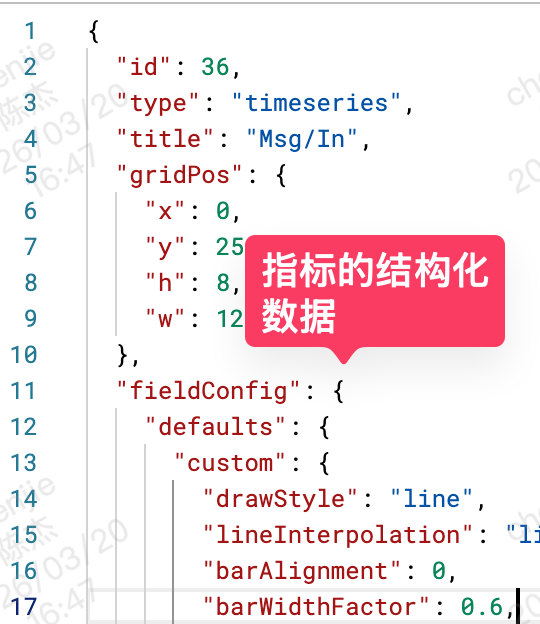
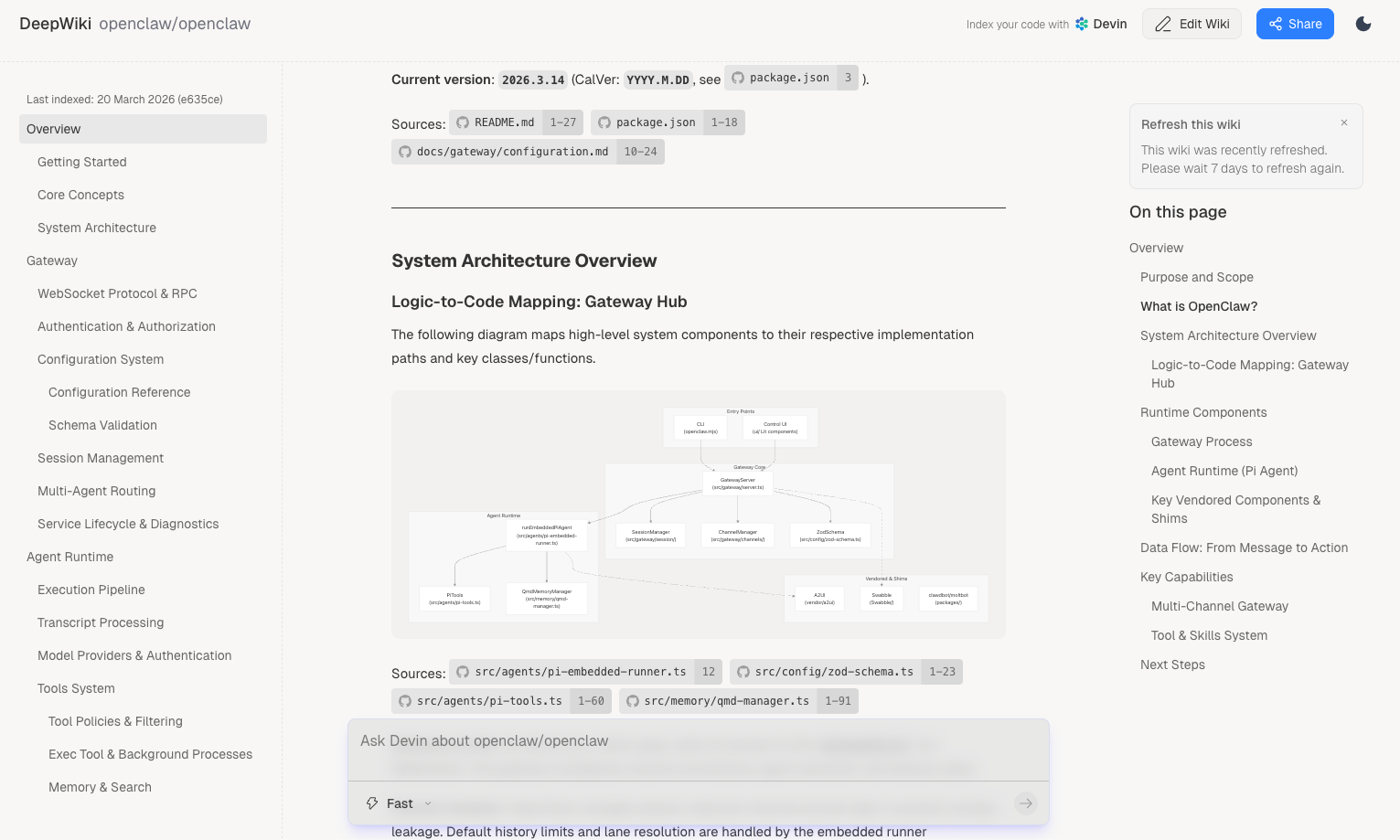
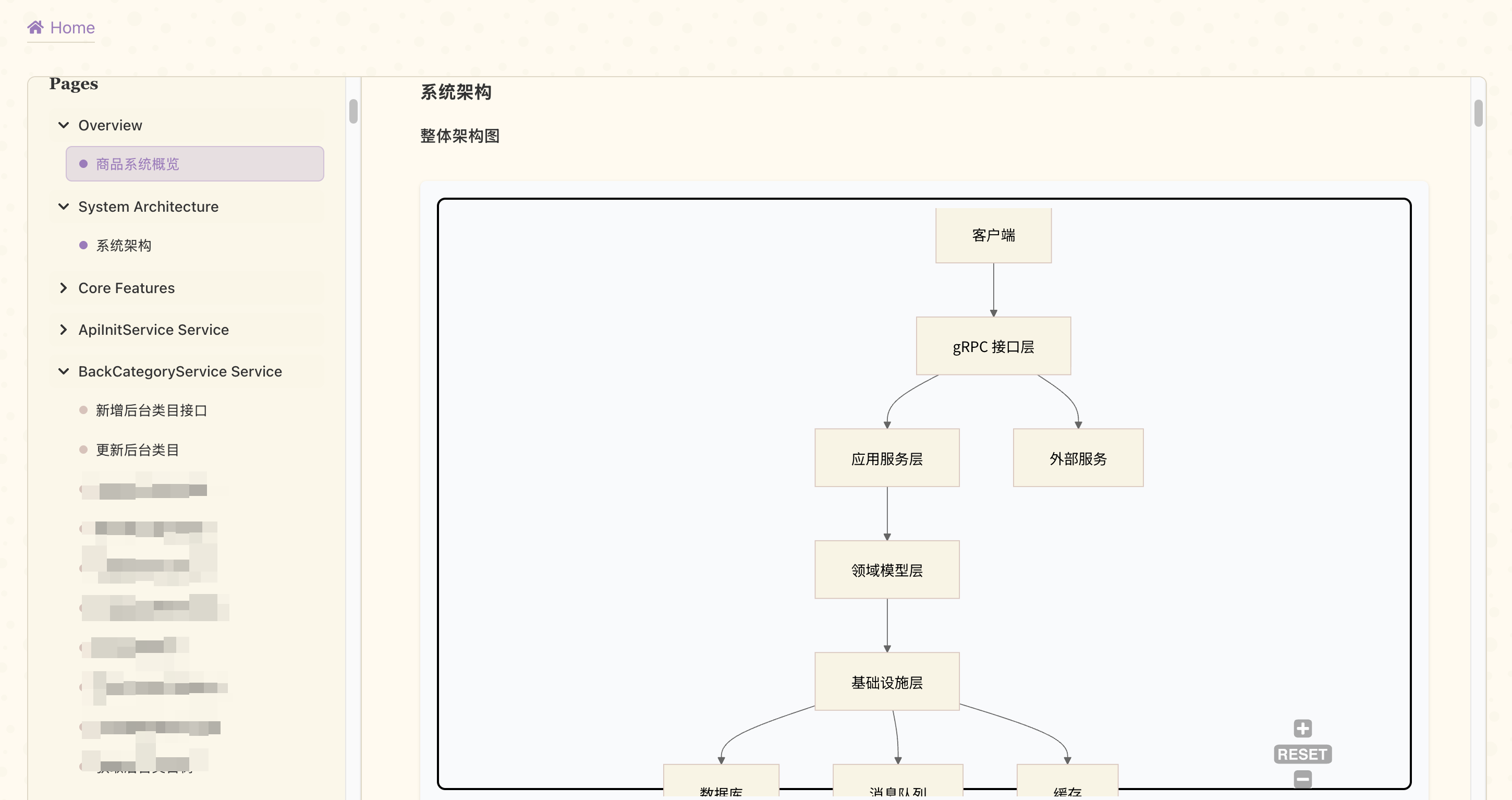

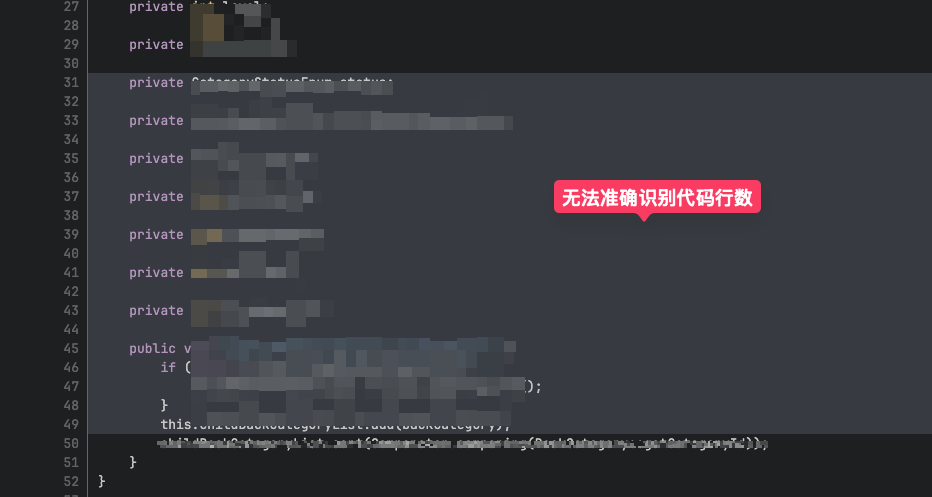
    
    
    <summary type="html">&lt;blockquote&gt;
&lt;p&gt;最近在做持续剖析 Profile 与链路系统打通的工作，就查到了 grafana 在 24 年初写的这篇文章；觉得比较有参考意义，在这里分享给大家。&lt;/p&gt;
&lt;/blockquote&gt;
&lt;p&gt;原文链接：&lt;a href=&quot;https://grafana.com/blog/2024/02/06/combining-tracing-and-profiling-for-enhanced-observability-introducing-span-profiles/&quot;&gt;https://grafana.com/blog/2024/02/06/combining-tracing-and-profiling-for-enhanced-observability-introducing-span-profiles/&lt;/a&gt;&lt;/p&gt;
&lt;p&gt;在当今复杂的数据环境中，连续剖析（continuous profiling）已成为获取应用资源使用情况细粒度洞察的关键。Grafana Labs 现通过在 &lt;a href=&quot;/blog/2024/01/23/grafana-10.3-release-canvas-panel-updates-multi-stack-data-sources-and-more/&quot;&gt;Grafana 10.3&lt;/a&gt; 中引入 Span Profiles 功能，将这工作持续推进。&lt;/p&gt;</summary>


    <category term="OB" scheme="http://crossoverjie.top/categories/OB/"/>
    
    <category term="OpenTelemetry" scheme="http://crossoverjie.top/categories/OB/OpenTelemetry/"/>
    
    
    <category term="OpenTelemetry" scheme="http://crossoverjie.top/tags/OpenTelemetry/"/>
    
  </entry>
  
  <entry>
    <title>StarRocks 如何监控 SQL</title>
    <link href="http://crossoverjie.top/2025/11/12/starrocks/StarRocks-SQL-monitor/"/>
    <id>http://crossoverjie.top/2025/11/12/starrocks/StarRocks-SQL-monitor/</id>
    <published>2025-11-12T17:56:51.000Z</published>
    <updated>2026-03-24T10:51:28.464Z</updated>
    
    <content type="html"><![CDATA[<p>StarRocks 监控中有一个很关键的指标，就是针对慢 SQL 的监控。</p><p>在 StarRocks 中审计日志记录了所有用户的查询和连接信息，理论上我们只需要对这些日志进行分析就可以得到相关的慢 SQL，高 CPU、高内存的 SQL 信息。</p><p>类似于这样的监控界面：<br><img src="https://s2.loli.net/2025/11/12/CJEwAz732myrd9H.png"></p><p><img src="https://s2.loli.net/2025/11/12/5l9ND3Bcve2GWb7.png"></p><p><img src="https://s2.loli.net/2025/11/12/UTyBDHtgX1Ariwm.png"><br><img src="https://s2.loli.net/2025/11/12/SVpLiCIZvf4Bj2u.png"></p><span id="more"></span><p>由于这些数据都是存放在日志文件里的我们想把他拿到 <code>grafna</code> 里展示的话得额外处理下。</p><h1 id="结构化日志"><a href="#结构化日志" class="headerlink" title="结构化日志"></a>结构化日志</h1><p><a href="https://docs.starrocks.io/zh/docs/administration/management/logs/#feauditlog">默认情况</a>下审计日志是以文本格式输出的，当然我们也可以使用一个<a href="https://github.com/StarRocks/fe-plugins-auditloader">审计插件</a>，将审计日志写入到一张单独的表里供后续分析，也可以实现类似的效果。</p><p>具体使用可以参考<a href="!%5B%5D(https://s2.loli.net/2025/11/12/WSwBQc964Jqbt5M.png)">官方文档</a>：<br><img src="https://s2.loli.net/2025/11/12/WSwBQc964Jqbt5M.png"></p><p>这里我们选择一个更简单的方法，我们可以将日志输出为 JSON 格式，然后再将其结构化，为每个字段创建索引，存入到单独的日志服务里。</p><p><img src="https://s2.loli.net/2025/11/12/faJ8VBU5S6Kb2vs.png"></p><p>由于我们使用了云厂商的日志服务能力，只需要为这个日志文件（<strong>fe&#x2F;log&#x2F;fe.audit.log</strong>）配置一个采集服务，然后为其中的字段创建索引即可。</p><p><img src="https://s2.loli.net/2025/11/12/nAfM7zPs3aFVo4L.png"></p><p>这样我们可以就可以通过云厂商提供的 grafna 插件将这里的日志作为一个数据源集成到 grafna 中。</p><p>之后就可以在 <code>grafna</code> 中直接使用云厂商提供的查询语法来查询我们刚才的审计日志了。</p><figure class="highlight sql"><table><tr><td class="gutter"><pre><span class="line">1</span><br></pre></td><td class="code"><pre><code class="hljs sql">IsQuery:&quot;true&quot;<span class="hljs-operator">|</span><span class="hljs-keyword">SELECT</span> QueryId,Stmt,<span class="hljs-type">Time</span>,CpuCostNs,MemCostBytes,ScanBytes,ScanRows,ReturnRows <span class="hljs-keyword">ORDER</span> <span class="hljs-keyword">BY</span> CpuCostNs <span class="hljs-keyword">DESC</span> LIMIT <span class="hljs-number">10</span><br></code></pre></td></tr></table></figure><p>比如这样的查询语句含义是：限制为查询的 SQL（还有其他的 alter delete 等 SQL）、按照 CPU 耗时排序。</p><figure class="highlight sql"><table><tr><td class="gutter"><pre><span class="line">1</span><br><span class="line">2</span><br><span class="line">3</span><br><span class="line">4</span><br><span class="line">5</span><br><span class="line">6</span><br><span class="line">7</span><br><span class="line">8</span><br><span class="line">9</span><br><span class="line">10</span><br><span class="line">11</span><br><span class="line">12</span><br><span class="line">13</span><br><span class="line">14</span><br><span class="line">15</span><br><span class="line">16</span><br><span class="line">17</span><br><span class="line">18</span><br><span class="line">19</span><br><span class="line">20</span><br><span class="line">21</span><br><span class="line">22</span><br><span class="line">23</span><br><span class="line">24</span><br><span class="line">25</span><br><span class="line">26</span><br><span class="line">27</span><br><span class="line">28</span><br><span class="line">29</span><br><span class="line">30</span><br></pre></td><td class="code"><pre><code class="hljs sql"><span class="hljs-keyword">CREATE TABLE</span> starrocks_audit_db__.starrocks_audit_tbl__ (<br>  `queryId` <span class="hljs-type">VARCHAR</span>(<span class="hljs-number">64</span>) COMMENT &quot;查询的唯一ID&quot;,<br>  `<span class="hljs-type">timestamp</span>` DATETIME <span class="hljs-keyword">NOT NULL</span> COMMENT &quot;查询开始时间&quot;,<br>  `queryType` <span class="hljs-type">VARCHAR</span>(<span class="hljs-number">12</span>) COMMENT &quot;查询类型（query, slow_query, connection）&quot;,<br>  `clientIp` <span class="hljs-type">VARCHAR</span>(<span class="hljs-number">32</span>) COMMENT &quot;客户端IP&quot;,<br>  `<span class="hljs-keyword">user</span>` <span class="hljs-type">VARCHAR</span>(<span class="hljs-number">64</span>) COMMENT &quot;查询用户名&quot;,<br>  `authorizedUser` <span class="hljs-type">VARCHAR</span>(<span class="hljs-number">64</span>) COMMENT &quot;用户唯一标识，既user_identity&quot;,<br>  `resourceGroup` <span class="hljs-type">VARCHAR</span>(<span class="hljs-number">64</span>) COMMENT &quot;资源组名&quot;,<br>  `catalog` <span class="hljs-type">VARCHAR</span>(<span class="hljs-number">32</span>) COMMENT &quot;数据目录名&quot;,<br>  `db` <span class="hljs-type">VARCHAR</span>(<span class="hljs-number">96</span>) COMMENT &quot;查询所在数据库&quot;,<br>  `state` <span class="hljs-type">VARCHAR</span>(<span class="hljs-number">8</span>) COMMENT &quot;查询状态（EOF，ERR，OK）&quot;,<br>  `errorCode` <span class="hljs-type">VARCHAR</span>(<span class="hljs-number">512</span>) COMMENT &quot;错误码&quot;,<br>  `queryTime` <span class="hljs-type">BIGINT</span> COMMENT &quot;查询执行时间（毫秒）&quot;,<br>  `scanBytes` <span class="hljs-type">BIGINT</span> COMMENT &quot;查询扫描的字节数&quot;,<br>  `scanRows` <span class="hljs-type">BIGINT</span> COMMENT &quot;查询扫描的记录行数&quot;,<br>  `returnRows` <span class="hljs-type">BIGINT</span> COMMENT &quot;查询返回的结果行数&quot;,<br>  `cpuCostNs` <span class="hljs-type">BIGINT</span> COMMENT &quot;查询CPU耗时（纳秒）&quot;,<br>  `memCostBytes` <span class="hljs-type">BIGINT</span> COMMENT &quot;查询消耗内存（字节）&quot;,<br>  `stmtId` <span class="hljs-type">INT</span> COMMENT &quot;SQL语句增量ID&quot;,<br>  `isQuery` TINYINT COMMENT &quot;SQL是否为查询（1或0）&quot;,<br>  `feIp` <span class="hljs-type">VARCHAR</span>(<span class="hljs-number">128</span>) COMMENT &quot;执行该语句的FE IP&quot;,<br>  `stmt` <span class="hljs-type">VARCHAR</span>(<span class="hljs-number">1048576</span>) COMMENT &quot;SQL原始语句&quot;,<br>  `digest` <span class="hljs-type">VARCHAR</span>(<span class="hljs-number">32</span>) COMMENT &quot;慢SQL指纹&quot;,<br>  `planCpuCosts` <span class="hljs-keyword">DOUBLE</span> COMMENT &quot;查询规划阶段CPU占用（纳秒）&quot;,<br>  `planMemCosts` <span class="hljs-keyword">DOUBLE</span> COMMENT &quot;查询规划阶段内存占用（字节）&quot;,<br>  `pendingTimeMs` <span class="hljs-type">BIGINT</span> COMMENT &quot;查询在队列中等待的时间（毫秒）&quot;,<br>  `candidateMVs` <span class="hljs-type">varchar</span>(<span class="hljs-number">65533</span>) <span class="hljs-keyword">NULL</span> COMMENT &quot;候选MV列表&quot;,<br>  `hitMvs` <span class="hljs-type">varchar</span>(<span class="hljs-number">65533</span>) <span class="hljs-keyword">NULL</span> COMMENT &quot;命中MV列表&quot;,<br>  `warehouse` <span class="hljs-type">VARCHAR</span>(<span class="hljs-number">128</span>) <span class="hljs-keyword">NULL</span> COMMENT &quot;仓库名称&quot; <br>)<br></code></pre></td></tr></table></figure><p>审计数据里的信息非常丰富，可以组合出各种查询条件。</p><p>比如：</p><ul><li>限制查询时间大于多少，可以只查询慢 SQL</li><li>根据内存占用排序</li><li>执行失败的 SQL</li></ul><p>大家可以按需选择。</p><h2 id="开源替换"><a href="#开源替换" class="headerlink" title="开源替换"></a>开源替换</h2><p>如果没有使用云厂商，一些开源组件也能满足以上需求：</p><ul><li>结构化存储日志</li><li>根据字段创建索引</li><li>类 SQL 查询</li><li>支持 grafna 数据源，方便做可视化</li></ul><table><thead><tr><th>服务名称</th><th>索引能力</th><th>查询语言</th><th>Grafana 支持</th><th>优点</th><th>缺点</th><th>适用场景</th></tr></thead><tbody><tr><td><a href="https://www.elastic.co/elasticsearch/"><strong>Elasticsearch</strong></a></td><td>全文索引、倒排索引</td><td>Elasticsearch DSL（类 SQL）</td><td>官方插件，集成完善</td><td>功能强大、生态成熟、搜索能力强</td><td>资源占用大、运维成本高、JVM 调优复杂</td><td>大规模日志搜索、全文检索</td></tr><tr><td><a href="https://grafana.com/oss/loki/"><strong>Loki</strong></a></td><td>仅索引标签（Label）</td><td>LogQL</td><td>原生支持，集成最佳</td><td>轻量级、成本低、与 Grafana 生态完美</td><td>全文搜索能力弱、不适合复杂查询</td><td>中小规模、成本敏感、Grafana 用户</td></tr><tr><td><a href="https://clickhouse.com/"><strong>ClickHouse</strong></a></td><td>主键索引、二级索引、跳数索引</td><td>标准 SQL</td><td>官方插件支持</td><td>查询速度极快、擅长 OLAP、支持复杂聚合</td><td>不适合高频更新、需要结构化设计</td><td>结构化日志分析、大数据量聚合查询</td></tr><tr><td><a href="https://opensearch.org/"><strong>OpenSearch</strong></a></td><td>全文索引、倒排索引</td><td>OpenSearch DSL（兼容 ES）</td><td>兼容 ES 插件</td><td>完全开源、无商业限制、功能与 ES 相近</td><td>社区相对较小、资源占用仍较大</td><td>ES 的开源替代方案</td></tr></tbody></table><h1 id="内部日志支持-JSON"><a href="#内部日志支持-JSON" class="headerlink" title="内部日志支持 JSON"></a>内部日志支持 JSON</h1><p>StarRocks 还有定期执行的内部 SQL，目前这些 SQL 也是会记录日志，但只是记录的纯文本，无法很好的对其进行监控。</p><p>我们就出现过内部 SQL 大量占用了 CN 的 CPU 资源，将它的执行时间控制到 <code>00:00:00~08:00:00</code> 之后就会好很多了，只是不会影响到白天的业务使用。</p><figure class="highlight java"><table><tr><td class="gutter"><pre><span class="line">1</span><br><span class="line">2</span><br><span class="line">3</span><br><span class="line">4</span><br><span class="line">5</span><br><span class="line">6</span><br><span class="line">7</span><br></pre></td><td class="code"><pre><code class="hljs java"><span class="hljs-comment">/**  </span><br><span class="hljs-comment"> * The start time of day when auto-updates are enabled */</span><span class="hljs-meta">@ConfField(mutable = true)</span>  <br><span class="hljs-keyword">public</span> <span class="hljs-keyword">static</span> <span class="hljs-type">String</span> <span class="hljs-variable">statistic_auto_analyze_start_time</span> <span class="hljs-operator">=</span> <span class="hljs-string">&quot;00:00:00&quot;</span>;  <br>  <br><span class="hljs-comment">/**  </span><br><span class="hljs-comment"> * The end time of day when auto-updates are enabled */</span><span class="hljs-meta">@ConfField(mutable = true)</span>  <br><span class="hljs-keyword">public</span> <span class="hljs-keyword">static</span> <span class="hljs-type">String</span> <span class="hljs-variable">statistic_auto_analyze_end_time</span> <span class="hljs-operator">=</span> <span class="hljs-string">&quot;23:59:59&quot;</span>;<br></code></pre></td></tr></table></figure><p>主要是这两个配置控制的时间范围，修改之后 CN CPU 使用有明显的下降：<br><img src="https://s2.loli.net/2025/11/13/U6xir9sYCnVLhjg.png"></p><p>为了方便后续对这部分内部 SQL 进行监控，提交了一个 <a href="https://github.com/StarRocks/starrocks/pull/64660">PR</a> 用于支持内部日志输出 JSON，这样采集日志之后就可以参考上面的审计日志对内部 SQL 进行监控了。</p><p>#Blog </p>]]></content>
    
    
    <summary type="html">&lt;p&gt;StarRocks 监控中有一个很关键的指标，就是针对慢 SQL 的监控。&lt;/p&gt;
&lt;p&gt;在 StarRocks 中审计日志记录了所有用户的查询和连接信息，理论上我们只需要对这些日志进行分析就可以得到相关的慢 SQL，高 CPU、高内存的 SQL 信息。&lt;/p&gt;
&lt;p&gt;类似于这样的监控界面：&lt;br&gt;&lt;img src=&quot;https://s2.loli.net/2025/11/12/CJEwAz732myrd9H.png&quot;&gt;&lt;/p&gt;
&lt;p&gt;&lt;img src=&quot;https://s2.loli.net/2025/11/12/5l9ND3Bcve2GWb7.png&quot;&gt;&lt;/p&gt;
&lt;p&gt;&lt;img src=&quot;https://s2.loli.net/2025/11/12/UTyBDHtgX1Ariwm.png&quot;&gt;&lt;br&gt;&lt;img src=&quot;https://s2.loli.net/2025/11/12/SVpLiCIZvf4Bj2u.png&quot;&gt;&lt;/p&gt;</summary>


    <category term="OB" scheme="http://crossoverjie.top/categories/OB/"/>
    
    <category term="StarRocks" scheme="http://crossoverjie.top/categories/OB/StarRocks/"/>
    
    
    <category term="StarRocks" scheme="http://crossoverjie.top/tags/StarRocks/"/>
    
  </entry>
  
  <entry>
    <title>Git cherry-pick 使用小技巧</title>
    <link href="http://crossoverjie.top/2025/09/18/git/git-tips-cherry-pick/"/>
    <id>http://crossoverjie.top/2025/09/18/git/git-tips-cherry-pick/</id>
    <published>2025-09-18T17:56:51.000Z</published>
    <updated>2026-03-24T10:51:28.449Z</updated>
    
    <content type="html"><![CDATA[<h1 id="背景"><a href="#背景" class="headerlink" title="背景"></a>背景</h1><p>前段时间我在实现 StarRocks 的一个关于<a href="https://github.com/StarRocks/starrocks/pull/62705">资源限制的特性</a>，由于该功能需要基于最新的 3.5 tag 进行开发，所以我需要需要从 3.5 的 tag 里拉出一个分支（3.5-feature）开发完成后再向上游的 main 分支提交 PR。</p><span id="more"></span><h1 id="解决方案"><a href="#解决方案" class="headerlink" title="解决方案"></a>解决方案</h1><p>如果直接使用 3.5-feature 分支向 main 提交 PR 会有很多之前的 commit 导致文件修改很多，所以得换一种方式提交这些变更。</p><h2 id="stash"><a href="#stash" class="headerlink" title="stash"></a>stash</h2><p>解决这个问题的办法也蛮多的，第一种是使用 <code>git stash</code>。</p><p>这个可以先将修改临时保存，然后再需要的时候再将 stash 里的数据应用到当前分支。</p><p>但这样有几个问题：</p><ul><li>开发的过程中没法提交代码了，提交之后就没法保存到 stash 里，没有提交代码总会有丢数据的风险。</li><li>后续需要多次提交时，stash 也不支持，毕竟 stash 之后当前分支的代码就没有了。</li></ul><h2 id="手动复制"><a href="#手动复制" class="headerlink" title="手动复制"></a>手动复制</h2><p>第二种办法那就是先把代码提交到 <code>3.5-feature</code>，然后重新基于 main 分支重新拉取一个分支，再手动对比 <code>3.5-feature</code> 的提交记录进行修改。</p><p>这样的好处是提交记录比较干净，但坏处是改动较多的话容易遗漏代码，并且每次在 <code>3.5-feature</code> 的改动都需要人工同步过来。</p><h2 id="cherry-pick"><a href="#cherry-pick" class="headerlink" title="cherry-pick"></a>cherry-pick</h2><p>我第一次看到 <code>cherry-pick</code> 的用法还是在 <code>Pulsar</code> 社区里，经常看到有 <a href="https://github.com/apache/pulsar/pull/24571">PR</a> 将某个在 main 分支的特性 cherry-pick 到其他分支。</p><p><img src="https://s2.loli.net/2025/09/17/wzxrVbLK8fqQFWa.png"></p><p>或者是一些重要的安全更新也需要在一些维护版本的分支进行修复。<br><img src="https://s2.loli.net/2025/09/17/yjZHLF1AQYOB7MK.png"></p><p><code>cherry-pick</code> 的主要作用是将其他分支的特定提交精确合并到当前分支，以便在不合并整个分支的情况下同步修复、<code>hot-fix</code> 或者是复用代码；</p><p>使用流程如下：</p><figure class="highlight shell"><table><tr><td class="gutter"><pre><span class="line">1</span><br><span class="line">2</span><br><span class="line">3</span><br></pre></td><td class="code"><pre><code class="hljs shell">git checkout main <br>git pull origin main <br>git checkout -b main-feature<br></code></pre></td></tr></table></figure><figure class="highlight shell"><table><tr><td class="gutter"><pre><span class="line">1</span><br><span class="line">2</span><br><span class="line">3</span><br><span class="line">4</span><br><span class="line">5</span><br><span class="line">6</span><br><span class="line">7</span><br></pre></td><td class="code"><pre><code class="hljs shell"><span class="hljs-meta prompt_"># </span><span class="language-bash">只pick你真正需要的功能相关提交</span><br><span class="hljs-meta prompt_"></span><br><span class="hljs-meta prompt_"># </span><span class="language-bash">你的核心功能提交1</span> <br>git cherry-pick abc123 <br><span class="hljs-meta prompt_"></span><br><span class="hljs-meta prompt_"># </span><span class="language-bash">你的核心功能提交2</span><br>git cherry-pick def456 ...<br></code></pre></td></tr></table></figure><p><img src="https://s2.loli.net/2025/09/17/rgcXnMkpdE3v1Z2.png"></p><blockquote><p>这里的 abc123 和 def456 都是提交记录的 hash 值，可以通过 git log 命令获取；也可以在 github 的提交记录页面复制。</p></blockquote><p>如果碰到冲突先解决，然后执行：</p><figure class="highlight shell"><table><tr><td class="gutter"><pre><span class="line">1</span><br><span class="line">2</span><br><span class="line">3</span><br></pre></td><td class="code"><pre><code class="hljs shell">git cherry-pick --continue<br><br>git push origin main-feature<br></code></pre></td></tr></table></figure><p>假设存在两个分支：</p><figure class="highlight shell"><table><tr><td class="gutter"><pre><span class="line">1</span><br><span class="line">2</span><br><span class="line">3</span><br></pre></td><td class="code"><pre><code class="hljs shell">a - b - c - d   main<br>     \<br>       e - f - g main-feature<br></code></pre></td></tr></table></figure><figure class="highlight shell"><table><tr><td class="gutter"><pre><span class="line">1</span><br></pre></td><td class="code"><pre><code class="hljs shell">git cherry-pick f<br></code></pre></td></tr></table></figure><p>现在需要将 <code>main-feature</code> 分支里的 <code>f</code> 提交到 main 分支，cherry-pick 之后会变成这样：</p><figure class="highlight shell"><table><tr><td class="gutter"><pre><span class="line">1</span><br><span class="line">2</span><br><span class="line">3</span><br></pre></td><td class="code"><pre><code class="hljs shell">a - b - c - d - f   main<br>     \<br>       e - f - g main-feature<br></code></pre></td></tr></table></figure><p>f 这个提交就会被追加到头部。</p><h1 id="适用场景"><a href="#适用场景" class="headerlink" title="适用场景"></a>适用场景</h1><p>cherry-pick 主要应用与一些小的修复，安全更新、紧急 bug 的处理，如果一个分支上的大部分 commit 都要被 cherry-pick 到另一个分支，不如考虑直接 使用 merge 或者 rebase。</p><p>就像这个功能的名称一样：摘樱桃。选择合适的果子进行摘取，而不是把所有的提交都合并过去。</p><p>#Blog #Github #Git</p>]]></content>
    
    
    <summary type="html">&lt;h1 id=&quot;背景&quot;&gt;&lt;a href=&quot;#背景&quot; class=&quot;headerlink&quot; title=&quot;背景&quot;&gt;&lt;/a&gt;背景&lt;/h1&gt;&lt;p&gt;前段时间我在实现 StarRocks 的一个关于&lt;a href=&quot;https://github.com/StarRocks/starrocks/pull/62705&quot;&gt;资源限制的特性&lt;/a&gt;，由于该功能需要基于最新的 3.5 tag 进行开发，所以我需要需要从 3.5 的 tag 里拉出一个分支（3.5-feature）开发完成后再向上游的 main 分支提交 PR。&lt;/p&gt;</summary>


    <category term="git" scheme="http://crossoverjie.top/categories/git/"/>
    
    
    <category term="cherry-pick" scheme="http://crossoverjie.top/tags/cherry-pick/"/>
    
  </entry>
  
  <entry>
    <title>在多语言的分布式系统中如何传递 Trace 信息</title>
    <link href="http://crossoverjie.top/2025/08/13/ob/%E5%9C%A8%E5%A4%9A%E8%AF%AD%E8%A8%80%E7%9A%84%E5%88%86%E5%B8%83%E5%BC%8F%E7%B3%BB%E7%BB%9F%E4%B8%AD%E5%A6%82%E4%BD%95%E4%BC%A0%E9%80%92%20Trace%20%E4%BF%A1%E6%81%AF/"/>
    <id>http://crossoverjie.top/2025/08/13/ob/%E5%9C%A8%E5%A4%9A%E8%AF%AD%E8%A8%80%E7%9A%84%E5%88%86%E5%B8%83%E5%BC%8F%E7%B3%BB%E7%BB%9F%E4%B8%AD%E5%A6%82%E4%BD%95%E4%BC%A0%E9%80%92%20Trace%20%E4%BF%A1%E6%81%AF/</id>
    <published>2025-08-13T17:06:46.000Z</published>
    <updated>2026-03-24T10:51:28.461Z</updated>
    
    <content type="html"><![CDATA[<h1 id="背景"><a href="#背景" class="headerlink" title="背景"></a>背景</h1><p><img src="https://s2.loli.net/2025/08/12/Q5fC3TugZ9dRvie.png"><br><img src="https://s2.loli.net/2025/08/12/pczbVE7qHTaOXLk.png"><br><img src="https://s2.loli.net/2025/08/12/XO2tqwaUPTGhvMI.png"></p><p>前段时间有朋友问我关于 <code>spring cloud</code> 的应用在调用到 Go 的 API 之后出现 Trace 没有串联起来的问题。</p><p>完整的调用流程如下：</p><figure class="highlight scss"><table><tr><td class="gutter"><pre><span class="line">1</span><br><span class="line">2</span><br><span class="line">3</span><br><span class="line">4</span><br><span class="line">5</span><br><span class="line">6</span><br><span class="line">7</span><br><span class="line">8</span><br><span class="line">9</span><br><span class="line">10</span><br><span class="line">11</span><br><span class="line">12</span><br><span class="line">13</span><br><span class="line">14</span><br><span class="line">15</span><br></pre></td><td class="code"><pre><code class="hljs scss">┌──────┐             <br>│Client│             <br>└┬─────┘             <br>┌▽──────────────────┐<br>│SpringCloud GateWay│<br>└┬──────────────────┘<br>┌▽──────────────┐    <br>│<span class="hljs-built_in">SpringBoot</span>(app)│    <br>└┬──────────────┘    <br>┌▽──────────┐        <br>│<span class="hljs-built_in">Feign</span>(http)│        <br>└┬──────────┘        <br>┌▽─────┐             <br>│Go Gin│             <br>└──────┘             <br></code></pre></td></tr></table></figure><span id="more"></span><h1 id="根因"><a href="#根因" class="headerlink" title="根因"></a>根因</h1><p>在解决这个问题之前想要搞清楚 Trace 是如何跨语言以及跨应用传递的。</p><p>其实也可以类比为在分布式系统中如何传递上下文；既然要传递数据那就涉及到系统之间的调用，也就是我们常说的 <code>RPC</code>（remote procedure call)。</p><p>提到 PRC 我们常见的一般有两种协议：</p><ul><li>基于 HTTP 协议，简单易读，兼容性好</li><li>基于 TCP 的私有协议，高效性能更佳</li></ul><p>基于 TCP 私有协议的又诞生出许多流行的框架，比如：</p><ul><li>Dubbo</li><li>Thrift</li><li>gRPC(基于 HTTP2,严格来说不算私有协议)</li><li>基于 MQ 实现的 RPC（生产消费者模式，本质上这些 MQ 都是私有协议，比如 RocketMQ、Pulsar 等）</li></ul><p>但我们需要在 RPC 调用的过程中在上下文里包含 Trace 时，通常都是将 TraceId 作为元数据进行传递。</p><p>对于 HTTP 来说就是 header、而其余的私有 TCP 协议通常也会提供一个元数据的结构用于存放一些非业务数据。<br><img src="https://s2.loli.net/2025/08/13/WmCMGO9q4rk3EAR.png"><br><img src="https://s2.loli.net/2025/08/13/VCfuBXTWQ9KSjFq.png"></p><p><img src="https://s2.loli.net/2025/08/13/SsItGoNAjKOdYeX.png"></p><p>比如在 OpenTelemetry-Go 的 sdk 中，会在一次 RPC 中对 Trace 数据进行埋点。</p><p>最终也是使用 <code>metadata metadata.MD</code> 来获取上下文。</p><hr><blockquote><p>在 Pulsar 中是将 TraceId 存放在 properties 中，也相当于是元数据。</p></blockquote><figure class="highlight arduino"><table><tr><td class="gutter"><pre><span class="line">1</span><br><span class="line">2</span><br><span class="line">3</span><br><span class="line">4</span><br><span class="line">5</span><br><span class="line">6</span><br><span class="line">7</span><br><span class="line">8</span><br><span class="line">9</span><br></pre></td><td class="code"><pre><code class="hljs arduino">┌──────┐<br>│<span class="hljs-built_in">Client</span>│<br>└┬─────┘<br>┌▽─────┐<br>│Pulsar│<br>└┬─────┘<br>┌▽───┐  <br>│gRPC│  <br>└────┘  <br></code></pre></td></tr></table></figure><figure class="highlight go"><table><tr><td class="gutter"><pre><span class="line">1</span><br><span class="line">2</span><br><span class="line">3</span><br><span class="line">4</span><br><span class="line">5</span><br><span class="line">6</span><br><span class="line">7</span><br><span class="line">8</span><br><span class="line">9</span><br><span class="line">10</span><br></pre></td><td class="code"><pre><code class="hljs go"><span class="hljs-function"><span class="hljs-keyword">func</span> <span class="hljs-params">(s *server)</span></span> SayHello(ctx context.Context, in *pb.HelloRequest) (*pb.HelloReply, <span class="hljs-type">error</span>) &#123;  <br>    <span class="hljs-keyword">defer</span> apiCounter.Add(ctx, <span class="hljs-number">1</span>)  <br>    md, _ := metadata.FromIncomingContext(ctx)  <br>    log.Printf(<span class="hljs-string">&quot;Received: %v, md: %v&quot;</span>, in.GetName(), md)  <br>    name, _ := os.Hostname()  <br>    span := trace.SpanFromContext(ctx)  <br>    span.SetAttributes(attribute.String(<span class="hljs-string">&quot;request.name&quot;</span>, in.Name))  <br>    s.span(ctx)  <br>    <span class="hljs-keyword">return</span> &amp;pb.HelloReply&#123;Message: fmt.Sprintf(<span class="hljs-string">&quot;hostname:%s, in:%s, md:%v&quot;</span>, name, in.Name, md)&#125;, <span class="hljs-literal">nil</span>  <br>&#125;<br></code></pre></td></tr></table></figure><p><img src="https://s2.loli.net/2025/08/13/3slym1JNSuUIaMv.png"><br><img src="https://s2.loli.net/2025/08/13/Bo9jh4Y2Xk7UiRL.png"></p><p>在这样一次调用中如果我们将 <code>Pulsar</code> 的 <code>properties</code> 和 <code>gRPC</code> meta 打印出来将会看到 <code>TraceID</code> 是如何进行传递的。</p><h1 id="解决"><a href="#解决" class="headerlink" title="解决"></a>解决</h1><p>回到这个问题本身，<code>Trace</code> 在 Gin Server 端没有关联起来，明显就是 Gin 没有接收到上游的 TraceId，导致它认为是新的一次调用，从而会创建一个 Trace。</p><p>解决起来也很容易，只需要在启动 Gin 的时候传入一个 OTEL 提供的拦截器，在这个拦截器中 OTEL 的 sdk 会自动从 HTTP header 里解析出 TraceId 然后塞入到当前的 context 中，这样两个进程的 Trace 就可以关联起来了。</p><p>相关代码如下：</p><figure class="highlight go"><table><tr><td class="gutter"><pre><span class="line">1</span><br><span class="line">2</span><br></pre></td><td class="code"><pre><code class="hljs go">r := gin.New()<br>r.Use(otelgin.Middleware(<span class="hljs-string">&quot;my-server&quot;</span>))<br></code></pre></td></tr></table></figure><blockquote><p>由于 Go 没有提供类似于 Java 的 javaagent 扩展，这类原本可以全自动打桩的代码都需要硬编码实现。</p></blockquote><p>在这个 <code>otelgin</code> 实现的 <code>Middleware</code> 里会使用 HTTP header 来传输 context。</p><p><img src="https://s2.loli.net/2025/08/13/CPjqJMG16kBDovu.png"><br><img src="https://s2.loli.net/2025/08/13/MiLFjUSBcCye7fb.png"><br><img src="https://s2.loli.net/2025/08/13/8OYmXLl2gxqpKHt.png"></p><blockquote><p>本质上是操作 HTTP header 查询和写入 Trace<br><img src="https://s2.loli.net/2025/08/13/FTGKkeifSL3IUys.png"></p></blockquote><p>会首先获取上游的 TraceID，这里的 <code>traceparentHeader</code> 也就是我们刚才看到的 <code>traceparent</code>。</p><p>如果获取到了就会解析里面的 <code>TraceID</code>，并生成当前的 <code>Context</code>，这样这个 context 就会一直往后传递了。</p><blockquote><p>流程与上文提到 gRPC 类似。<br><img src="https://s2.loli.net/2025/08/13/WR1yX75C2Fmuk6r.png" alt="image.png"></p></blockquote><p>这是目前 otel-go-sdk 支持的<a href="https://github.com/open-telemetry/opentelemetry-go-contrib/tree/main/instrumentation">自动打桩框架</a>，目前看来还不太多，但常用的也都支持了。</p><h1 id="总结"><a href="#总结" class="headerlink" title="总结"></a>总结</h1><p>如何跨进程调的 Trace 信息都是通过网络传递的，只是对于不同的协议传输的细节也各不相同，但原理都是类似的。</p><p><img src="https://s2.loli.net/2025/08/13/g1eaAzMXFjDkfU8.png"></p><p>关键就是上面这两张图，进程 1 在调用进程 2 的时候将信息写入进去，进程 2 在收到请求的时候解析出 Trace，这两个步骤缺一不可。<br>#Blog </p>]]></content>
    
    
    <summary type="html">&lt;h1 id=&quot;背景&quot;&gt;&lt;a href=&quot;#背景&quot; class=&quot;headerlink&quot; title=&quot;背景&quot;&gt;&lt;/a&gt;背景&lt;/h1&gt;&lt;p&gt;&lt;img src=&quot;https://s2.loli.net/2025/08/12/Q5fC3TugZ9dRvie.png&quot;&gt;&lt;br&gt;&lt;img src=&quot;https://s2.loli.net/2025/08/12/pczbVE7qHTaOXLk.png&quot;&gt;&lt;br&gt;&lt;img src=&quot;https://s2.loli.net/2025/08/12/XO2tqwaUPTGhvMI.png&quot;&gt;&lt;/p&gt;
&lt;p&gt;前段时间有朋友问我关于 &lt;code&gt;spring cloud&lt;/code&gt; 的应用在调用到 Go 的 API 之后出现 Trace 没有串联起来的问题。&lt;/p&gt;
&lt;p&gt;完整的调用流程如下：&lt;/p&gt;
&lt;figure class=&quot;highlight scss&quot;&gt;&lt;table&gt;&lt;tr&gt;&lt;td class=&quot;gutter&quot;&gt;&lt;pre&gt;&lt;span class=&quot;line&quot;&gt;1&lt;/span&gt;&lt;br&gt;&lt;span class=&quot;line&quot;&gt;2&lt;/span&gt;&lt;br&gt;&lt;span class=&quot;line&quot;&gt;3&lt;/span&gt;&lt;br&gt;&lt;span class=&quot;line&quot;&gt;4&lt;/span&gt;&lt;br&gt;&lt;span class=&quot;line&quot;&gt;5&lt;/span&gt;&lt;br&gt;&lt;span class=&quot;line&quot;&gt;6&lt;/span&gt;&lt;br&gt;&lt;span class=&quot;line&quot;&gt;7&lt;/span&gt;&lt;br&gt;&lt;span class=&quot;line&quot;&gt;8&lt;/span&gt;&lt;br&gt;&lt;span class=&quot;line&quot;&gt;9&lt;/span&gt;&lt;br&gt;&lt;span class=&quot;line&quot;&gt;10&lt;/span&gt;&lt;br&gt;&lt;span class=&quot;line&quot;&gt;11&lt;/span&gt;&lt;br&gt;&lt;span class=&quot;line&quot;&gt;12&lt;/span&gt;&lt;br&gt;&lt;span class=&quot;line&quot;&gt;13&lt;/span&gt;&lt;br&gt;&lt;span class=&quot;line&quot;&gt;14&lt;/span&gt;&lt;br&gt;&lt;span class=&quot;line&quot;&gt;15&lt;/span&gt;&lt;br&gt;&lt;/pre&gt;&lt;/td&gt;&lt;td class=&quot;code&quot;&gt;&lt;pre&gt;&lt;code class=&quot;hljs scss&quot;&gt;┌──────┐             &lt;br&gt;│Client│             &lt;br&gt;└┬─────┘             &lt;br&gt;┌▽──────────────────┐&lt;br&gt;│SpringCloud GateWay│&lt;br&gt;└┬──────────────────┘&lt;br&gt;┌▽──────────────┐    &lt;br&gt;│&lt;span class=&quot;hljs-built_in&quot;&gt;SpringBoot&lt;/span&gt;(app)│    &lt;br&gt;└┬──────────────┘    &lt;br&gt;┌▽──────────┐        &lt;br&gt;│&lt;span class=&quot;hljs-built_in&quot;&gt;Feign&lt;/span&gt;(http)│        &lt;br&gt;└┬──────────┘        &lt;br&gt;┌▽─────┐             &lt;br&gt;│Go Gin│             &lt;br&gt;└──────┘             &lt;br&gt;&lt;/code&gt;&lt;/pre&gt;&lt;/td&gt;&lt;/tr&gt;&lt;/table&gt;&lt;/figure&gt;</summary>


    <category term="OpenSource" scheme="http://crossoverjie.top/categories/OpenSource/"/>
    
    <category term="OpenTelemetry" scheme="http://crossoverjie.top/categories/OpenSource/OpenTelemetry/"/>
    
    
    <category term="OpenSource" scheme="http://crossoverjie.top/tags/OpenSource/"/>
    
  </entry>
  
  <entry>
    <title>StarRocks 如何在本地搭建存算分离集群</title>
    <link href="http://crossoverjie.top/2025/08/01/ob/StarRocks-shard-data-cluster/"/>
    <id>http://crossoverjie.top/2025/08/01/ob/StarRocks-shard-data-cluster/</id>
    <published>2025-08-01T17:56:51.000Z</published>
    <updated>2026-03-24T10:51:28.457Z</updated>
    
    <content type="html"><![CDATA[<p>之前写过一篇 <a href="https://crossoverjie.top/2025/02/26/ob/StarRocks-dev-shard-data-build/">StarRocks 开发环境搭建踩坑指北之存算分离篇</a>讲解如何在本地搭建一个可以 debug 的存算分离版本。</p><p>但最近在本地调试一个场景，需要 CN 节点是以集群的方式启动，我还是按照<a href="https://crossoverjie.top/2025/02/26/ob/StarRocks-dev-shard-data-build/">老方法</a>通过 docker 启动 CN，然后 export 端口的方式让 FE 进行绑定。</p><p>比如用以下两个命令可以启动两个 CN 节点。</p><figure class="highlight shell"><table><tr><td class="gutter"><pre><span class="line">1</span><br></pre></td><td class="code"><pre><code class="hljs shell">docker run -p 9060:9060 -p 8040:8040 -p 9050:9050 -p 8060:8060 -p 9070:9070 -itd --rm --name cn -e &quot;TZ=Asia/Shanghai&quot; starrocks/cn-ubuntu:3.5.2<br></code></pre></td></tr></table></figure><figure class="highlight shell"><table><tr><td class="gutter"><pre><span class="line">1</span><br></pre></td><td class="code"><pre><code class="hljs shell">docker run -p 9061:9060 -p 8041:8040 -p 9051:9050 -p 8061:8060 -p 9071:9070 -itd --rm --name cn2 -e &quot;TZ=Asia/Shanghai&quot; starrocks/cn-ubuntu:3.5.2<br></code></pre></td></tr></table></figure><span id="more"></span><p>然后按照之前的方式在 FE 中手动绑定这两个节点：</p><figure class="highlight sql"><table><tr><td class="gutter"><pre><span class="line">1</span><br><span class="line">2</span><br><span class="line">3</span><br></pre></td><td class="code"><pre><code class="hljs sql"><span class="hljs-keyword">ALTER</span> <span class="hljs-keyword">SYSTEM</span> <span class="hljs-keyword">ADD</span> COMPUTE NODE &quot;127.0.0.1:9050&quot;;  <br><span class="hljs-keyword">ALTER</span> <span class="hljs-keyword">SYSTEM</span> <span class="hljs-keyword">ADD</span> COMPUTE NODE &quot;127.0.0.1:9051&quot;;  <br><span class="hljs-keyword">show</span> compute nodes;<br></code></pre></td></tr></table></figure><p><img src="https://s2.loli.net/2025/08/01/9moNIdYTbqr3Kvu.png"></p><p>此时会出现新增的第二个节点的状态有问题，比如 <code>metrics</code> 取不到，<code>workerId</code> 是-1（-1 代表节点创建失败了，默认值是 -1)</p><p><img src="https://s2.loli.net/2025/08/01/gEvlLsZYOHG53Q4.png"><br><img src="https://s2.loli.net/2025/08/01/c6Cr4PxsR8o7UzH.png"><br>经过 debug 发现是在添加节点的时候，由于生成的 <code>workerIpPort</code> 与上一个节点相同（<code>127.0.0.1:9060)</code> 从而导致这个节点被跳过了。</p><p>也就是说我这两个 CN 节点不能是相同的 IP（用不同的端口来区分）。</p><p>解决这个问题有以下几个办法：</p><ul><li>再找一个台机器来跑 CN2 节点</li><li>启动一个虚拟机来跑 CN2 节点</li><li>使用 docker compose 来启动 CN 集群，会在集群内自动分配不同的 IP</li><li>利用 Docker Bridge 创建一个虚拟网络，由他来分配 IP</li></ul><p>第一种方案直接 Pass 了，我手上没有多余的设备。</p><p>第二种方案倒是可以直接用 <code>OrbStack</code> 启动一个 VM，但是还不如后面的 docker 来的轻量，此外还需要我安装运行环境，也 pass 了。</p><p>第三种方案看似可行，但也比较繁琐，由于 CN 给 docker compose 管理了，FE 要和 CN 网络打通也得在 docker compose 里运行，这样我 Debug 就不方便了，更别提如果需要频繁修改源码的情况。</p><blockquote><p>甚至每次修改代码后都得重新打包上传镜像，以及开启 remote debug，非常麻烦。</p></blockquote><p>这么看来就第四种方案最为合适了。</p><h1 id="使用-Docker-Bridge-网络"><a href="#使用-Docker-Bridge-网络" class="headerlink" title="使用 Docker Bridge 网络"></a>使用 Docker Bridge 网络</h1><p>我们可以使用 Docker Bridge 创建一个虚拟网络，使用这个虚拟网络启动的镜像会自动分配自定义范围的 IP；同时本地启动的 FE 也能直接访问。</p><figure class="highlight shell"><table><tr><td class="gutter"><pre><span class="line">1</span><br></pre></td><td class="code"><pre><code class="hljs shell">docker network create --subnet=172.18.0.0/16 --gateway=172.18.0.1 my_custom_net<br></code></pre></td></tr></table></figure><p>首先用 docker 创建一个 network。</p><ul><li><code>--subnet=172.18.0.0/16</code>: 定义网络的 IP 地址范围。这里我们使用了 <code>172.18.x.x</code> 这个私有网段。</li><li><code>--gateway=172.18.0.1</code>: 指定这个网络的网关地址。</li></ul><p>之后我们就可以使用这个虚拟网络来启动容器了。</p><figure class="highlight shell"><table><tr><td class="gutter"><pre><span class="line">1</span><br><span class="line">2</span><br><span class="line">3</span><br></pre></td><td class="code"><pre><code class="hljs shell">docker run --ip 172.18.0.20 --net my_custom_net -p 9060:9060 -p 8040:8040 -p 9050:9050 -p 8060:8060 -p 9070:9070 -itd --rm --name cn -e &quot;TZ=Asia/Shanghai&quot; starrocks/cn-ubuntu:3.5.2<br><br>docker run --ip 172.18.0.30 --net my_custom_net -p 9061:9060 -p 8041:8040 -p 9051:9050 -p 8061:8060 -p 9071:9070 -itd --rm --name cn2 -e &quot;TZ=Asia/Shanghai&quot; starrocks/cn-ubuntu:3.5.2<br></code></pre></td></tr></table></figure><p>这样这两个容器就会被分配不同的 IP，并且网络和宿主机也是互通的。</p><p>需要注意的是这里的子网尽量选择 <code>172.16.0.0</code> 到 <code>172.31.255.255</code> 这个 IP 段，<code>192.168.0.0</code> 到 <code>192.168.255.255</code> 这个范围段很有可能家里或公司的路由器占用了。</p><p>而这里的网关 <code>--gateway=172.18.0.1</code>地址也需要在我们自定义的 IP 范围里。</p><p>同时我们也不需要在这两个容器内为 CN 指定 <code>priority_networks</code> 参数了。</p><p>同理 <code>minio</code> 也得使用这个虚拟网络启动：</p><figure class="highlight shell"><table><tr><td class="gutter"><pre><span class="line">1</span><br><span class="line">2</span><br><span class="line">3</span><br><span class="line">4</span><br><span class="line">5</span><br><span class="line">6</span><br><span class="line">7</span><br><span class="line">8</span><br><span class="line">9</span><br><span class="line">10</span><br></pre></td><td class="code"><pre><code class="hljs shell">docker run -d --rm --name minio \<br>  --ip 172.18.0.10 \<br>  --net my_custom_net \<br>  -e MINIO_ROOT_USER=miniouser \<br>  -e MINIO_ROOT_PASSWORD=miniopassword \<br>  -p 9001:9001 \<br>  -p 9000:9000 \<br>  --entrypoint sh \<br>  minio/minio:latest \<br>  -c &#x27;mkdir -p /minio_data/starrocks &amp;&amp; minio server /minio_data --console-address &quot;:9001&quot;&#x27;<br></code></pre></td></tr></table></figure><p>设置 <code>token</code> 的时候也要指定对应的 IP:</p><figure class="highlight shell"><table><tr><td class="gutter"><pre><span class="line">1</span><br></pre></td><td class="code"><pre><code class="hljs shell">mc alias set myminio http://172.18.0.10:9000 miniouser miniopassword; mc admin user svcacct add --access-key AAAAAAAAAAAAAAAAAAAA --secret-key BBBBBBBBBBBBBBBBBBBBBBBBBBBBBBBBBBBBBBBB myminio miniouser<br></code></pre></td></tr></table></figure><p>当 CN 和 minio 都启动之后，我们在 FE 里手动绑定这两个 CN 节点:</p><figure class="highlight sql"><table><tr><td class="gutter"><pre><span class="line">1</span><br><span class="line">2</span><br></pre></td><td class="code"><pre><code class="hljs sql"><span class="hljs-keyword">ALTER</span> <span class="hljs-keyword">SYSTEM</span> <span class="hljs-keyword">ADD</span> COMPUTE NODE &quot;172.18.0.20:9050&quot;;<br><span class="hljs-keyword">ALTER</span> <span class="hljs-keyword">SYSTEM</span> <span class="hljs-keyword">ADD</span> COMPUTE NODE &quot;172.18.0.30:9050&quot;<br></code></pre></td></tr></table></figure><p>这样这两个节点就可以绑定成功了。</p><p>#Blog </p>]]></content>
    
    
    <summary type="html">&lt;p&gt;之前写过一篇 &lt;a href=&quot;https://crossoverjie.top/2025/02/26/ob/StarRocks-dev-shard-data-build/&quot;&gt;StarRocks 开发环境搭建踩坑指北之存算分离篇&lt;/a&gt;讲解如何在本地搭建一个可以 debug 的存算分离版本。&lt;/p&gt;
&lt;p&gt;但最近在本地调试一个场景，需要 CN 节点是以集群的方式启动，我还是按照&lt;a href=&quot;https://crossoverjie.top/2025/02/26/ob/StarRocks-dev-shard-data-build/&quot;&gt;老方法&lt;/a&gt;通过 docker 启动 CN，然后 export 端口的方式让 FE 进行绑定。&lt;/p&gt;
&lt;p&gt;比如用以下两个命令可以启动两个 CN 节点。&lt;/p&gt;
&lt;figure class=&quot;highlight shell&quot;&gt;&lt;table&gt;&lt;tr&gt;&lt;td class=&quot;gutter&quot;&gt;&lt;pre&gt;&lt;span class=&quot;line&quot;&gt;1&lt;/span&gt;&lt;br&gt;&lt;/pre&gt;&lt;/td&gt;&lt;td class=&quot;code&quot;&gt;&lt;pre&gt;&lt;code class=&quot;hljs shell&quot;&gt;docker run -p 9060:9060 -p 8040:8040 -p 9050:9050 -p 8060:8060 -p 9070:9070 -itd --rm --name cn -e &amp;quot;TZ=Asia/Shanghai&amp;quot; starrocks/cn-ubuntu:3.5.2&lt;br&gt;&lt;/code&gt;&lt;/pre&gt;&lt;/td&gt;&lt;/tr&gt;&lt;/table&gt;&lt;/figure&gt;

&lt;figure class=&quot;highlight shell&quot;&gt;&lt;table&gt;&lt;tr&gt;&lt;td class=&quot;gutter&quot;&gt;&lt;pre&gt;&lt;span class=&quot;line&quot;&gt;1&lt;/span&gt;&lt;br&gt;&lt;/pre&gt;&lt;/td&gt;&lt;td class=&quot;code&quot;&gt;&lt;pre&gt;&lt;code class=&quot;hljs shell&quot;&gt;docker run -p 9061:9060 -p 8041:8040 -p 9051:9050 -p 8061:8060 -p 9071:9070 -itd --rm --name cn2 -e &amp;quot;TZ=Asia/Shanghai&amp;quot; starrocks/cn-ubuntu:3.5.2&lt;br&gt;&lt;/code&gt;&lt;/pre&gt;&lt;/td&gt;&lt;/tr&gt;&lt;/table&gt;&lt;/figure&gt;</summary>


    <category term="OB" scheme="http://crossoverjie.top/categories/OB/"/>
    
    <category term="StarRocks" scheme="http://crossoverjie.top/categories/OB/StarRocks/"/>
    
    
    <category term="StarRocks" scheme="http://crossoverjie.top/tags/StarRocks/"/>
    
  </entry>
  
  <entry>
    <title>StarRocks 物化视图创建与刷新全流程解析</title>
    <link href="http://crossoverjie.top/2025/06/27/ob/StarRocks-create-sync/"/>
    <id>http://crossoverjie.top/2025/06/27/ob/StarRocks-create-sync/</id>
    <published>2025-06-27T17:34:15.000Z</published>
    <updated>2026-03-24T10:51:28.457Z</updated>
    
    <content type="html"><![CDATA[<p>最近在为 StarRocks 的物化视图增加<a href="https://github.com/StarRocks/starrocks/pull/60035">多表达式支持</a>的能力，于是便把物化视图（MV）的创建刷新流程完成的捋了一遍。</p><p>之前也写过一篇：<a href="https://crossoverjie.top/2024/11/18/ob/StarRocks-MV-refresh-Principle/">StarRocks 物化视图刷新流程和原理</a>，主要分析了刷新的流程，以及刷新的条件。</p><p>这次从头开始，从 MV 的创建开始来看看 StarRocks 是如何管理物化视图的。</p><h1 id="创建物化视图"><a href="#创建物化视图" class="headerlink" title="创建物化视图"></a>创建物化视图</h1><figure class="highlight sql"><table><tr><td class="gutter"><pre><span class="line">1</span><br><span class="line">2</span><br><span class="line">3</span><br><span class="line">4</span><br><span class="line">5</span><br><span class="line">6</span><br><span class="line">7</span><br><span class="line">8</span><br><span class="line">9</span><br><span class="line">10</span><br><span class="line">11</span><br></pre></td><td class="code"><pre><code class="hljs sql"><span class="hljs-keyword">CREATE</span><br>MATERIALIZED <span class="hljs-keyword">VIEW</span> mv_test99<br>REFRESH ASYNC <span class="hljs-keyword">EVERY</span>(<span class="hljs-type">INTERVAL</span> <span class="hljs-number">60</span> <span class="hljs-keyword">MINUTE</span>)<br><span class="hljs-keyword">PARTITION</span> <span class="hljs-keyword">BY</span> p_time<br>PROPERTIES (<br>&quot;partition_refresh_number&quot; <span class="hljs-operator">=</span> &quot;1&quot;<br>)<br><span class="hljs-keyword">AS</span><br><span class="hljs-keyword">select</span> date_trunc(&quot;day&quot;, a.datekey) <span class="hljs-keyword">as</span> p_time, <span class="hljs-built_in">sum</span>(a.v1) <span class="hljs-keyword">as</span> <span class="hljs-keyword">value</span><br><span class="hljs-keyword">from</span> par_tbl1 a<br><span class="hljs-keyword">group</span> <span class="hljs-keyword">by</span> p_time, a.item_id<br></code></pre></td></tr></table></figure><span id="more"></span><p>创建物化视图的时候首先会进入这个函数：<code>com.starrocks.sql.analyzer.MaterializedViewAnalyzer.MaterializedViewAnalyzerVisitor#visitCreateMaterializedViewStatement</code></p><p><img src="https://s2.loli.net/2025/07/01/UNapLOkBosmY95F.png"></p><blockquote><p>其实就是将我们的创建语句结构化为一个 <code>CreateMaterializedViewStatement</code> 对象，这个过程是使用 ANTLR 实现的。</p></blockquote><p>这个函数负责对创建物化视图的 SQL 语句进行语义分析、和基本的校验。</p><p>比如：</p><ul><li>分区表达式是否正确</li><li>基表、数据库这些的格是否正确</li></ul><p><img src="https://s2.loli.net/2025/07/01/9hXceIt5E6LauAK.png"></p><blockquote><p>校验分区分区表达式的各种信息。</p></blockquote><p>然后会进入函数：<code>com.starrocks.server.LocalMetastore#createMaterializedView()</code></p><p>这个函数的主要作用如下：</p><ol><li><p><strong>检查数据库和物化视图是否存在</strong>。</p></li><li><p><strong>初始化物化视图的基本信息</strong>：</p><ul><li>获取物化视图的列定义（schema）</li><li>验证列定义的合法性</li><li>初始化物化视图的属性（如分区信息）。</li></ul></li><li><p><strong>处理刷新策略</strong>：</p><ul><li>根据刷新类型（如 <code>ASYNC</code>、<code>SYNC</code>、<code>MANUAL</code> 或 <code>INCREMENTAL</code>）设置刷新方案。</li><li>对于异步刷新，设置刷新间隔、开始时间等，并进行参数校验。</li></ul></li><li><p><strong>创建物化视图对象</strong>：</p><ul><li>根据运行模式（存算分离和存算一体）创建不同类型的物化视图对象</li><li>设置物化视图的索引、排序键、注释、基础表信息等。</li></ul></li><li><p><strong>处理分区逻辑</strong>：</p><ul><li>如果物化视图是非分区的，创建单一分区并设置相关属性。</li><li>如果是分区的，解析分区表达式并生成分区映射关系</li></ul></li><li><p><strong>绑定存储卷</strong>：</p><ul><li>如果物化视图是云原生类型，绑定存储卷。<br><img src="https://s2.loli.net/2025/07/01/8B45JZMejnPmLNG.png"></li></ul></li></ol><h2 id="序列化关键数据"><a href="#序列化关键数据" class="headerlink" title="序列化关键数据"></a>序列化关键数据</h2><p>对于一些核心数据，比如分区表达式、原始的创建 SQL 等，需要再重启的时候可以再次加载到内存里供后续使用时；</p><p>就需要将这些数据序列化到元数据里。</p><p>这些数据定期保存在 <code>fe/meta</code> 目录中。<br><img src="https://s2.loli.net/2024/09/27/3C4GaXM5BlWmNIw.png"></p><p>我们需要序列化的字段需要使用 <code>@SerializedName</code>注解。</p><figure class="highlight java"><table><tr><td class="gutter"><pre><span class="line">1</span><br><span class="line">2</span><br></pre></td><td class="code"><pre><code class="hljs java"><span class="hljs-meta">@SerializedName(value = &quot;partitionExprMaps&quot;)</span>  <br><span class="hljs-keyword">private</span> Map&lt;ExpressionSerializedObject, ExpressionSerializedObject&gt; serializedPartitionExprMaps;<br></code></pre></td></tr></table></figure><p>同时在 <code>com.starrocks.catalog.MaterializedView#gsonPreProcess/gsonPostProcess</code> 这两个函数中将数据序列化和反序列化。</p><h3 id="元数据的同步与加载"><a href="#元数据的同步与加载" class="headerlink" title="元数据的同步与加载"></a>元数据的同步与加载</h3><p>当 StarRocks 的 FE 集群部署时，会由 leader 的 FE 启动一个 checkpoint 线程，定时扫描当前的元数据是否需要生成一个 <code>image.$&#123;JournalId&#125;</code> 的文件。</p><p><img src="https://s2.loli.net/2024/09/20/lQCkBnNWIZ4GwuV.png"></p><blockquote><p>其实就是判断当前日志数量是否达到上限（默认是 5w）生成一次。</p></blockquote><p>具体的流程如下：<br><img src="https://s2.loli.net/2024/09/27/zgy6ZaQ7b1ceWkm.png"><br><img src="https://s2.loli.net/2024/09/27/QiTHLpOfJ19oAam.png"></p><p><img src="https://i.imgur.com/txqTt0U.png"></p><p>更多元数据同步和加载流程可以查看我之前的文章：<a href="https://crossoverjie.top/2024/11/11/ob/StarRocks-meta/">深入理解 StarRocks 的元数据管理</a></p><h1 id="刷新物化视图"><a href="#刷新物化视图" class="headerlink" title="刷新物化视图"></a>刷新物化视图</h1><p>创建完成后会立即触发一次 MV 的刷新逻辑。</p><h2 id="同步分区"><a href="#同步分区" class="headerlink" title="同步分区"></a>同步分区</h2><p><img src="https://s2.loli.net/2025/07/01/RiFufPw3bOa8H9T.png"><br>刷新 MV 的时候有一个很重要的步骤：<strong>同步 MV 和基表的分区</strong>。</p><blockquote><p>这个步骤在每次刷新的时候都会做，只是如果基表分区和 MV 相比没有变化的话就会跳过。</p></blockquote><p>这里我们以常用的 <code>Range</code> 分区为例，核心的函数为：<code>com.starrocks.scheduler.mv.MVPCTRefreshRangePartitioner#syncAddOrDropPartitions</code></p><p>它的主要作用是同步物化视图的分区，添加、删除分区来保持 MV 的分区与基础表的分区一致；核心流程：</p><ol><li><strong>计算分区差异</strong>：根据指定的分区范围，计算物化视图与基础表之间的分区差异。</li><li>同步分区：<ol><li><strong>删除旧分区</strong>：删除物化视图中与基础表不再匹配的分区。</li><li><strong>添加新分区</strong>：根据计算出的差异，添加新的分区到物化视图。</li></ol></li></ol><p><img src="https://s2.loli.net/2025/07/01/oi8tkKVCebH4Q5E.png"></p><p>分区同步完成之后就可以计算需要刷新的分区了：<br><img src="https://s2.loli.net/2024/11/14/QljDLmRrx97EIK6.png" alt="image.png"></p><p>以上内容再结合之前的两篇文章：</p><ul><li><a href="https://crossoverjie.top/2024/11/18/ob/StarRocks-MV-refresh-Principle/">StarRocks 物化视图刷新流程和原理</a></li><li><a href="https://crossoverjie.top/2024/11/11/ob/StarRocks-meta/">深入理解 StarRocks 的元数据管理</a></li></ul><p>就可以将整个物化视图的创建与刷新的核心流程掌握了。</p><p>#StarRocks #Blog </p>]]></content>
    
    
    <summary type="html">&lt;p&gt;最近在为 StarRocks 的物化视图增加&lt;a href=&quot;https://github.com/StarRocks/starrocks/pull/60035&quot;&gt;多表达式支持&lt;/a&gt;的能力，于是便把物化视图（MV）的创建刷新流程完成的捋了一遍。&lt;/p&gt;
&lt;p&gt;之前也写过一篇：&lt;a href=&quot;https://crossoverjie.top/2024/11/18/ob/StarRocks-MV-refresh-Principle/&quot;&gt;StarRocks 物化视图刷新流程和原理&lt;/a&gt;，主要分析了刷新的流程，以及刷新的条件。&lt;/p&gt;
&lt;p&gt;这次从头开始，从 MV 的创建开始来看看 StarRocks 是如何管理物化视图的。&lt;/p&gt;
&lt;h1 id=&quot;创建物化视图&quot;&gt;&lt;a href=&quot;#创建物化视图&quot; class=&quot;headerlink&quot; title=&quot;创建物化视图&quot;&gt;&lt;/a&gt;创建物化视图&lt;/h1&gt;&lt;figure class=&quot;highlight sql&quot;&gt;&lt;table&gt;&lt;tr&gt;&lt;td class=&quot;gutter&quot;&gt;&lt;pre&gt;&lt;span class=&quot;line&quot;&gt;1&lt;/span&gt;&lt;br&gt;&lt;span class=&quot;line&quot;&gt;2&lt;/span&gt;&lt;br&gt;&lt;span class=&quot;line&quot;&gt;3&lt;/span&gt;&lt;br&gt;&lt;span class=&quot;line&quot;&gt;4&lt;/span&gt;&lt;br&gt;&lt;span class=&quot;line&quot;&gt;5&lt;/span&gt;&lt;br&gt;&lt;span class=&quot;line&quot;&gt;6&lt;/span&gt;&lt;br&gt;&lt;span class=&quot;line&quot;&gt;7&lt;/span&gt;&lt;br&gt;&lt;span class=&quot;line&quot;&gt;8&lt;/span&gt;&lt;br&gt;&lt;span class=&quot;line&quot;&gt;9&lt;/span&gt;&lt;br&gt;&lt;span class=&quot;line&quot;&gt;10&lt;/span&gt;&lt;br&gt;&lt;span class=&quot;line&quot;&gt;11&lt;/span&gt;&lt;br&gt;&lt;/pre&gt;&lt;/td&gt;&lt;td class=&quot;code&quot;&gt;&lt;pre&gt;&lt;code class=&quot;hljs sql&quot;&gt;&lt;span class=&quot;hljs-keyword&quot;&gt;CREATE&lt;/span&gt;&lt;br&gt;MATERIALIZED &lt;span class=&quot;hljs-keyword&quot;&gt;VIEW&lt;/span&gt; mv_test99&lt;br&gt;REFRESH ASYNC &lt;span class=&quot;hljs-keyword&quot;&gt;EVERY&lt;/span&gt;(&lt;span class=&quot;hljs-type&quot;&gt;INTERVAL&lt;/span&gt; &lt;span class=&quot;hljs-number&quot;&gt;60&lt;/span&gt; &lt;span class=&quot;hljs-keyword&quot;&gt;MINUTE&lt;/span&gt;)&lt;br&gt;&lt;span class=&quot;hljs-keyword&quot;&gt;PARTITION&lt;/span&gt; &lt;span class=&quot;hljs-keyword&quot;&gt;BY&lt;/span&gt; p_time&lt;br&gt;PROPERTIES (&lt;br&gt;&amp;quot;partition_refresh_number&amp;quot; &lt;span class=&quot;hljs-operator&quot;&gt;=&lt;/span&gt; &amp;quot;1&amp;quot;&lt;br&gt;)&lt;br&gt;&lt;span class=&quot;hljs-keyword&quot;&gt;AS&lt;/span&gt;&lt;br&gt;&lt;span class=&quot;hljs-keyword&quot;&gt;select&lt;/span&gt; date_trunc(&amp;quot;day&amp;quot;, a.datekey) &lt;span class=&quot;hljs-keyword&quot;&gt;as&lt;/span&gt; p_time, &lt;span class=&quot;hljs-built_in&quot;&gt;sum&lt;/span&gt;(a.v1) &lt;span class=&quot;hljs-keyword&quot;&gt;as&lt;/span&gt; &lt;span class=&quot;hljs-keyword&quot;&gt;value&lt;/span&gt;&lt;br&gt;&lt;span class=&quot;hljs-keyword&quot;&gt;from&lt;/span&gt; par_tbl1 a&lt;br&gt;&lt;span class=&quot;hljs-keyword&quot;&gt;group&lt;/span&gt; &lt;span class=&quot;hljs-keyword&quot;&gt;by&lt;/span&gt; p_time, a.item_id&lt;br&gt;&lt;/code&gt;&lt;/pre&gt;&lt;/td&gt;&lt;/tr&gt;&lt;/table&gt;&lt;/figure&gt;</summary>


    <category term="OB" scheme="http://crossoverjie.top/categories/OB/"/>
    
    
    <category term="StarRocks" scheme="http://crossoverjie.top/tags/StarRocks/"/>
    
  </entry>
  
  <entry>
    <title>关于 Golang 的错误处理的讨论可以大结局了</title>
    <link href="http://crossoverjie.top/2025/06/05/ob/go-error-future/"/>
    <id>http://crossoverjie.top/2025/06/05/ob/go-error-future/</id>
    <published>2025-06-05T17:08:57.000Z</published>
    <updated>2026-03-24T10:51:28.458Z</updated>
    
    <content type="html"><![CDATA[<p>  原文链接：<a href="https://go.dev/blog/error-syntax">[ On | No ] syntactic support for error handling</a></p><hr><p>关于 Go 语言最有争论的就是错误处理：</p><figure class="highlight go"><table><tr><td class="gutter"><pre><span class="line">1</span><br><span class="line">2</span><br><span class="line">3</span><br><span class="line">4</span><br></pre></td><td class="code"><pre><code class="hljs Go">x, err := call()<br><span class="hljs-keyword">if</span> err != <span class="hljs-literal">nil</span> &#123;<br>        <span class="hljs-comment">// handle err</span><br>&#125;<br></code></pre></td></tr></table></figure><p><code>if err != nil</code> 类似于这样的代码非常多，淹没了其余真正有用的代码。这通常发生在进行大量API调用的代码中，其中错误处理很普遍，只是简单地返回错误，有些最终的代码看起来像这样：</p><figure class="highlight go"><table><tr><td class="gutter"><pre><span class="line">1</span><br><span class="line">2</span><br><span class="line">3</span><br><span class="line">4</span><br><span class="line">5</span><br><span class="line">6</span><br><span class="line">7</span><br><span class="line">8</span><br><span class="line">9</span><br><span class="line">10</span><br><span class="line">11</span><br><span class="line">12</span><br></pre></td><td class="code"><pre><code class="hljs Go"><span class="hljs-function"><span class="hljs-keyword">func</span> <span class="hljs-title">printSum</span><span class="hljs-params">(a, b <span class="hljs-type">string</span>)</span></span> <span class="hljs-type">error</span> &#123;<br>    x, err := strconv.Atoi(a)<br>    <span class="hljs-keyword">if</span> err != <span class="hljs-literal">nil</span> &#123;<br>        <span class="hljs-keyword">return</span> err<br>    &#125;<br>    y, err := strconv.Atoi(b)<br>    <span class="hljs-keyword">if</span> err != <span class="hljs-literal">nil</span> &#123;<br>        <span class="hljs-keyword">return</span> err<br>    &#125;<br>    fmt.Println(<span class="hljs-string">&quot;result:&quot;</span>, x + y)<br>    <span class="hljs-keyword">return</span> <span class="hljs-literal">nil</span><br>&#125;<br></code></pre></td></tr></table></figure><span id="more"></span><p>在这个函数的十行代码中，只有四行看起来是有实际的作用。其余六行看起来甚至会影响主要的逻辑。所以关于错误处理的抱怨多年来一直位居我们年度用户调查的榜首也就不足为奇了。（有一段时间，缺乏泛型支持超过了对错误处理的抱怨，但现在 Go 已经支持泛型了，错误处理又回到了榜首。）</p><p>Go团队认真对待社区反馈，因此多年来我们一直在尝试为这个问题找到解决方案，并听取 Go 社区的意见。</p><p>Go 团队的第一次明确尝试可以追溯到 2018 年，当时Russ Cox<a href="https://go.googlesource.com/proposal/+/master/design/go2draft-error-handling-overview.md">正式提到了这个问题</a>，作为我们当时称为 Go2 努力的一部分。他基于 Marcel van Lohuizen 的<a href="https://go.googlesource.com/proposal/+/master/design/go2draft-error-handling.md">草案设计</a>概述了一个可能的解决方案。该设计基于<code>check</code>和<code>handle</code>机制，相当全面。草案包括对替代解决方案的详细分析，包括与其他语言采用的方法的比较。如果您想知道您的特定错误处理想法之前是否被考虑过，请阅读这份文档！</p><figure class="highlight go"><table><tr><td class="gutter"><pre><span class="line">1</span><br><span class="line">2</span><br><span class="line">3</span><br><span class="line">4</span><br><span class="line">5</span><br><span class="line">6</span><br><span class="line">7</span><br><span class="line">8</span><br></pre></td><td class="code"><pre><code class="hljs Go"><span class="hljs-comment">// printSum implementation using the proposed check/handle mechanism.</span><br><span class="hljs-function"><span class="hljs-keyword">func</span> <span class="hljs-title">printSum</span><span class="hljs-params">(a, b <span class="hljs-type">string</span>)</span></span> <span class="hljs-type">error</span> &#123;<br>    handle err &#123; <span class="hljs-keyword">return</span> err &#125;<br>    x := check strconv.Atoi(a)<br>    y := check strconv.Atoi(b)<br>    fmt.Println(<span class="hljs-string">&quot;result:&quot;</span>, x + y)<br>    <span class="hljs-keyword">return</span> <span class="hljs-literal">nil</span><br>&#125;<br></code></pre></td></tr></table></figure><p><code>check</code>和<code>handle</code>方法被认为过于复杂，大约一年后，在2019年，我们推出了更加简化的、现在<a href="https://go.dev/issue/32437#issuecomment-2278932700">臭名昭著</a>的<a href="https://go.googlesource.com/proposal/+/master/design/32437-try-builtin.md"><code>try</code>提案</a>。它基于 <code>check</code> 和 <code>handle</code> 的思想，但 <code>check</code> 伪关键字变成了<code>try</code>内置函数，<code>handle</code>部分被省略了。为了探索<code>try</code>内置函数的影响，我们编写了一个简单的工具（<a href="https://github.com/griesemer/tryhard">tryhard</a>），使用<code>try</code>重写现有的错误处理代码。这个提案被激烈争论，在<a href="https://go.dev/issue/32437">GitHub问题</a>上接近900条评论。</p><figure class="highlight go"><table><tr><td class="gutter"><pre><span class="line">1</span><br><span class="line">2</span><br><span class="line">3</span><br><span class="line">4</span><br><span class="line">5</span><br><span class="line">6</span><br><span class="line">7</span><br><span class="line">8</span><br></pre></td><td class="code"><pre><code class="hljs Go"><span class="hljs-comment">// printSum implementation using the proposed try mechanism.</span><br><span class="hljs-function"><span class="hljs-keyword">func</span> <span class="hljs-title">printSum</span><span class="hljs-params">(a, b <span class="hljs-type">string</span>)</span></span> <span class="hljs-type">error</span> &#123;<br>    <span class="hljs-comment">// use a defer statement to augment errors before returning</span><br>    x := try(strconv.Atoi(a))<br>    y := try(strconv.Atoi(b))<br>    fmt.Println(<span class="hljs-string">&quot;result:&quot;</span>, x + y)<br>    <span class="hljs-keyword">return</span> <span class="hljs-literal">nil</span><br>&#125;<br></code></pre></td></tr></table></figure><p>然而，<code>try</code>通过在出错时从封闭函数返回来影响控制流，并且可能从深度嵌套的表达式中这样做，从而隐藏了这种控制流。这使得该提案对许多人来说难以接受，尽管在这个提案上投入了大量精力，我们还是决定放弃这项工作。回顾起来，引入一个新关键字可能会更好，这是我们现在可以做的事情，因为我们通过<code>go.mod</code>文件和特定文件的指令对语言版本有细粒度的控制。将<code>try</code>的使用限制在赋值和语句中可能会缓解一些其他的担忧。Jimmy Frasche的<a href="https://go.dev/issue/73376">最近提案</a>基本上回到了原始的<code>check</code>和<code>handle</code>设计，并解决了该设计的一些缺点，正朝着这个方向发展。</p><p><code>try</code>提案的反响导致了大量的反思，包括Russ Cox的一系列博客文章：<a href="https://research.swtch.com/proposals-intro">“关于Go提案流程的思考”</a>。其中一个结论是，我们可能通过提出一个几乎完全成熟的提案，给社区反馈留下很少的空间，以及一个”具有威胁性”的实现时间表，从而降低了获得更好结果的机会。根据<a href="https://research.swtch.com/proposals-large">“Go提案流程：大型变更”</a>：”回顾起来，<code>try</code>是一个足够大的变更，我们发布的新设计应该是第二版草案设计，而不是带有实现时间表的提案”。但不管在这种情况下可能存在的流程和沟通失败，用户对该提案有着非常强烈地抵触情绪。</p><p>当时我们没有更好的解决方案，几年来都没有为错误处理追求语法变更。不过，社区中的许多人受到了启发，我们收到了源源不断的错误处理提案，其中许多非常相似，有些有趣，有些难以理解，有些不可行。为了跟踪不断扩大的提案，一年后，Ian Lance Taylor 创建了一个<a href="https://go.dev/issue/40432">总体问题</a>，总结了改进错误处理的提议变更的当前状态。创建了一个<a href="https://go.dev/wiki/Go2ErrorHandlingFeedback">Go Wiki</a>来收集相关的反馈、讨论和文章。</p><p>关于错误处理冗长性的抱怨持续存在（参见<a href="https://go.dev/blog/survey2024-h1-results">2024年上半年Go开发者调查结果</a>），因此，在Go团队内部提案经过一系列日益完善之后，Ian Lance Taylor 在2024年发布了<a href="https://go.dev/issue/71203">“使用<code>?</code>减少错误处理样板代码”</a>。这次的想法是借鉴<a href="https://www.rust-lang.org/">Rust</a>中实现的构造，特别是<a href="https://doc.rust-lang.org/std/result/index.html#the-question-mark-operator-"><code>?</code>操作符</a>。希望通过依靠使用既定符号的现有机制，并考虑我们多年来学到的东西，我们应该能够最终取得一些进展。在一小批用户调研中，向开发者展示使用 <code>?</code> 的 Go 代码时，绝大多数参与者正确猜出了代码的含义，这进一步说服我们再试一次。为了能够看到变化的影响，Ian 编写了一个工具，将普通 Go 代码转换为使用提议的新语法的代码，我们还在编译器中对该功能进行了原型设计。</p><figure class="highlight go"><table><tr><td class="gutter"><pre><span class="line">1</span><br><span class="line">2</span><br><span class="line">3</span><br><span class="line">4</span><br><span class="line">5</span><br><span class="line">6</span><br><span class="line">7</span><br></pre></td><td class="code"><pre><code class="hljs Go"><span class="hljs-comment">// printSum implementation using the proposed &quot;?&quot; statements.</span><br><span class="hljs-function"><span class="hljs-keyword">func</span> <span class="hljs-title">printSum</span><span class="hljs-params">(a, b <span class="hljs-type">string</span>)</span></span> <span class="hljs-type">error</span> &#123;<br>    x := strconv.Atoi(a) ?<br>    y := strconv.Atoi(b) ?<br>    fmt.Println(<span class="hljs-string">&quot;result:&quot;</span>, x + y)<br>    <span class="hljs-keyword">return</span> <span class="hljs-literal">nil</span><br>&#125;<br></code></pre></td></tr></table></figure><p>不幸的是，与其他错误处理想法一样，这个新提案也很快被评论淹没，许多人建议进行微调，通常基于个人偏好。Ian关闭了提案，并将内容移到了<a href="https://go.dev/issue/71460">讨论区</a>，以促进对话并收集进一步的反馈。一个稍作修改的版本得到了<a href="https://github.com/golang/go/discussions/71460#discussioncomment-12060294">稍微积极一些</a>的接受，但广泛的支持仍然难以达成一致。</p><p>经过这么多年的尝试，Go团队提出了三个完整的提案，社区提出了数百个提案，其中大多数是各类提案的变体，所有这些都未能获得足够（更不用说压倒性）的支持，我们现在面临的问题是：如何继续？我们是否应该继续？</p><p><em>我们认为不应该。</em></p><p>更准确地说，我们应该停止尝试解决_语法问题_，至少在可预见的未来是这样。<a href="https://github.com/golang/proposal?tab=readme-ov-file#consensus-and-disagreement">提案流程</a>为这个决定提供了理由：</p><blockquote><p>提案流程的目标是及时就结果达成普遍共识。如果提案审查无法在问题跟踪器上的问题讨论中确定普遍共识，通常的结果是提案被拒绝。</p></blockquote><p>没有一个错误处理提案达到任何接近共识的程度，所以它们都被拒绝了。即使是 Google 的 Go 团队最资深的成员也不一致同意目前最佳的方案（也许在某个时候会改变）。但是没有具体的共识，我们就无法合理地向前推进。</p><p>有支持现状的有效证据： </p><ul><li><p>如果 Go 早期就为错误处理引入了特定的语法糖，今天几乎没有人会争论它。但我们已经走过了15年，机会已经过去了，Go 有一种完全合适的错误处理方式，即使有时看起来可能很冗长。</p></li><li><p>从另一个角度看，假设我们今天找到了完美的解决方案。将其纳入语言只会导致从一个不满意的用户群体（支持变更的）转移到另一个（喜欢现状的）。当我们决定向语言添加泛型时，我们处于类似的情况，尽管有一个重要的区别是：今天没有人被迫使用泛型，好的泛型库的编写使得用户可以基本忽略它们是不是泛型，这要归功于类型推断。相反，如果向语言添加新的错误处理语法构造，几乎每个人都需要开始使用它，以免他们的代码变得不符合最新的范式。</p></li><li><p>不添加额外的语法符合 Go 的设计规则之一：不提供多种做同一件事的方式。在” foot traffic “的领域有这个规则的例外：赋值就是一个例子。具有讽刺意味的是，在<a href="https://go.dev/ref/spec#Short_variable_declarations">短变量声明</a>（<code>:=</code>）中重新声明变量的能力是为了解决因错误处理而产生的问题而引入的：没有重新声明，错误检查序列需要为每个检查使用不同名称的<code>err</code>变量（或额外的单独变量声明）。当时更好的解决方案可能是为错误处理提供更多的语法支持。那样的话，可能就不需要重新声明规则了，没有它各种相关的<a href="https://go.dev/issue/377">复杂性</a>也就不存在了。</p></li><li><p>回到实际的错误处理代码，如果错误得到处理，冗长性就会被淡化。良好的错误处理通常需要向错误添加额外信息。例如，用户调查中的一个反复出现的评论是关于缺少与错误相关的堆栈信息。这可以通过生成并返回增强错误的支持函数来解决。在这个例子中，模板代码的相对数量要小得多：</p></li></ul><figure class="highlight go"><table><tr><td class="gutter"><pre><span class="line">1</span><br><span class="line">2</span><br><span class="line">3</span><br><span class="line">4</span><br><span class="line">5</span><br><span class="line">6</span><br><span class="line">7</span><br><span class="line">8</span><br><span class="line">9</span><br><span class="line">10</span><br><span class="line">11</span><br><span class="line">12</span><br></pre></td><td class="code"><pre><code class="hljs Go"><span class="hljs-function"><span class="hljs-keyword">func</span> <span class="hljs-title">printSum</span><span class="hljs-params">(a, b <span class="hljs-type">string</span>)</span></span> <span class="hljs-type">error</span> &#123;<br>    x, err := strconv.Atoi(a)<br>    <span class="hljs-keyword">if</span> err != <span class="hljs-literal">nil</span> &#123;<br>        <span class="hljs-keyword">return</span> fmt.Errorf(<span class="hljs-string">&quot;invalid integer: %q&quot;</span>, a)<br>    &#125;<br>    y, err := strconv.Atoi(b)<br>    <span class="hljs-keyword">if</span> err != <span class="hljs-literal">nil</span> &#123;<br>        <span class="hljs-keyword">return</span> fmt.Errorf(<span class="hljs-string">&quot;invalid integer: %q&quot;</span>, b)<br>    &#125;<br>    fmt.Println(<span class="hljs-string">&quot;result:&quot;</span>, x + y)<br>    <span class="hljs-keyword">return</span> <span class="hljs-literal">nil</span><br>&#125;<br></code></pre></td></tr></table></figure><ul><li>新的标准库功能也可以帮助减少错误处理样板代码，这与Rob Pike 2015年的博客文章<a href="https://go.dev/blog/errors-are-values">“错误就是值”</a>的观点非常相似。例如在某些情况下，<a href="https://go.dev/pkg/cmp#Or"><code>cmp.Or</code></a>可用于一次处理一系列错误：</li></ul><figure class="highlight go"><table><tr><td class="gutter"><pre><span class="line">1</span><br><span class="line">2</span><br><span class="line">3</span><br><span class="line">4</span><br><span class="line">5</span><br><span class="line">6</span><br><span class="line">7</span><br><span class="line">8</span><br><span class="line">9</span><br></pre></td><td class="code"><pre><code class="hljs Go"><span class="hljs-function"><span class="hljs-keyword">func</span> <span class="hljs-title">printSum</span><span class="hljs-params">(a, b <span class="hljs-type">string</span>)</span></span> <span class="hljs-type">error</span> &#123;<br>    x, err1 := strconv.Atoi(a)<br>    y, err2 := strconv.Atoi(b)<br>    <span class="hljs-keyword">if</span> err := cmp.Or(err1, err2); err != <span class="hljs-literal">nil</span> &#123;<br>        <span class="hljs-keyword">return</span> err<br>    &#125;<br>    fmt.Println(<span class="hljs-string">&quot;result:&quot;</span>, x+y)<br>    <span class="hljs-keyword">return</span> <span class="hljs-literal">nil</span><br>&#125;<br></code></pre></td></tr></table></figure><ul><li><p>编写、阅读和调试代码都是完全不同的工作。编写重复的错误检查可能很乏味，但今天的 IDE 提供了强大的、甚至是 LLM 辅助的代码补全。编写基本的错误检查对这些工具来说很简单。在阅读代码时冗长性最明显，但工具在这里也可能有所帮助；例如，有 Go 语言设置的 IDE 可以提供一个切换开关来隐藏错误处理代码。</p></li><li><p>在调试错误处理代码时，能够快速添加<code>println</code>或有一个专门的行位置来在调试器中设置断点会很有帮助。当已经有专门的<code>if</code>语句时，这很容易。但如果所有错误处理逻辑都隐藏在<code>check</code>、<code>try</code>或<code>?</code>后面，代码可能必须首先更改为普通的<code>if</code>语句，这会使调试复杂化，甚至可能引入一些错误。</p></li><li><p>还有实际的考虑：想出一个新的错误处理语法想法很容易；因此社区提出了大量的提案。想出一个经得起审查的好解决方案：就不那么容易了。正确设计语言变更并实际实现它需要协调一致的努力。真正的成本仍然在后面：所有需要更改的代码、需要更新的文档、需要调整的工具。综合考虑，语法变更非常昂贵，Go 团队相对较小，还有很多其他优先事项要处理。</p></li><li><p>最后一点，我们中的一些人最近有机会参加<a href="https://cloud.withgoogle.com/next/25">Google Cloud Next 2025</a>，Go团队在那里有一个展位，我们还举办了一个小型的Go聚会。我们有机会询问的每一位Go用户都坚决认为我们不应该为了更好的错误处理而改变语言。许多人提到，当刚从另一种具有错误处理支持的语言转过来时，Go中缺乏特定的错误处理支持最为明显。随着人们使用的时间越来越久，这个问题变得不那么重要了。这当然不是一个足够大的代表性人群，但它是我们在 GitHub上 看到的不同人群。</p></li></ul><p>当然，也有支持变更的理由：</p><ul><li><p>缺乏更好的错误处理支持仍然是我们用户调查中最大的抱怨。如果Go团队真的认真对待用户反馈，我们最终应该为此做些什么。（尽管似乎也没有<a href="https://github.com/golang/go/discussions/71460#discussioncomment-11977299">压倒性的支持</a>语言变更。）</p></li><li><p>也许单一地关注减少字符数不是一个正确的方向。更好的方法可能是使用关键字使默认错误处理高度可见，同时也要删除模板代码（<code>err != nil</code>）。这种方法可能使读者（代码审查者）更容易看到错误被处理了，而不需要”看多次”，从而提高代码质量和安全性。这将使我们回到<code>check</code>和<code>handle</code>的起点。</p></li><li><p>我们真的不知道现在的冗长问题在多大程度上是错误检查直接导致的。</p></li></ul><p>尽管如此，迄今为止没有任何解决错误处理的尝试获得足够的支持。如果我们诚实地评估我们所处的位置，我们只能承认我们既没有对问题的共同理解，也不是都同意首先存在问题。考虑到这一点，我们做出以下符合当下的决定：</p><p>_在可预见的未来，Go团队将停止为错误处理追求语法语言变更。我们还将关闭所有主要涉及错误处理语法的开放和即将提交的提案，不再进一步跟进。</p><p>社区在探索、讨论和辩论这些问题上投入了巨大的努力。虽然这可能没有导致错误处理语法的任何变化，但这些努力已经为 Go 语言和我们的流程带来了许多其他改进。也许，在未来的某个时候，关于错误处理会出现更清晰的图景。在那之前，我们期待着将这种令人难以置信的热情集中在新的机会上，让Go对每个人都变得更好。</p><h1 id="总结一下"><a href="#总结一下" class="headerlink" title="总结一下"></a>总结一下</h1><ol><li><p><strong>问题背景</strong>：Go的错误处理一直被认为过于冗长，多年来一直是用户调查中的首先被抱怨的。</p></li><li><p><strong>历次尝试</strong>：</p><ul><li>2018年的 <code>check</code> 和 <code>handle</code> 机制</li><li>2019年的 <code>try</code> 提案</li><li>2024年的 <code>?</code> 操作符提案</li></ul></li><li><p><strong>最终决定</strong>：经过多年尝试和数百个提案，Go团队决定在可预见的未来停止追求错误处理的语法变更，主要原因包括：</p><ul><li>没有达成共识</li><li>现有方式虽然冗长但足够好</li><li>改变会造成社区分裂</li><li>工具和库可以帮助缓解问题</li></ul></li><li><p><strong>未来方向</strong>：团队将关注其他改进Go语言的机会，而不是继续在错误处理语法上投入精力。</p></li></ol><p>由于  Go 长期没有错误处理的解决方案，导致这个问题被拖了很久，从而每个开发者也都有自己的使用习惯，越多人参与讨论就越难以达成一致。</p>]]></content>
    
    
    <summary type="html">&lt;p&gt;  原文链接：&lt;a href=&quot;https://go.dev/blog/error-syntax&quot;&gt;[ On | No ] syntactic support for error handling&lt;/a&gt;&lt;/p&gt;
&lt;hr&gt;
&lt;p&gt;关于 Go 语言最有争论的就是错误处理：&lt;/p&gt;
&lt;figure class=&quot;highlight go&quot;&gt;&lt;table&gt;&lt;tr&gt;&lt;td class=&quot;gutter&quot;&gt;&lt;pre&gt;&lt;span class=&quot;line&quot;&gt;1&lt;/span&gt;&lt;br&gt;&lt;span class=&quot;line&quot;&gt;2&lt;/span&gt;&lt;br&gt;&lt;span class=&quot;line&quot;&gt;3&lt;/span&gt;&lt;br&gt;&lt;span class=&quot;line&quot;&gt;4&lt;/span&gt;&lt;br&gt;&lt;/pre&gt;&lt;/td&gt;&lt;td class=&quot;code&quot;&gt;&lt;pre&gt;&lt;code class=&quot;hljs Go&quot;&gt;x, err := call()&lt;br&gt;&lt;span class=&quot;hljs-keyword&quot;&gt;if&lt;/span&gt; err != &lt;span class=&quot;hljs-literal&quot;&gt;nil&lt;/span&gt; &amp;#123;&lt;br&gt;        &lt;span class=&quot;hljs-comment&quot;&gt;// handle err&lt;/span&gt;&lt;br&gt;&amp;#125;&lt;br&gt;&lt;/code&gt;&lt;/pre&gt;&lt;/td&gt;&lt;/tr&gt;&lt;/table&gt;&lt;/figure&gt;


&lt;p&gt;&lt;code&gt;if err != nil&lt;/code&gt; 类似于这样的代码非常多，淹没了其余真正有用的代码。这通常发生在进行大量API调用的代码中，其中错误处理很普遍，只是简单地返回错误，有些最终的代码看起来像这样：&lt;/p&gt;
&lt;figure class=&quot;highlight go&quot;&gt;&lt;table&gt;&lt;tr&gt;&lt;td class=&quot;gutter&quot;&gt;&lt;pre&gt;&lt;span class=&quot;line&quot;&gt;1&lt;/span&gt;&lt;br&gt;&lt;span class=&quot;line&quot;&gt;2&lt;/span&gt;&lt;br&gt;&lt;span class=&quot;line&quot;&gt;3&lt;/span&gt;&lt;br&gt;&lt;span class=&quot;line&quot;&gt;4&lt;/span&gt;&lt;br&gt;&lt;span class=&quot;line&quot;&gt;5&lt;/span&gt;&lt;br&gt;&lt;span class=&quot;line&quot;&gt;6&lt;/span&gt;&lt;br&gt;&lt;span class=&quot;line&quot;&gt;7&lt;/span&gt;&lt;br&gt;&lt;span class=&quot;line&quot;&gt;8&lt;/span&gt;&lt;br&gt;&lt;span class=&quot;line&quot;&gt;9&lt;/span&gt;&lt;br&gt;&lt;span class=&quot;line&quot;&gt;10&lt;/span&gt;&lt;br&gt;&lt;span class=&quot;line&quot;&gt;11&lt;/span&gt;&lt;br&gt;&lt;span class=&quot;line&quot;&gt;12&lt;/span&gt;&lt;br&gt;&lt;/pre&gt;&lt;/td&gt;&lt;td class=&quot;code&quot;&gt;&lt;pre&gt;&lt;code class=&quot;hljs Go&quot;&gt;&lt;span class=&quot;hljs-function&quot;&gt;&lt;span class=&quot;hljs-keyword&quot;&gt;func&lt;/span&gt; &lt;span class=&quot;hljs-title&quot;&gt;printSum&lt;/span&gt;&lt;span class=&quot;hljs-params&quot;&gt;(a, b &lt;span class=&quot;hljs-type&quot;&gt;string&lt;/span&gt;)&lt;/span&gt;&lt;/span&gt; &lt;span class=&quot;hljs-type&quot;&gt;error&lt;/span&gt; &amp;#123;&lt;br&gt;    x, err := strconv.Atoi(a)&lt;br&gt;    &lt;span class=&quot;hljs-keyword&quot;&gt;if&lt;/span&gt; err != &lt;span class=&quot;hljs-literal&quot;&gt;nil&lt;/span&gt; &amp;#123;&lt;br&gt;        &lt;span class=&quot;hljs-keyword&quot;&gt;return&lt;/span&gt; err&lt;br&gt;    &amp;#125;&lt;br&gt;    y, err := strconv.Atoi(b)&lt;br&gt;    &lt;span class=&quot;hljs-keyword&quot;&gt;if&lt;/span&gt; err != &lt;span class=&quot;hljs-literal&quot;&gt;nil&lt;/span&gt; &amp;#123;&lt;br&gt;        &lt;span class=&quot;hljs-keyword&quot;&gt;return&lt;/span&gt; err&lt;br&gt;    &amp;#125;&lt;br&gt;    fmt.Println(&lt;span class=&quot;hljs-string&quot;&gt;&amp;quot;result:&amp;quot;&lt;/span&gt;, x + y)&lt;br&gt;    &lt;span class=&quot;hljs-keyword&quot;&gt;return&lt;/span&gt; &lt;span class=&quot;hljs-literal&quot;&gt;nil&lt;/span&gt;&lt;br&gt;&amp;#125;&lt;br&gt;&lt;/code&gt;&lt;/pre&gt;&lt;/td&gt;&lt;/tr&gt;&lt;/table&gt;&lt;/figure&gt;</summary>


    <category term="OB" scheme="http://crossoverjie.top/categories/OB/"/>
    
    
  </entry>
  
  <entry>
    <title>我的 CodeReview 实战经验</title>
    <link href="http://crossoverjie.top/2025/05/21/ob/codereview-practice/"/>
    <id>http://crossoverjie.top/2025/05/21/ob/codereview-practice/</id>
    <published>2025-05-21T10:39:04.000Z</published>
    <updated>2026-03-24T10:51:28.457Z</updated>
    
    <content type="html"><![CDATA[<h1 id="背景"><a href="#背景" class="headerlink" title="背景"></a>背景</h1><p>Code Review 是大家日常开发过程中很常见的流程，当然也不排除一些团队为了快速上线，只要功能测试没问题就直接省去了 Code Review。</p><p>我个人觉得再忙的团队  Code Review 还是很有必要的（甚至可以事后再 Review），好处很多：</p><ul><li>跳出个人开发的思维误区，更容易发现问题</li><li>增进团队交流，提高整体的技术氛围</li><li>团队水平检测器，不管是审核者还是被审核的，review 几次后大概就知道是什么水平了</li></ul><p>通常 Code Review 有两种场景，一种是公司内部，还有就是开源社区。</p><span id="more"></span><h1 id="开源社区"><a href="#开源社区" class="headerlink" title="开源社区"></a>开源社区</h1><p>先说开源社区，最近也在做 <a href="https://github.com/crossoverJie/cim/pull/170">cim</a> 项目里做 Review，同时也在 Pulsar、OpenTelemetry、StarRocks 这些项目里做过 Reviewer。</p><p>以下是一些我参与 Code Review 的一些经验：</p><h2 id="先提-issue"><a href="#先提-issue" class="headerlink" title="先提 issue"></a>先提 issue</h2><p>在提交 PR 进行 Code Review 之前最好先提交一个 issue 和社区讨论下，你的这个改动社区是否接受。</p><p>我见过一些事前没有提前沟通，然后提交了一个很复杂的 PR，会导致维护者很难 Review，同时也会打击参与者的积极性。</p><p>所以强烈建议一些复杂的修改一定先要提前和社区沟通，除非这是一些十拿九稳的问题。</p><h2 id="个人-CI"><a href="#个人-CI" class="headerlink" title="个人 CI"></a>个人 CI</h2><p>一些大型项目往往都有完善的 CI 流程来保证代码质量，通常都有以下的校验：</p><ul><li>各种测试流程（单元测试、集成测试）</li><li>代码 Code Style 检测</li><li>安全、依赖检测等</li></ul><p>如果一个 PR 连 CI 都没跑过，其实也没有提前 Review 的必要了，所以在提 PR 之前都建议先在自己的 repo 里将主要的 CI 都跑过再提交 PR。</p><p>这个在 Pulsar 的<a href="https://pulsar.apache.org/contribute/personal-ci/">官方贡献流程</a>里也有单独提到。<br><img src="https://s2.loli.net/2025/05/26/kYQj1ecNCs3HbaB.png"></p><p><img src="https://s2.loli.net/2025/05/26/eImx2GPq5AsbBap.png"></p><p>同时在 <a href="https://github.com/apache/pulsar/blob/master/.github/PULL_REQUEST_TEMPLATE.md">PR 模板</a>里也有提到，建议先在自己的 fork 的 repo 里完成 CI 之后再提交到 <code>upstream</code>。</p><p><img src="https://s2.loli.net/2025/05/29/3KhSawogqksm1I9.png"></p><p>这个其实也很简单，我们只要给自己的 repo 提交一个 PR，然后在 repo 设置中开启 Action，之后就会触发 CI 了。</p><p><img src="https://s2.loli.net/2025/05/26/QqpCzHJnjGV2R8P.png"></p><p>如果自己的 PR 还需要频繁的提交修改，那建议可以先修改为  draft，这样可以提醒维护者稍后再做 Review。</p><p>同时也不建议提交一个过大的 PR，尽量控制在 500 行改动以内，这样才方便 Review。</p><h2 id="Review-代码"><a href="#Review-代码" class="headerlink" title="Review 代码"></a>Review 代码</h2><p><img src="https://s2.loli.net/2025/05/29/RtXAc1KYJ5FhDfG.png"></p><p>Github 有提供代码对比页面，但也只是简单的代码高亮，没法像 IDE 这样提供函数跳转等功能。</p><p><img src="https://s2.loli.net/2025/05/26/2kAVKWr45T7ZFRg.png"></p><p>所以对于 Reviewer 来说，最好是在本地 IDE 中添加 PR 的 repo，这样就可以直接切换到 PR 的分支，然后再本地跟代码，也更好调试。</p><p>有相关的修改建议可以直接在 github 页面上进行评论，这样两者结合起来 Review，效率会更高。</p><p>Review 代码其实不比写代码轻松，所以对免费帮你做 Review 的要多保持一些瑞思拜。</p><h2 id="AI-Review"><a href="#AI-Review" class="headerlink" title="AI Review"></a>AI Review</h2><p>现在 Github 已经支持 copilot 自动 Review 了，它可以帮我们总结变更，同时对一些参加的错误提供修改建议。<br><img src="https://s2.loli.net/2025/05/26/1jBs9oOcMQ4t3e5.png"></p><p>使用它还是可以帮我们省不少事情，推荐开启。</p><h1 id="企业内部"><a href="#企业内部" class="headerlink" title="企业内部"></a>企业内部</h1><p>在企业内部做 Code Review 流程上要简单许多，毕竟沟通成本要低一些，往往都是达成一致之后才会开始开发，所以重点就是 Review 的过程了。</p><p>既然是在公司内部，那就要发挥线下沟通的优势了；当然在开始前还是建议在内部的代码工具里比如说 gitlab 中提交一个 MR，先让参会人员都提前看看大概修改了哪些内容，最好是提前在 gitlab 中评论，带着问题开会讨论。</p><p>实际 Review 过程应该尽量关注业务逻辑与设计，而不是代码风格、格式等细枝末节的问题。</p><p>提出修改意见的时候也要对事不对人，我见过好几次在 Review 现场吵起来的场景，就是代入了一些主观情绪，被 Review 的觉得自己能力被质疑，从而产生了一些冲突。</p><p>Code Review 做得好的话整个团队都会一起进步，对个人来说参与一些优质开源项目的 Code Review 也会学到很多东西。</p>]]></content>
    
    
    <summary type="html">&lt;h1 id=&quot;背景&quot;&gt;&lt;a href=&quot;#背景&quot; class=&quot;headerlink&quot; title=&quot;背景&quot;&gt;&lt;/a&gt;背景&lt;/h1&gt;&lt;p&gt;Code Review 是大家日常开发过程中很常见的流程，当然也不排除一些团队为了快速上线，只要功能测试没问题就直接省去了 Code Review。&lt;/p&gt;
&lt;p&gt;我个人觉得再忙的团队  Code Review 还是很有必要的（甚至可以事后再 Review），好处很多：&lt;/p&gt;
&lt;ul&gt;
&lt;li&gt;跳出个人开发的思维误区，更容易发现问题&lt;/li&gt;
&lt;li&gt;增进团队交流，提高整体的技术氛围&lt;/li&gt;
&lt;li&gt;团队水平检测器，不管是审核者还是被审核的，review 几次后大概就知道是什么水平了&lt;/li&gt;
&lt;/ul&gt;
&lt;p&gt;通常 Code Review 有两种场景，一种是公司内部，还有就是开源社区。&lt;/p&gt;</summary>


    <category term="OB" scheme="http://crossoverjie.top/categories/OB/"/>
    
    
    <category term="OpenSource" scheme="http://crossoverjie.top/tags/OpenSource/"/>
    
  </entry>
  
  <entry>
    <title>如何在本地打包 StarRocks 发行版</title>
    <link href="http://crossoverjie.top/2025/05/12/ob/StarRocks-build-in-local/"/>
    <id>http://crossoverjie.top/2025/05/12/ob/StarRocks-build-in-local/</id>
    <published>2025-05-12T17:47:52.000Z</published>
    <updated>2026-03-24T10:51:28.457Z</updated>
    
    <content type="html"><![CDATA[<p>最近我们在使用 StarRocks 的时候碰到了一些小问题：</p><ul><li>重启物化视图的时候会导致视图全量刷新，大量消耗资源。<br>  - 修复 PR：<a href="https://github.com/StarRocks/starrocks/pull/57371">https://github.com/StarRocks/starrocks/pull/57371</a></li><li>excluded_refresh_tables 参数与 MV 不在一个数据库的时候，无法生效。<ul><li>修复 PR：<a href="https://github.com/StarRocks/starrocks/pull/58752">https://github.com/StarRocks/starrocks/pull/58752</a></li></ul></li></ul><p>而提交的 PR 是有发布流程的，通常需要间隔一段时间才会发布版本，但是我们线上又等着用这些修复，没办法就只有在本地打包了。</p><p>好在社区已经考虑到这种场景了，专门为我们提供了打包的镜像。</p><span id="more"></span><blockquote><p>FE 是 Java 开发的，本地构建还比较容易，而 BE 是基于 cpp 开发的，构建环境比较复杂，在统一的 docker 镜像里构建会省去不少环境搭建流程。</p></blockquote><p>我们先要拉取对应的打包镜像：</p><figure class="highlight shell"><table><tr><td class="gutter"><pre><span class="line">1</span><br></pre></td><td class="code"><pre><code class="hljs shell">starrocks/dev-env-ubuntu:3.3.9<br></code></pre></td></tr></table></figure><p>根据自己的版本号拉取即可，比如我这里使用的是 3.3.9 的版本。</p><p>然后需要根据我使用的 tag 拉取一个我们自己的开发分支，在这个分支上将修复的代码手动合并进来。</p><p>然后便可以开始打包了。</p><figure class="highlight shell"><table><tr><td class="gutter"><pre><span class="line">1</span><br><span class="line">2</span><br><span class="line">3</span><br><span class="line">4</span><br><span class="line">5</span><br><span class="line">6</span><br><span class="line">7</span><br><span class="line">8</span><br><span class="line">9</span><br><span class="line">10</span><br><span class="line">11</span><br></pre></td><td class="code"><pre><code class="hljs shell">git clone git@github.com:StarRocks/starrocks.git /xx/starrocks<br><br>docker run -it -v /xx/starrocks/.m2:/root/.m2 \ <br>-v /xx/starrocks:/root/starrocks \ <br>--name 3.3.9 -d starrocks/dev-env-ubuntu:3.3.9<br><br>docker exec -it 3.3.9 bash<br><br>cd /root/starrocks/<br><br>./build.sh --fe --clean<br></code></pre></td></tr></table></figure><p>我们需要将宿主机的代码磁盘挂载到镜像里，这样镜像就会使用我们的源码进行编译构建。</p><p>最终会在 <code>/xx/starrocks/output</code> 目录生成我们的目标文件。</p><p><img src="https://s2.loli.net/2025/05/14/RqDW2k9telrP4YN.png"></p><h2 id="替换目标镜像"><a href="#替换目标镜像" class="headerlink" title="替换目标镜像"></a>替换目标镜像</h2><p>既然 fe 的各种 jar 包都已经构建出来了，那就可以基于这些 jar 包手动打出 fe 的 image 了。</p><p>我们可以参考官方例子，使用 <code>fe-ubuntu.Dockerfile</code> 来构建 FE 的镜像。</p><figure class="highlight shell"><table><tr><td class="gutter"><pre><span class="line">1</span><br></pre></td><td class="code"><pre><code class="hljs shell">DOCKER_BUILDKIT=1 docker build --build-arg ARTIFACT_SOURCE=local --build-arg LOCAL_REPO_PATH=. -f fe-ubuntu.Dockerfile -t fe-ubuntu:main ../../..<br></code></pre></td></tr></table></figure><p>除此之外还有更简单的方式，也是更加稳妥的方法。</p><p>我们可以直接使用官方的镜像作为基础镜像，只替换其中核心的 <code>starrocks-fe.jar</code> 。</p><blockquote><p>这个 jar 包会在编译的时候构建出来</p></blockquote><p>因为 <code>starrocks-fe.jar</code> 也是通过同样的镜像打包出来的，所以运行起来不会出现兼容性问题（同样的 jdk 版本），而且也能保证原有的镜像没有修改。</p><figure class="highlight dockerfile"><table><tr><td class="gutter"><pre><span class="line">1</span><br><span class="line">2</span><br></pre></td><td class="code"><pre><code class="hljs dockerfile"><span class="hljs-keyword">FROM</span> starrocks/fe-ubuntu:<span class="hljs-number">3.3</span>.<span class="hljs-number">9</span><br><span class="hljs-keyword">COPY</span><span class="language-bash"> starrocks-fe.jar /opt/starrocks/fe/lib/</span><br></code></pre></td></tr></table></figure><figure class="highlight shell"><table><tr><td class="gutter"><pre><span class="line">1</span><br></pre></td><td class="code"><pre><code class="hljs shell">docker build -t fe-ubuntu:3.3.9-fix-&#123;branch&#125; .<br></code></pre></td></tr></table></figure><p>这样我们就可以放心的替换线上的镜像了。</p><p>参考链接：</p><ul><li><a href="https://docs.starrocks.io/zh/docs/developers/build-starrocks/Build_in_docker/">https://docs.starrocks.io/zh/docs/developers/build-starrocks/Build_in_docker&#x2F;</a> </li><li><a href="https://github.com/StarRocks/starrocks/blob/759a838ae15b91056233f180aedc88da67a84937/docker/dockerfiles/fe/README.md#L15">https://github.com/StarRocks/starrocks/blob/759a838ae15b91056233f180aedc88da67a84937/docker/dockerfiles/fe/README.md#L15</a></li></ul>]]></content>
    
    
    <summary type="html">&lt;p&gt;最近我们在使用 StarRocks 的时候碰到了一些小问题：&lt;/p&gt;
&lt;ul&gt;
&lt;li&gt;重启物化视图的时候会导致视图全量刷新，大量消耗资源。&lt;br&gt;  - 修复 PR：&lt;a href=&quot;https://github.com/StarRocks/starrocks/pull/57371&quot;&gt;https://github.com/StarRocks/starrocks/pull/57371&lt;/a&gt;&lt;/li&gt;
&lt;li&gt;excluded_refresh_tables 参数与 MV 不在一个数据库的时候，无法生效。&lt;ul&gt;
&lt;li&gt;修复 PR：&lt;a href=&quot;https://github.com/StarRocks/starrocks/pull/58752&quot;&gt;https://github.com/StarRocks/starrocks/pull/58752&lt;/a&gt;&lt;/li&gt;
&lt;/ul&gt;
&lt;/li&gt;
&lt;/ul&gt;
&lt;p&gt;而提交的 PR 是有发布流程的，通常需要间隔一段时间才会发布版本，但是我们线上又等着用这些修复，没办法就只有在本地打包了。&lt;/p&gt;
&lt;p&gt;好在社区已经考虑到这种场景了，专门为我们提供了打包的镜像。&lt;/p&gt;</summary>


    <category term="StarRocks" scheme="http://crossoverjie.top/categories/StarRocks/"/>
    
    
    <category term="StarRocks" scheme="http://crossoverjie.top/tags/StarRocks/"/>
    
  </entry>
  
</feed>